

KV Cache Explained: How LLMs Reuse Attention and Use GPU Memory
What the KV cache is, why it makes LLM generation fast, prefill vs decode, a numpy speed-up demo, and the formula for KV cache memory with GQA and 8-bit caches.
Picture a clerk at the Chappan Express office writing a reply letter one word at a time. Before every new word, a careless clerk rereads the entire letter from the top and re-summarises each sentence in his head. By the hundredth word, he spends almost all his time rereading.
A smart clerk keeps a notepad. After reading each word once, he jots a short note about it. For the next word, he only glances at his notes and adds one more line.
The notepad is the KV cache. It makes writing fast, but the notepad fills up, and with many letters in progress at once, the desk runs out of space.
What is the KV cache?
The KV cache is a store, kept in GPU memory during generation, of the key and value vectors that each attention layer has computed for every previous token, so they can be reused rather than recomputed when the model generates the next token.
Recall from transformers and attention that each token produces three vectors in every attention layer: a query, a key and a value. The new token's query is compared with the keys of all earlier tokens, and the result weights their values.
The keys and values of earlier tokens never change, because a decoder model's attention is causal: token 10 cannot look at token 11. So once computed, they can be kept. Only the newest token's query, key and value are fresh at each step.
This lesson continues the LLMOps series. Chappan Express now self-hosts the model behind Chappan Help on one GPU, so memory has become its problem.
Why do LLMs need a KV cache?
An LLM generates text one token at a time, feeding each output back as input, as covered in decoding strategies. Without a cache, producing token number t means running all t − 1 earlier tokens through every layer again.
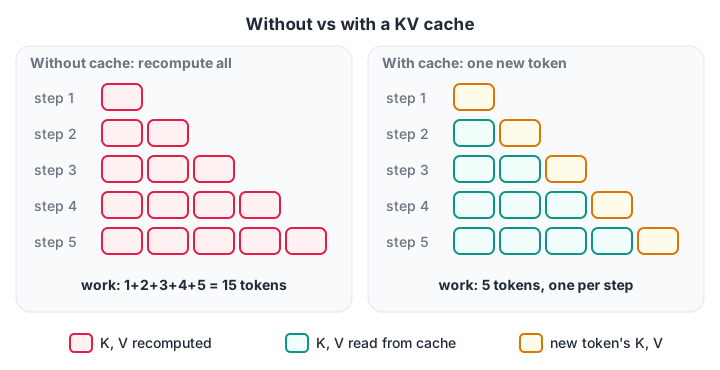
Without a cache, step 5 redoes the work of steps 1 to 4. With a cache, every step does one token's worth of new work.
For a 500-token reply, recomputing means roughly 125,000 token-passes through the model instead of 500. That is the difference between a reply in seconds and a reply in minutes.
See the speed-up in numpy
The block below runs one toy attention layer two ways and checks that both give identical outputs.
import time
import numpy as np

rng = np.random.default_rng(0)
d, steps = 128, 300
Wq, Wk, Wv = (rng.normal(0, d ** -0.5, (d, d)) for _ in range(3))
X = rng.normal(0, 1, (steps, d))                 # embeddings of tokens as they arrive

def attend(q, K, V):
    w = np.exp(q @ K.T / np.sqrt(d)); w /= w.sum()
    return w @ V

t0 = time.perf_counter(); out_nocache = []
for t in range(1, steps + 1):                    # recompute K, V for all tokens so far
    K, V = X[:t] @ Wk, X[:t] @ Wv
    out_nocache.append(attend(X[t - 1] @ Wq, K, V))
t_nocache = time.perf_counter() - t0

t0 = time.perf_counter(); Kc, Vc, out_cache = [], [], []
for t in range(1, steps + 1):                    # compute only the newest token's K, V
    Kc.append(X[t - 1] @ Wk); Vc.append(X[t - 1] @ Wv)
    out_cache.append(attend(X[t - 1] @ Wq, np.array(Kc), np.array(Vc)))
t_cache = time.perf_counter() - t0

print("same outputs:", np.allclose(out_nocache, out_cache))
print(f"projection rows computed: {steps * (steps + 1) // 2:,} without cache vs {steps:,} with")
print(f"time: {t_nocache * 1000:.0f} ms without cache, {t_cache * 1000:.0f} ms with cache")
The outputs match exactly, so the cache is a pure optimisation, not an approximation. The count of projections falls from about 45,000 to 300. A real model repeats this in dozens of layers, so the saving is enormous.
The measured time gap in this toy is smaller, because the cached loop still converts the growing list to an array each step and numpy overheads dominate tiny matrices.
Prefill and decode: two phases of generation
With a cache, a request has two distinct phases.
- Prefill. The whole prompt (system prompt, retrieved help articles, chat history and the new question) goes through the model in one parallel pass. Its keys and values fill the cache. This phase decides the time to first token.
- Decode. The model generates one token per step, each time reading the entire cache and appending one new entry. This phase decides the time per output token.
Prefill is limited by raw compute, because thousands of tokens are processed at once. Decode is limited by memory bandwidth, because each step reads the full model weights and the full cache to produce a single token. That split drives almost every trick in LLM inference optimisation.
Quick check
Which phase of generation fills the KV cache with the whole prompt in one parallel pass?
Prefill processes all prompt tokens at once and stores their keys and values. Decode then appends one entry per generated token.
How much memory does the KV cache use?
Each layer stores one key and one value vector per KV head per token. Multiply it out:
KV bytes per token = 2 × layers × KV heads × head dimension × bytes per value
Then multiply by the tokens in each conversation and the number of conversations running at once. Take a typical 8-billion-parameter open model shape: 32 layers, 8 KV heads, head dimension 128, stored in 16-bit precision (2 bytes).
GiB = 1024 ** 3

def kv_bytes_per_token(layers, kv_heads, head_dim, bytes_per_value):
    return 2 * layers * kv_heads * head_dim * bytes_per_value

configs = {
    "multi-head (32 KV heads), fp16": (32, 32, 128, 2),
    "grouped-query (8 KV heads), fp16": (32, 8, 128, 2),
    "grouped-query (8 KV heads), fp8": (32, 8, 128, 1),
    "multi-query (1 KV head), fp16": (32, 1, 128, 2),
}
chat_tokens, gpu_gib = 4000, 80
weights_gib = 8e9 * 2 / GiB                       # 8B parameters in 16-bit
free_for_kv = gpu_gib * 0.90 - weights_gib - 4    # leave room for activations

for name, cfg in configs.items():
    per_tok = kv_bytes_per_token(*cfg)
    per_chat = per_tok * chat_tokens / GiB
    print(f"{name:<34} {per_tok / 1024:>5.0f} KiB/token  {per_chat:5.2f} GiB per 4k chat"
          f"  fits {int(free_for_kv // per_chat):>4} chats")
With full multi-head attention, one 4,000-token Chappan Help chat would hold 2 GiB of cache and the GPU would fit only about 27 at once. The grouped-query shape that most current open models use cuts that by four. Storing the cache in 8-bit halves it again.
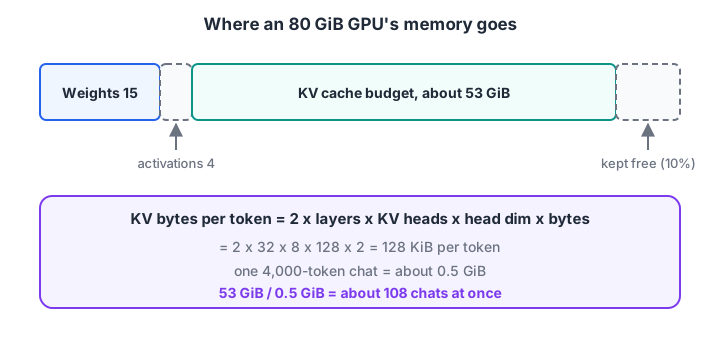
Weights are a fixed cost. The KV cache budget is what decides how many users you can serve together.
Quick check
A model has 32 layers, 8 KV heads and head dimension 128, with a 16-bit cache. How much KV cache does one token use?
2 × 32 × 8 × 128 × 2 bytes = 131,072 bytes, which is 128 KiB.
Ways to shrink or reuse the KV cache
| Technique | What it does | Trade-off |
|---|---|---|
| Grouped-query attention (GQA) | Several query heads share one key/value head | Chosen when the model is designed; you cannot add it later |
| Multi-query attention (MQA) | All query heads share a single key/value head | Smallest cache, some quality loss |
| KV cache quantisation | Store keys and values in 8-bit instead of 16-bit | Small accuracy risk; test on your golden set |
| Paged KV cache | Store the cache in fixed-size blocks instead of one long slab | Needs a serving engine that supports it |
| Prefix caching | Reuse the cache for a shared prompt start, such as the system prompt | Only helps when prompts share an identical prefix |
| Sliding-window attention | Keep only the most recent N tokens' keys and values | Model must be trained for it; loses long context |
| Shorter context | Trim chat history and retrieved text | Fewer facts available to the model |
Prefix caching is especially useful for Chappan Help. Every conversation starts with the same 1,200-token system prompt and policy text. Cache it once and every new chat skips that part of prefill. The same idea, taken further, is cache-augmented generation, explained in RAG vs CAG.
Paging, which removes wasted gaps between conversations in memory, is the core idea behind vLLM and is covered in serving LLMs with vLLM.
Common misunderstandings about the KV cache
- "The KV cache changes the answer." It does not. Cached and uncached generation give the same outputs, as the numpy check shows.
- "It caches answers between users." No. It caches internal vectors for tokens. Only prefix caching shares them, and only for identical starting text.
- "Longer context is free if the model supports it." Every token of context costs cache memory for as long as the request runs.
- "Bigger batch is always faster." More conversations at once raise throughput until the cache fills, then requests queue or get evicted.
- "Quantising weights also shrinks the cache." Weight and cache precision are separate settings. See open-source LLM quantisation for weights.
Key takeaways
- The KV cache stores earlier tokens' keys and values so each generation step only computes the newest token.
- It gives identical outputs and turns quadratic recomputation into linear work.
- Memory per token is 2 × layers × KV heads × head dimension × bytes; multiply by tokens and active requests.
- Prefill is compute-bound and sets time to first token; decode is bandwidth-bound and sets time per token.
- GQA, 8-bit caches, paging and prefix caching are the main levers. Next: LLM inference optimisation.
FAQ
What is KV cache in LLM in simple words?
It is short-term memory that an LLM keeps while writing a reply. For every token already read or written, the model saves two vectors per layer, a key and a value. When it writes the next word, it reuses these instead of re-reading the whole conversation, which makes generation many times faster.
Why is it called a KV cache?
Because it caches the K (key) and V (value) vectors from the attention mechanism. Queries are not cached, since only the newest token's query is needed at each step. Keys and values of earlier tokens are needed again on every step, so storing them avoids repeated computation.
Does the KV cache use GPU memory?
Yes. It lives in GPU memory next to the model weights and often becomes larger than them when many long conversations run together. Its size grows with layers, KV heads, head dimension, precision, context length and the number of concurrent requests. Serving engines reserve a fixed budget for it.
Does the KV cache affect output quality?
A standard KV cache does not; it is mathematically exact. Techniques that compress it, such as 8-bit KV quantisation or dropping old tokens, can affect quality slightly. Test them on your evaluation set before rolling them out, the same way you would test a new prompt.
Can I learn LLM serving and the KV cache at Debugshala in Indore?
Yes. Debugshala, at Old Palasia in Indore, teaches Generative AI in offline classes in English and Hindi, from LLM fundamentals to deploying models. A Generative AI course in Indore that goes down to the GPU memory level offers a free demo class. Revise the maths with quick numeric aptitude quizzes on Debugshala Test.
From the team behind this site
Go further with the Generative AI Course at Debugshala
These tutorials are written by Debugshala, a training and placement institute at Old Palasia, Indore. The classroom course adds live mentoring, real projects and interview preparation.
- Offline classes at Old Palasia, Indore
- Free demo class before you pay
- Non-IT, fresher and year-gap friendly
- Placement assistance
700+ students placed · 200+ hiring partners · 4.9★ Google rating
