

Docker for Machine Learning: Package and Ship a Model API
Docker for machine learning: write a Dockerfile for a FastAPI model, use layer caching, keep images small and safe, tag by model version, and run Compose.
A tiffin service in Indore sends lunch to offices across Vijay Nagar. Early on, they handed raw dal and rice to each office and let them cook it. Some had pressure cookers, some had microwaves, one had nothing. Every office got a different lunch.
Then they started sending sealed steel tiffins, cooked and packed in their own kitchen. Every office just opens the box. Same lunch everywhere, whatever kitchen the office has.
A Docker image is that sealed tiffin for your model. The receiving machine does not need the right Python, the right numpy or the right instructions. It just runs the box.
What is Docker and why does ML need it?
In the analogy, the sealed tiffin is a Docker image, opening it at an office is running a container, the packing kitchen's recipe card is the Dockerfile, and the delivery van depot is a container registry.
Docker is an open-source platform that packages an application with its runtime, libraries and configuration into a portable image, and runs that image as an isolated process called a container on any machine with a container engine.
Ordinary apps benefit from Docker. ML apps need it more, because a model is a frozen snapshot of numerical libraries. A model saved under scikit-learn 1.7 may warn, misbehave or fail to load under another version, as the reproducibility lesson explained.
The "works on my machine" problem, in code
Chappan Express, the fictional Indore delivery company in this course, records library versions with every model in its registry. Before loading eta-model:14, its service compares them with what is installed. Run the block: the "running" column shows whatever your browser or laptop has, which will almost certainly differ from the training machine.
import sys
import numpy, pandas, sklearn, joblib

# What the registry recorded when eta-model:14 was trained
trained_with = {"python": "3.12", "numpy": "2.2.6", "pandas": "2.3.3",
                "scikit-learn": "1.7.2", "joblib": "1.5.2"}

running = {"python": ".".join(map(str, sys.version_info[:2])),
           "numpy": numpy.__version__, "pandas": pandas.__version__,
           "scikit-learn": sklearn.__version__, "joblib": joblib.__version__}

def minor(v):                      # "1.7.2" -> "1.7"
    return ".".join(v.split(".")[:2])

print(f"{'package':<14}{'trained':<10}{'running':<10}status")
for pkg, want in trained_with.items():
    have = running[pkg]
    status = "ok" if have == want else ("patch differs" if minor(have) == minor(want)
                                        else "MISMATCH")
    print(f"{pkg:<14}{want:<10}{have:<10}{status}")
risky = [p for p in trained_with if minor(running[p]) != minor(trained_with[p])]
print("\nSafe to load model?", "yes" if not risky else f"no, check {risky}")
Most likely you see several mismatches. That is the everyday reality without containers: every machine has slightly different versions. Docker removes the question by shipping the training-time versions inside the image.
Quick check
What is the main reason ML services benefit from Docker more than many other apps?
Models are snapshots of numerical libraries. Shipping those exact versions with the model removes load errors and silent behaviour changes.
Images, containers and registries
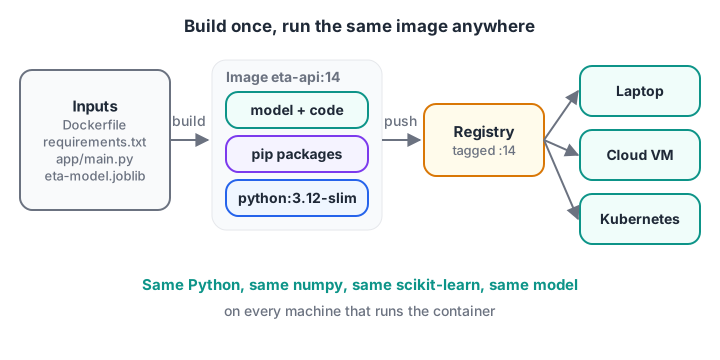
Build once, run anywhere. The image tag ties a container to one exact model version.
| Term | What it is | Chappan Express example |
|---|---|---|
| Dockerfile | Text recipe for building an image | Dockerfile in the eta-api repo |
| Image | Read-only, layered package built from the Dockerfile | chappan/eta-api:14 |
| Container | A running instance of an image | Three containers serving traffic |
| Registry | Server that stores and shares images | Docker Hub, Amazon ECR, GitHub Container Registry |
| Tag | Human-readable label on an image | 14, matching the model version |
Container vs virtual machine
A virtual machine includes a whole guest operating system and takes minutes to boot. A container shares the host's kernel and starts in about a second, which makes it practical to run many copies and replace them quickly. For ML services that scale up at lunchtime, that speed matters.
Writing a Dockerfile for an ML API
Here is the project layout for the FastAPI service from the deployment lesson:
eta-api/
├── Dockerfile
├── .dockerignore
├── requirements.txt      # exact pins, e.g. scikit-learn==1.7.2
├── app/
│   └── main.py
└── models/
    └── eta-model.joblib
And the Dockerfile, following the pattern in the FastAPI Docker guide:
# Dockerfile
FROM python:3.12-slim

ENV PYTHONDONTWRITEBYTECODE=1 \
    PYTHONUNBUFFERED=1

WORKDIR /code

# 1. Dependencies first: this layer is reused until requirements.txt changes
COPY requirements.txt .
RUN pip install --no-cache-dir -r requirements.txt

# 2. Then the code and the model, which change more often
COPY app/ ./app/
COPY models/ ./models/

# 3. Do not run as root
RUN useradd --create-home appuser
USER appuser

EXPOSE 8000
HEALTHCHECK --interval=30s --timeout=3s \
  CMD python -c "import urllib.request; urllib.request.urlopen('http://localhost:8000/health')"

# Exec form, so the server receives shutdown signals properly
CMD ["fastapi", "run", "app/main.py", "--port", "8000"]
A .dockerignore keeps junk out of the build context, which makes builds faster and images smaller:
.git
.venv
__pycache__/
*.ipynb
data/
mlruns/
Build, run and push:
docker build -t chappan/eta-api:14 .
docker run --rm -p 8000:8000 --memory 1g --cpus 1 chappan/eta-api:14

# In another terminal
curl http://localhost:8000/health

docker tag chappan/eta-api:14 registry.example.com/chappan/eta-api:14
docker push registry.example.com/chappan/eta-api:14
--memory and --cpus cap the container, so you learn early whether the model fits in its budget. The FastAPI documentation recommends one server process per container when an orchestrator such as Kubernetes handles replication, which is the setup in the next lesson.
Why instruction order matters: layer caching
Each Dockerfile instruction creates a layer. Docker caches layers and reuses one if its instruction and the files it copies have not changed. Once a layer changes, every layer after it is rebuilt.
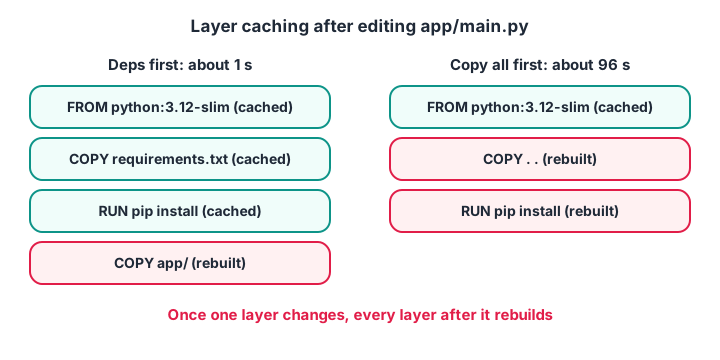
Put slow, rarely changing steps first and fast, often changing steps last.
The block simulates Docker's cache with hashes. Each layer's key depends on the previous key, the instruction and the copied files' contents. It edits only main.py and counts what gets rebuilt under two orderings.
import hashlib

def build(steps, files, cache):
    key, rebuilt = "", []
    for step in steps:
        content = "".join(files[f] for f in step.get("copies", []))
        key = hashlib.sha256((key + step["cmd"] + content).encode()).hexdigest()
        if key not in cache:
            cache.add(key)
            rebuilt.append((step["cmd"], step["secs"]))
    return rebuilt

deps = {"cmd": "RUN pip install -r requirements.txt", "secs": 95}
good = [{"cmd": "FROM python:3.12-slim", "secs": 0},
        {"cmd": "COPY requirements.txt", "copies": ["requirements.txt"], "secs": 1},
        deps, {"cmd": "COPY app/", "copies": ["app/main.py"], "secs": 1}]
bad = [good[0], {"cmd": "COPY . .", "copies": ["requirements.txt", "app/main.py"],
                 "secs": 1}, deps]

v1 = {"requirements.txt": "fastapi\nscikit-learn==1.7.2\n", "app/main.py": "v1"}
v2 = dict(v1, **{"app/main.py": "v2: better error message"})  # code-only change

for name, steps in [("deps first", good), ("copy all first", bad)]:
    cache = set()
    build(steps, v1, cache)                          # first build fills the cache
    redo = build(steps, v2, cache)                   # rebuild after editing code
    print(f"{name:15s} rebuilt {[c for c, _ in redo]}  ~{sum(s for _, s in redo)} s")
With dependencies installed first, editing one line of code rebuilds a one-second layer. Copying everything first means the same edit reinstalls every library, around a minute and a half each time. Over a day of small fixes, that ordering decides whether builds feel instant or painful.
Quick check
You edit one line in app/main.py. Which Dockerfile order avoids reinstalling all libraries?
Layers are reused until something they depend on changes. Installing dependencies before copying code keeps the slow layer cached.
Keeping ML images small and safe
ML images grow fast. A CPU-only scikit-learn image can stay a few hundred megabytes; one with deep learning frameworks and CUDA can pass several gigabytes. Some habits help:
- Start from
python:3.12-slim, not the full image, unless you need compilers. - Pin every package in
requirements.txtwith==, generated from a lock file. - Use
--no-cache-dirwith pip so downloaded wheels are not stored in the image. - Use a multi-stage build if you need compilers: build wheels in one stage, copy only the results into a slim final stage.
- Run as a non-root user, as the Dockerfile above does.
- Never bake secrets (API keys, database passwords) into an image. Pass them as environment variables or mounted secrets at runtime.
Bake the model in, or download it at startup?
| Approach | How | Pros | Cons |
|---|---|---|---|
| Bake in | COPY models/ in the Dockerfile |
Image is fully self-contained; tag equals model version | Rebuild image for every new model |
| Download at start | Fetch models:/eta-model@champion from the registry on startup |
Swap models without rebuilding | Startup depends on registry; harder to roll back exactly |
Chappan Express bakes small models in, because "image 14 is model 14" makes audits and rollbacks trivial. Large language models are usually mounted from storage instead, a pattern covered in serving LLMs with vLLM.
GPUs in containers
For GPU models, install the NVIDIA Container Toolkit on the host and run with docker run --gpus all ..., using a CUDA-enabled base image that matches your framework. The eta-model is small enough that CPUs are cheaper.
Docker Compose for local development
During development you often want the API and a supporting service running together, such as an MLflow tracking server. Docker Compose describes them in one file:
# compose.yaml
services:
  eta-api:
    build: .
    ports:
      - "8000:8000"
    environment:
      MODEL_VERSION: "14"
    depends_on:
      - mlflow
  mlflow:
    image: ghcr.io/mlflow/mlflow:latest
    command: mlflow server --host 0.0.0.0 --port 5000
    ports:
      - "5000:5000"
Run docker compose up --build and both start together. In real projects pin the MLflow image to a specific version tag rather than latest.
Common mistakes with Docker for ML
- Unpinned requirements. Two builds a month apart produce different images.
- Copying everything before
pip install. It destroys layer caching. - Huge build contexts. Without
.dockerignore, datasets and.gitget sent to the builder. - Shell-form
CMD. The server may not receive stop signals, so shutdowns are not graceful. - Tagging only
latest. You cannot roll back to "the previous latest". Tag with the model or Git version. - Secrets in the image. Anyone who pulls it can read them.
If you would like to practise containerising projects with mentors nearby, the generative AI programme with a free demo class at Debugshala is a place to start, and you can fit in a coding quiz on Debugshala Test while the image builds.
Key takeaways
- A Docker image bundles model, code, Python and pinned libraries into one portable artefact.
- Order the Dockerfile from rarely changing to often changing steps to keep builds fast.
- Use slim bases,
--no-cache-dir, non-root users and exec-formCMD. - Tag images with the model version and push them to a registry for deploys and rollbacks.
- Keep secrets out of images; inject them at runtime.
FAQ
Why use Docker for machine learning?
Docker guarantees that a model runs with the same Python version and library versions it was trained and tested with, on any machine. That removes environment bugs, makes deployments repeatable, and produces a versioned artefact that orchestrators like Kubernetes can scale and roll back.
What is the difference between a Docker image and a container?
An image is a read-only package built from a Dockerfile: the files, libraries and start command. A container is a running instance of that image with its own process and writable layer. You can run many containers from one image, just as many offices open identical tiffins.
Which base image is best for a Python ML API?
For most scikit-learn or FastAPI services, an official python:3.x-slim image is a good default: small, maintained and compatible with standard wheels. Use a CUDA-enabled base image only for GPU models, and avoid Alpine for scientific Python because many wheels are not built for it.
Should the model file be inside the Docker image?
For small and medium models, baking the model into the image is simplest, because the image tag then identifies the model exactly. For very large models, or when you swap models often, download them from a registry or mount them from storage at startup instead.
Where can I learn Docker for ML in Indore?
Debugshala in Old Palasia, Indore, offers Generative AI, Machine Learning and Data Engineering courses with offline classes in English and Hindi and placement assistance. Freshers and non-IT graduates are welcome, and a free demo class comes first. Reach admissions at +91-8982385539 or info@debugshala.com.
From the team behind this site
Go further with the Generative AI Course at Debugshala
These tutorials are written by Debugshala, a training and placement institute at Old Palasia, Indore. The classroom course adds live mentoring, real projects and interview preparation.
- Offline classes at Old Palasia, Indore
- Free demo class before you pay
- Non-IT, fresher and year-gap friendly
- Placement assistance
700+ students placed · 200+ hiring partners · 4.9★ Google rating
