

ML Model Deployment: Serve a Model as a REST API with FastAPI
Deploy an ML model as an API: choose batch or online serving, serialise with joblib, validate input with FastAPI and Pydantic, and release by shadow or canary.
At a busy chaat counter in Sarafa, one cook makes all the tikki. Customers do not walk into the kitchen and fry their own. They shout an order at the counter, a helper checks it ("aloo or matar?"), the cook makes it, and the plate comes back through the window.
The counter is the important part. It hides the kitchen, rejects impossible orders and keeps the line moving.
A deployed model needs the same counter. The rest of the company's software should not import your training code or load your pickle. It should send a request to a well-defined window and get an answer back.
What does deploying a model as an API mean?
In the chaat analogy, the cook is the model, the counter window is the API endpoint, the helper checking orders is input validation, and the written menu is the API contract.
Deploying an ML model as an API means running a web service that loads a trained model at startup and exposes an HTTP endpoint which validates JSON input, computes a prediction and returns it as JSON to any client.
At Chappan Express, the fictional Indore delivery company in this course, the mobile app needs a delivery estimate the moment a customer taps "Place order". That means an online prediction service for eta-model, answering in well under 100 milliseconds.
The feature stores lesson made sure the features are consistent. This lesson builds the service that uses them.
Which deployment pattern do you need?
Before writing any server code, decide how predictions are consumed. An API is only one option.
| Pattern | How it works | Chappan Express example | Latency |
|---|---|---|---|
| Batch | Score many rows on a schedule, store results | Nightly "which restaurants will be slow tomorrow" report | Hours |
| Online API | Score one request on demand over HTTP | ETA shown when placing an order | Milliseconds |
| Streaming | Score events from a queue as they arrive | Re-estimate ETA on every rider GPS ping | Seconds |
| On-device | Model runs inside the app or device | Offline ETA when the network drops | Milliseconds, no server |
Batch is the cheapest and simplest. Pick online serving only when a person or system is waiting for the answer. On-device inference is covered on the robotics side in model quantization for the edge.
How a prediction API works
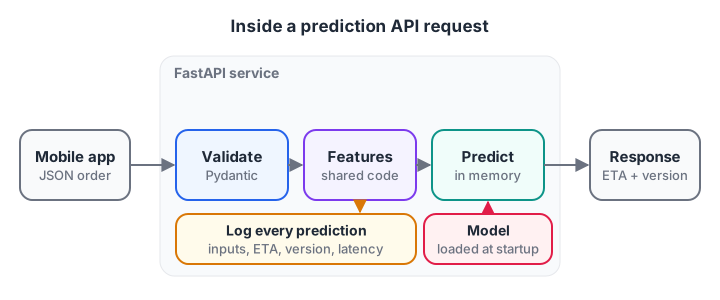
The model is loaded once when the service starts, not on every request. Every response carries the model version.
A good prediction service does five things on each request:
- Parse the JSON body.
- Validate types and ranges, and reject bad input with a clear error (HTTP 422).
- Build features using the same code as training, ideally inside the saved pipeline.
- Predict with the in-memory model.
- Log inputs, output, model version and latency, then return the result.
Serialise the model, then serve it
The model you trained is a Python object in memory. To ship it, you serialise it to bytes. For scikit-learn the usual choice is joblib, which handles large numpy arrays efficiently.
The block below plays both roles. It trains and dumps the model to an in-memory buffer (standing in for a file in your registry), loads it back the way a server would at startup, and runs three requests through a hand-written handler, including one with an impossible distance.
import io, json
import joblib
import numpy as np
from sklearn.ensemble import GradientBoostingRegressor

rng = np.random.default_rng(2)
X = np.column_stack([rng.uniform(0.5, 9, 1500), rng.integers(8, 25, 1500),
                     rng.integers(0, 2, 1500)])
y = 6 + 3.2 * X[:, 0] + X[:, 1] + 5 * X[:, 2] + rng.normal(0, 3, 1500)

buffer = io.BytesIO()                                # stands in for a file or S3
joblib.dump(GradientBoostingRegressor(random_state=0).fit(X, y), buffer)
buffer.seek(0)
MODEL, VERSION = joblib.load(buffer), "eta-model:14"  # loaded once at startup

LIMITS = {"distance_km": (0, 30), "prep_min": (0, 90), "is_raining": (0, 1)}

def predict_handler(body: str) -> dict:
    req = json.loads(body)
    for field, (lo, hi) in LIMITS.items():
        if not isinstance(req.get(field), (int, float)) or not lo <= req[field] <= hi:
            return {"status": 422, "error": f"{field} must be a number in [{lo}, {hi}]"}
    row = [[req["distance_km"], req["prep_min"], req["is_raining"]]]
    return {"status": 200, "eta_minutes": round(float(MODEL.predict(row)[0]), 1),
            "model_version": VERSION}

for body in ['{"distance_km": 3.4, "prep_min": 15, "is_raining": 1}',
             '{"distance_km": 3.4, "prep_min": 15, "is_raining": 0}',
             '{"distance_km": -2, "prep_min": 15, "is_raining": 0}']:
    print(body, "->", predict_handler(body))
Two good requests get estimates, with rain adding about four minutes. The bad one is rejected with a message instead of a nonsense number. Notice that every response carries the model version. When a customer complains, you can tell which model answered.
Validation is not optional. A model will happily predict for a distance of minus two kilometres; only your code can refuse.
Building the API with FastAPI
FastAPI is a modern Python web framework that builds request validation and interactive docs from type hints. The service below is the production version of the handler above. It targets FastAPI 0.1xx with Pydantic v2 and Python 3.12.
# app/main.py
from contextlib import asynccontextmanager
import joblib
from fastapi import FastAPI
from pydantic import BaseModel, Field

MODEL = {}

@asynccontextmanager
async def lifespan(app: FastAPI):
    MODEL["eta"] = joblib.load("models/eta-model.joblib")   # once, at startup
    MODEL["version"] = "eta-model:14"
    yield
    MODEL.clear()

app = FastAPI(title="Chappan Express ETA", lifespan=lifespan)

class Order(BaseModel):
    distance_km: float = Field(ge=0, le=30)
    prep_min: float = Field(ge=0, le=90)
    is_raining: bool

class Prediction(BaseModel):
    eta_minutes: float
    model_version: str

@app.post("/predict", response_model=Prediction)
def predict(order: Order) -> Prediction:
    row = [[order.distance_km, order.prep_min, int(order.is_raining)]]
    eta = float(MODEL["eta"].predict(row)[0])
    return Prediction(eta_minutes=round(eta, 1), model_version=MODEL["version"])

@app.get("/health")
def health():
    return {"status": "ok", "model_loaded": "eta" in MODEL}
Key points in this code:
- The lifespan function loads the model once when the server starts. Loading it inside
predictwould add hundreds of milliseconds to every request. - Pydantic
Field(ge=0, le=30)does the range checks. FastAPI returns a 422 error automatically for bad input. - The endpoint is a plain
def, notasync def, becausemodel.predictis CPU-bound work that would block the event loop. FastAPI runs plain functions in a thread pool. - A
/healthendpoint lets Docker and Kubernetes check the service is alive, which the Kubernetes lesson relies on.
If type hints like distance_km: float are new to you, read Python type hints first.
Run it locally and call it:
pip install "fastapi[standard]" scikit-learn joblib
fastapi dev app/main.py          # auto-reload for development, port 8000

curl -X POST http://127.0.0.1:8000/predict \
  -H "Content-Type: application/json" \
  -d '{"distance_km": 3.4, "prep_min": 15, "is_raining": true}'
# {"eta_minutes":35.7,"model_version":"eta-model:14"}
For production, use fastapi run app/main.py, which starts Uvicorn without auto-reload. FastAPI also serves interactive docs at /docs, handy for testing by hand. The FastAPI documentation covers settings and deployment.
Quick check
Where should a FastAPI prediction service load its model?
Loading once keeps each request fast. Loading per request repeats a slow disk read and deserialisation every time.
Latency: online vs batch prediction
Each call to model.predict has fixed overhead: input checks, array creation, a pass through every tree. For one row that overhead dominates. The block measures 300 single-row predictions against one batch of 300.
import time
import numpy as np
from sklearn.ensemble import GradientBoostingRegressor

rng = np.random.default_rng(6)
X = np.column_stack([rng.uniform(0.5, 9, 2000), rng.integers(8, 25, 2000)])
y = 6 + 3.2 * X[:, 0] + X[:, 1] + rng.normal(0, 3, 2000)
model = GradientBoostingRegressor(n_estimators=100, random_state=0).fit(X, y)

requests = X[:300]
latencies = []
for row in requests:                         # online: one order at a time
    t0 = time.perf_counter()
    model.predict(row.reshape(1, -1))
    latencies.append((time.perf_counter() - t0) * 1000)

t0 = time.perf_counter()
model.predict(requests)                      # batch: all orders together
batch_ms = (time.perf_counter() - t0) * 1000

p50, p95, p99 = np.percentile(latencies, [50, 95, 99])
print(f"online  p50 {p50:.2f} ms | p95 {p95:.2f} ms | p99 {p99:.2f} ms")
print(f"online  total for 300 orders: {sum(latencies):.0f} ms")
print(f"batch   total for 300 orders: {batch_ms:.1f} ms")
Your exact numbers will differ, but the batch call is typically around a hundred times faster in total. That is why batch scoring is cheaper whenever nobody is waiting, and why some servers group requests arriving within a few milliseconds into micro-batches.
Always report p95 and p99 latency, not just the average. The app team cares about the slowest one in twenty requests, because those are the customers who stare at a spinner.
How to release a new model version safely
Replacing eta-model:14 with version 15 for every customer at once is risky. Three standard strategies reduce that risk.
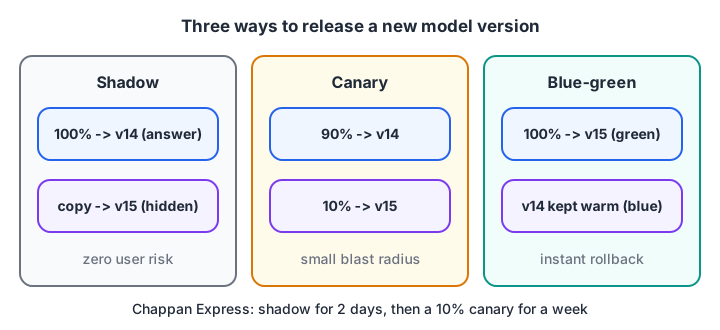
Shadow tests with zero user risk, canary limits the blast radius, and blue-green makes rollback instant.
| Strategy | What users see | Best for | Watch out for |
|---|---|---|---|
| Shadow | Only the old model's answer | Checking latency and prediction differences safely | Doubles compute; no user feedback |
| Canary | 5 to 10% get the new model | Measuring real impact on a small group | Needs per-version metrics |
| Blue-green | Everyone switches at once, old copy kept warm | Fast, clean rollback | Full exposure if the new model is bad |
| A/B test | Random split for days | Proving business impact | Needs enough traffic for significance |
Chappan Express uses shadow for two days, then a 10% canary for a week, comparing real delivery times against each version's estimates. The statistics behind that comparison are in A/B testing.
Quick check
Which release strategy lets you test a new model on live traffic with no effect on users?
In shadow mode the new model receives a copy of real requests, but only the old model's answers are returned to users.
Common mistakes when deploying ML models
- Loading the model per request. Load once at startup.
- No input validation. Models never refuse bad input; your API must.
- Shipping the estimator without its preprocessing. Serialise the whole
Pipeline. - Missing model version in responses and logs. You cannot debug what you cannot trace.
- Using
async defwith heavy CPU work. It blocks every other request on that worker. - Different library versions in training and serving. The next lesson, Docker for machine learning, freezes them in an image.
To build services like this alongside other learners, an AI engineering course you can attend in Indore is one route. For interview preparation, practise API-round coding questions on Debugshala Test.
Key takeaways
- Decide between batch, online, streaming and on-device serving before writing a server.
- Serialise the whole preprocessing-plus-model pipeline with joblib and load it once at startup.
- FastAPI with Pydantic gives you validation, typed responses and docs with little code.
- Track p95 and p99 latency; batch scoring is far cheaper when nobody waits.
- Release gradually with shadow, canary or blue-green, and return the model version with every prediction.
FAQ
How do I deploy a machine learning model as an API?
Save the trained pipeline with joblib, write a FastAPI app that loads it once at startup, define a Pydantic model for the input, and add a POST endpoint that calls predict and returns JSON. Run it with fastapi run, then package it in Docker for deployment to a server or cluster.
Is FastAPI better than Flask for ML models?
For new ML APIs, FastAPI is usually the more convenient choice because it validates requests from type hints, generates interactive docs and supports async I/O. Flask works well too and is simpler for tiny apps. Prediction speed depends mostly on the model, not the framework.
What is the difference between batch and real-time prediction?
Batch prediction scores many records together on a schedule and stores the results for later use. Real-time, or online, prediction scores one request immediately when a user or system asks. Batch is cheaper and simpler; real-time is needed only when someone is waiting for the answer.
What is a canary deployment for ML models?
A canary deployment sends a small share of live traffic, often 5 to 10%, to the new model version while everyone else stays on the current one. You compare errors, latency and business metrics between the two groups, then increase the share or roll back.
Can I learn ML model deployment in Indore?
Yes. Debugshala, a training and placement institute in Old Palasia, Indore, teaches Generative AI and Machine Learning in offline classes in English and Hindi. The courses accept fresh graduates and non-IT learners, include placement assistance, and start with a free demo class. Call +91-8982385539 for details.
From the team behind this site
Go further with the Generative AI Course at Debugshala
These tutorials are written by Debugshala, a training and placement institute at Old Palasia, Indore. The classroom course adds live mentoring, real projects and interview preparation.
- Offline classes at Old Palasia, Indore
- Free demo class before you pay
- Non-IT, fresher and year-gap friendly
- Placement assistance
700+ students placed · 200+ hiring partners · 4.9★ Google rating
