

LLM Inference Optimization: Batching, Quantisation and Speed
LLM inference optimization: TTFT and TPOT, why decoding is memory-bound, continuous batching and speculative decoding simulated in Python, and a tuning order.
Chappan Express's kitchen has one large tawa. A cook could make one dosa at a time, but the tawa is big enough for eight. So she pours eight at once.
The first method she tries is to wait until all eight are done before pouring the next round. One masala dosa takes twice as long as the plain ones, so six spots sit empty while it finishes. The better method is to pour a fresh dosa the moment any spot frees up.
That tawa is a GPU, the dosas are chat requests, and pouring into free spots is continuous batching, the single most important serving optimisation.
What is LLM inference optimisation?
LLM inference optimisation is the set of techniques that reduce the latency, memory and cost of generating text with a trained model, by changing how the model is stored, scheduled and executed rather than retraining it for a new task.
Inference is everything after training: taking a prompt and producing tokens. For Chappan Help, inference is the whole running cost once the bot is live. Training happened once, somewhere else.
This lesson builds on the KV cache. If you have not met prefill and decode yet, read that first.
Which metrics matter for LLM serving?
Before optimising anything, agree on what "fast" means. Users and finance teams care about different numbers.
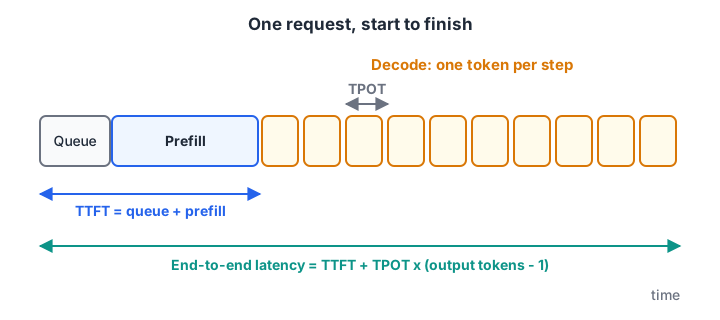
Time to first token is what users feel as "it's thinking". Time per output token is how fast the reply streams.
| Metric | Meaning | Chappan Help target |
|---|---|---|
| TTFT (time to first token) | Queue wait plus prefill of the prompt | Under 1 second at p95 |
| TPOT (time per output token) | Average gap between streamed tokens | Under 50 ms, faster than reading speed |
| End-to-end latency | TTFT + TPOT × (output tokens − 1) | Under 6 seconds for a 120-token reply |
| Throughput | Output tokens per second across all users | As high as possible within the latency targets |
| Cost per request | GPU hours divided by requests served | Tracked weekly |
Throughput and latency pull against each other. Packing more requests together raises throughput but slows each individual reply. The goal is maximum throughput while staying under the latency targets, sometimes called goodput.
Why is LLM decoding memory-bound?
At every decode step, the GPU must read all the model's weights from memory to produce one token per request. For an 8-billion-parameter model in 16-bit, that is 16 GB per step. The arithmetic on those weights is cheap by comparison; moving them is the bottleneck.
So a rough ceiling on decode speed is memory bandwidth ÷ bytes read per step. The block below applies it, including the KV cache that each request also reads.
GB = 1e9
bandwidth = 2000 * GB          # placeholder data-centre GPU, bytes per second
params = 8e9
kv_per_token = 128 * 1024      # bytes, from the KV cache lesson
context = 2000                 # tokens already in each conversation

def decode_speed(bits, batch):
    weights = params * bits / 8
    kv = batch * context * kv_per_token
    step_s = (weights + kv) / bandwidth          # one step = one token for every request
    return 1 / step_s, batch / step_s            # per-user tokens/s, total tokens/s

for bits in (16, 8, 4):
    for batch in (1, 16, 64):
        user, total = decode_speed(bits, batch)
        print(f"{bits:>2}-bit weights, batch {batch:>2}: {user:6.0f} tok/s per user, {total:7.0f} tok/s total")
Two lessons fall out of this. Quantising weights from 16-bit to 4-bit nearly quadruples single-user speed, because each step reads a quarter of the bytes. And batching multiplies total throughput, because one read of the weights serves every request in the batch. With large batches, the KV cache reads start to dominate, which is why cache size matters so much.
These are upper bounds. Real engines reach a good fraction of them, not all.
Quick check
Why does quantising weights from 16-bit to 4-bit speed up single-user decoding?
Decode speed is roughly bandwidth divided by bytes read per step. Smaller weights mean fewer bytes per token.
Batching: static vs continuous
Batching is how you share each weight read across users. The way you batch matters as much as whether you batch.
Static batching groups requests, runs them together, and starts the next group only when every request in the current group has finished. Short replies sit idle waiting for the longest one.
Continuous batching (also called in-flight batching) checks after every decode step. When a request finishes, a waiting request takes its slot immediately.
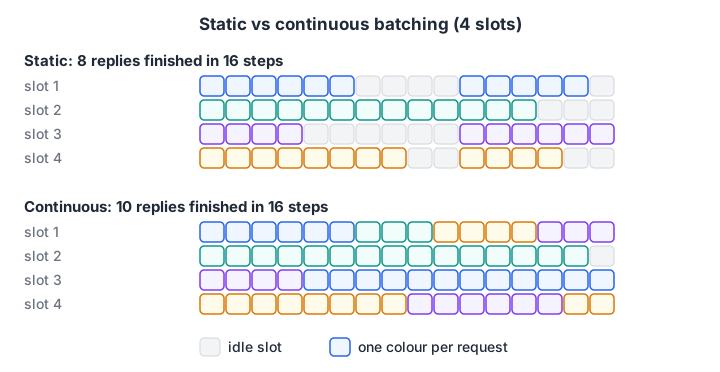
Grey cells are wasted GPU time. Continuous batching fills them with new work.
import numpy as np

rng = np.random.default_rng(1)
lengths = rng.integers(20, 400, 64)              # output tokens for 64 support replies
slots = 8

# static: groups of 8, each group lasts as long as its longest reply
steps_static = sum(lengths[i:i + slots].max() for i in range(0, len(lengths), slots))

# continuous: a free slot takes the next request immediately
free_at = np.zeros(slots)
for n in lengths:
    s = free_at.argmin()
    free_at[s] += n
steps_cont = free_at.max()

useful = lengths.sum()
print(f"static batching    : {steps_static:5d} steps, slot use {useful / (steps_static * slots):.0%}")
print(f"continuous batching: {steps_cont:5.0f} steps, slot use {useful / (steps_cont * slots):.0%}")
print(f"speed-up for the whole queue: {steps_static / steps_cont:.2f}x")
With replies of very different lengths, as support chats are, continuous batching keeps the slots about 90% busy instead of 55% and clears the queue about 1.6 times sooner. Every modern serving engine, including vLLM, uses it.
Chunked prefill
A long new prompt can stall everyone else's decode while its prefill runs. Chunked prefill splits big prompts into pieces and mixes them with ongoing decode steps, so streaming replies do not freeze when a long chat arrives.
Quick check
In static batching, what wastes GPU time?
Short requests finish early but cannot be replaced until the whole batch completes. Continuous batching fixes this.
Speculative decoding: guess ahead, verify in one pass
Decode wastes compute because each step produces a single token. Speculative decoding uses a cheap method to guess the next k tokens, then has the main model check all k in one forward pass. Correct guesses are kept; at the first wrong one, the main model's own token is used instead.
The guesser can be a small draft model, or simple n-gram lookup from the prompt, which works well when replies copy text, such as quoting a policy. The output distribution is preserved, so quality does not change.
If each guess is accepted with probability α, the expected tokens per main-model pass is (1 − α^(k+1)) / (1 − α).
def tokens_per_pass(alpha, k):
    return (1 - alpha ** (k + 1)) / (1 - alpha)

draft_cost = 0.05      # one draft step costs 5% of a main-model step (placeholder)
print("alpha  k  tokens/pass  est. speed-up")
for alpha in (0.6, 0.8):
    for k in (2, 4, 6):
        e = tokens_per_pass(alpha, k)
        print(f"{alpha:>5} {k:>2} {e:>11.2f} {e / (1 + k * draft_cost):>13.2f}x")
High acceptance rates give real gains; low ones barely help and add complexity. Speculative decoding helps most at small batch sizes, where the GPU has spare compute. At very large batches the GPU is already busy, so the gain shrinks.
Other inference optimisations, compared
| Technique | Main benefit | Watch out for |
|---|---|---|
| Weight quantisation (8-bit, 4-bit) | Fewer bytes per step, fits smaller GPUs | Quality loss on some tasks; see quantisation basics |
| KV cache quantisation | More concurrent requests | Small accuracy risk on long context |
| Continuous batching | Much higher throughput | Needs a serving engine |
| Prefix caching | Skips prefill for shared system prompts | Prefix must be byte-identical |
| Speculative decoding | Lower latency per user | Gains depend on acceptance rate |
| FlashAttention-style kernels | Faster, memory-efficient attention | Hardware and engine support |
| Tensor parallelism | Splits a big model across GPUs | Communication overhead between GPUs |
| Smaller or distilled model | Everything gets cheaper | Must re-evaluate quality |
| Shorter prompts and replies | Less prefill, less decode, lower bill | Fewer facts in context |
Do not forget the cheapest option. Trimming Chappan Help's retrieved context from four articles to two cut prefill time and cost before any GPU trick, as the LLMOps cost example showed. Mixture-of-experts models, which read only some weights per token, are another route, covered in mixture of experts.
A safe order for optimising
- Measure a baseline with realistic traffic: prompt lengths, reply lengths and arrival rate from real logs.
- Cut tokens first: shorter system prompt, fewer retrieved chunks, a max-tokens cap.
- Use a serving engine with continuous batching and prefix caching instead of a hand-written loop.
- Try quantisation and run the full evaluation set; keep it only if scores hold.
- Tune batch limits until p95 latency touches the target, not beyond.
- Add speculative decoding if per-user latency is still too high at low load.
Common mistakes in inference optimisation
- Optimising averages. Users feel p95 and p99 latency, not the mean.
- Benchmarking with identical short prompts. Real chats vary; uniform tests flatter every system.
- Quantising without evaluation. A faster model that misquotes the refund policy is not an optimisation.
- Maximising batch size blindly. Past a point, latency explodes while throughput barely rises.
- Ignoring prompt length. Prefill of long contexts often costs more than decode.
Key takeaways
- Measure TTFT, TPOT, throughput and cost per request before changing anything.
- Decode is memory-bound: fewer bytes per step and more requests per read are the core levers.
- Continuous batching and chunked prefill keep the GPU busy without freezing streams.
- Speculative decoding preserves quality and helps when acceptance is high and load is low.
- Every optimisation must pass the golden set. Next, put it all together in serving LLMs with vLLM.
FAQ
What is the difference between latency and throughput in LLM inference?
Latency is how long one user waits, measured as time to first token and time per output token. Throughput is how many tokens or requests the whole system produces per second across all users. Batching more requests raises throughput but increases each user's latency, so you tune for maximum throughput within a latency target.
What is continuous batching?
Continuous batching is a scheduling method where the serving engine adds new requests to the running batch as soon as any request finishes, checking after every generation step. It avoids the idle time of static batching, where a whole batch waits for its longest reply, and often raises throughput substantially for chat traffic, where reply lengths vary widely.
Does quantisation reduce LLM quality?
It can, slightly. 8-bit weights usually lose very little; 4-bit methods lose more on some tasks such as maths or exact quoting. The only reliable answer comes from running your own evaluation set on the quantised model and comparing it with the full-precision version before switching.
What is speculative decoding in simple words?
A fast helper guesses several next tokens, and the main model checks all the guesses in one step instead of producing one token at a time. Correct guesses are kept for free, so replies arrive faster. The final text follows the same probabilities as normal decoding, so quality is unchanged.
Where can I learn to optimise and deploy LLMs in Indore?
Debugshala at Old Palasia, Indore, teaches Generative AI in offline classes in English and Hindi, including model serving and deployment. Debugshala's LLM deployment and performance training starts with a free demo class. Between lessons, test your Python speed-up instincts on Debugshala Test.
From the team behind this site
Go further with the Generative AI Course at Debugshala
These tutorials are written by Debugshala, a training and placement institute at Old Palasia, Indore. The classroom course adds live mentoring, real projects and interview preparation.
- Offline classes at Old Palasia, Indore
- Free demo class before you pay
- Non-IT, fresher and year-gap friendly
- Placement assistance
700+ students placed · 200+ hiring partners · 4.9★ Google rating
