

RAG vs CAG: Cache-Augmented Generation vs Retrieval Explained
RAG vs CAG compared: how cache-augmented generation preloads a KV cache, when the knowledge fits, memory and token maths in Python, and hybrid designs.
A new waiter at a busy restaurant on 56 Dukan keeps the price list in his apron and checks it for every table. That works for any menu, but every check takes a moment, and sometimes he opens the wrong page.
By week two he has the short menu memorised and orders flow faster. But when the owner adds three dishes, he must re-learn, and he could never memorise the 400-item catering menu.
The order book is RAG. The memorised menu is CAG. Which is better depends on the size of the menu and how often it changes.
What is CAG (cache-augmented generation)?
Mapping the restaurant: checking the order book per table is retrieval, the memorised menu is knowledge preloaded into the context window, the effort of memorising is computing the KV cache, and re-learning on Monday is rebuilding that cache when documents change.
Cache-augmented generation (CAG) is an approach in which the entire knowledge base is placed in the LLM's context ahead of time and its key-value (KV) cache is computed once and stored, so each new question is answered by reusing that cache without any retrieval step.
The approach was named in the December 2024 paper "Don't Do RAG: When Cache-Augmented Generation is All You Need for Knowledge Tasks" by Chan and colleagues. It became practical because context windows grew: many current models accept 128,000 tokens or more.
Retrieval-augmented generation (RAG), covered in What is RAG?, keeps knowledge in an external index and fetches a few chunks per question.
The KV cache in one paragraph
When an LLM reads a prompt, every layer computes a key and a value vector for every token. Generation then attends to those keys and values. If many requests start with the same long prefix, such as the same 40-page handbook, recomputing them each time is pure waste.
A KV cache stores them so the next request skips straight to the new tokens. The full mechanics are in KV cache explained; for CAG you only need to know it can be computed once and reused.
How RAG and CAG differ, step by step
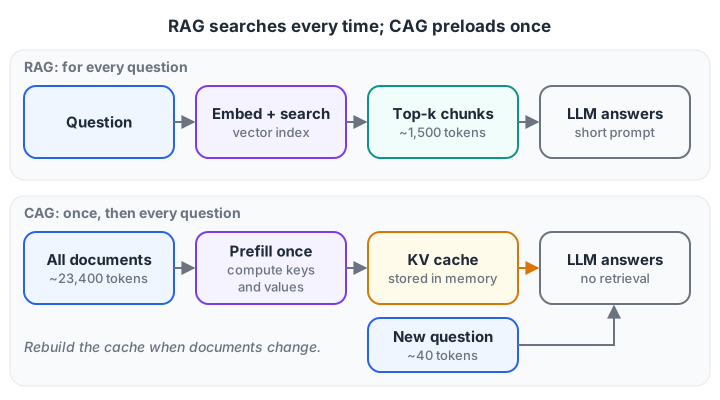
RAG does a search on every question. CAG pays once to precompute the KV cache for the whole knowledge base, then each question only adds its own tokens.
RAG, for every question:
- Embed the question.
- Search the index for the top-k chunks.
- Build a prompt with those chunks and the question.
- The LLM processes the prompt and answers.
CAG, once: put all documents into a fixed prompt prefix and compute its KV cache. Then, for every question: copy the cache, append the question, generate.
Will your knowledge base fit, and what does it cost?
The first question for CAG is not quality; it is arithmetic. Here are three collections at our fictional KIT college in Indore, measured against a 128,000-token window:
# Will the knowledge base fit in the context window?
TOKENS_PER_WORD = 1.3          # rough average for English prose
WORDS_PER_PAGE = 450

collections = {
    "KIT handbook (40 pages)":          40,
    "Handbook + all circulars (300 pp)": 300,
    "Ten years of exam papers (6,000 pp)": 6000,
}
context_window = 128_000       # tokens the model accepts
reserved = 8_000               # instructions, question, answer, chat history

for name, pages in collections.items():
    tokens = int(pages * WORDS_PER_PAGE * TOKENS_PER_WORD)
    fits = tokens <= context_window - reserved
    share = tokens / context_window
    print(f"{name:<36} ~{tokens:>9,} tokens  {share:6.0%} of window  "
          f"-> {'CAG possible' if fits else 'needs RAG'}")
The 40-page handbook is about 23,400 tokens, 18 percent of the window: a good CAG candidate. Add every circular and it overflows. Ten years of exam papers is 27 times too big. Hindi and other non-Latin scripts often need more tokens per word, so measure with your model's real tokenizer.
Fitting is necessary but not sufficient: models often use the middle of a long context less well than its start and end. Test your questions at your real context length.
How much memory does a KV cache take?
A precomputed cache has to live somewhere, usually GPU memory. Its size per token is easy to estimate:
# KV cache size: 2 (keys and values) x layers x kv_heads x head_dim x bytes, per token
def kv_bytes_per_token(layers, kv_heads, head_dim, bytes_per_value=2):
    return 2 * layers * kv_heads * head_dim * bytes_per_value

# An illustrative 8B-class model with grouped-query attention, stored in 16-bit
per_token = kv_bytes_per_token(layers=32, kv_heads=8, head_dim=128)
print(f"KV cache per token: {per_token / 1024:.0f} KiB")

for tokens in [23_400, 100_000, 1_000_000]:
    gib = per_token * tokens / 1024**3
    print(f"{tokens:>9,} cached tokens -> {gib:6.1f} GiB of GPU memory")
At 128 KiB per token, the handbook's cache is about 2.9 GiB. A 100,000-token cache needs about 12 GiB, and a million tokens over 120 GiB, more than most single GPUs hold. Check your own model's config for its layer count, KV heads and head size.
Cost and speed: tokens processed per 1,000 questions
The work an LLM does before writing the first word is called prefill, and it grows with prompt length. Compare three strategies over 1,000 questions, with the handbook edited four times in that period:
# Tokens the model must process (prefill) to answer 1,000 questions
questions = 1_000
kb_tokens = 23_400          # the whole KIT handbook
question_tokens = 40
rag_context = 1_500         # top-5 retrieved chunks
handbook_edits = 4          # times the handbook changes in this period

strategies = {
    "RAG (top-5 chunks)":          questions * (rag_context + question_tokens),
    "Long context, no cache":      questions * (kb_tokens + question_tokens),
    "CAG (precomputed KV cache)":  (1 + handbook_edits) * kb_tokens + questions * question_tokens,
}
baseline = strategies["Long context, no cache"]
for name, tokens in strategies.items():
    print(f"{name:<28} {tokens:>12,} tokens  ({tokens / baseline:5.1%} of no-cache)")
Pasting the whole handbook into every prompt without caching processes 23.4 million tokens. RAG cuts that to 1.5 million. CAG drops prefill to 157,000 tokens, because the handbook is processed only five times.
Two caveats keep this honest: each generated token still attends over the full cached context, so decoding is slower than with a short RAG prompt, and the cache occupies memory the whole time.
Quick check
Your knowledge base is a 30-page policy manual that changes twice a year and is the same for all users. Which approach fits best?
Small, stable, shared knowledge fits in the context and rarely needs the cache rebuilt, which is CAG's sweet spot.
RAG vs CAG: a side-by-side comparison
| Factor | RAG | CAG |
|---|---|---|
| Knowledge size | Unlimited (millions of chunks) | Must fit in the context window |
| Retrieval errors | Possible: the right chunk may be missed | None: everything is always present |
| Per-question latency | Embedding + search + short prompt | No search; cached prefix, longer attention |
| Updating knowledge | Re-index changed chunks instantly | Rebuild the whole cache |
| Per-user access control | Easy with metadata filters | Hard: everyone shares one cached prefix |
| Citations | Natural: you know which chunks were used | Possible, but the model must point within a big context |
| Infrastructure | Embedding model + vector index | Model server that can store and reuse KV caches |
| Best for | Large, changing or permission-sensitive data | Small, stable, shared knowledge |
Quick check
Why is CAG a poor fit when different users may see different documents?
RAG can filter chunks by permission at query time; a single shared cache exposes the same content to everyone.
Combining RAG and CAG
You rarely have to choose one. Split your knowledge by how it behaves:
- Cold, stable, shared knowledge, such as the handbook, fee rules and FAQ, goes into a cached prefix.
- Hot, large or personal knowledge, such as this week's circulars, a student's own attendance record or ten years of papers, is retrieved per question.
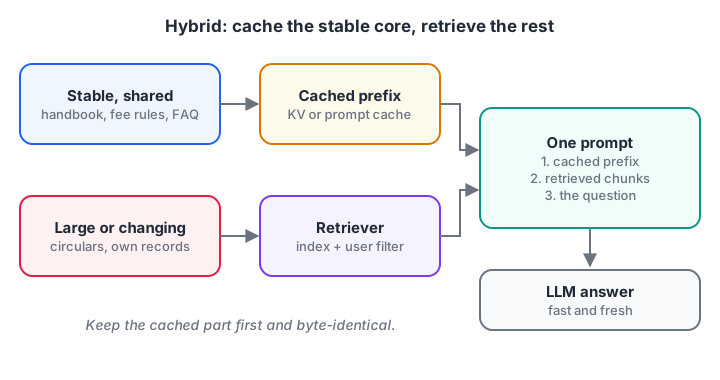
Cache what is stable and shared; retrieve what is large, new or personal. The model sees both in one prompt.
Many hosted LLM APIs offer prompt caching, which reuses the processed prefix when requests start with identical text, giving most of CAG's benefit without your own GPUs. Put the stable part first, unchanged byte for byte, and the retrieved chunks and question after it.
CAG with Hugging Face transformers
This follows the prefix-caching pattern in the transformers cache documentation: compute the cache for the handbook once, then deep-copy it for each question so one answer does not pollute the next. It needs a GPU and a model download, so it cannot run in the browser.
import copy
import torch
from transformers import AutoModelForCausalLM, AutoTokenizer, DynamicCache

model_id = "your-org/your-instruct-model"         # any causal LM you can run
tokenizer = AutoTokenizer.from_pretrained(model_id)
model = AutoModelForCausalLM.from_pretrained(model_id, dtype=torch.bfloat16, device_map="auto")

handbook = open("kit_handbook.txt", encoding="utf-8").read()
PREFIX = ("Answer using only the KIT handbook below. If it is not covered, say you don't know.\n\n"
          f"{handbook}\n\nQuestion: ")

# 1) Pay once: run the prefix through the model and keep its KV cache
prefix_inputs = tokenizer(PREFIX, return_tensors="pt").to(model.device)
with torch.no_grad():
    handbook_cache = model(**prefix_inputs, past_key_values=DynamicCache(config=model.config)).past_key_values

# 2) Reuse for every question
for question in ["How long do refunds take?", "What is the hostel curfew?"]:
    inputs = tokenizer(PREFIX + question + "\nAnswer:", return_tensors="pt").to(model.device)
    out = model.generate(**inputs, past_key_values=copy.deepcopy(handbook_cache), max_new_tokens=60)
    print(tokenizer.decode(out[0, inputs["input_ids"].shape[1]:], skip_special_tokens=True))
Notice the full text PREFIX + question is passed each time; generate sees the cached prefix and only computes the new tokens. Rebuild handbook_cache whenever the handbook changes.
How to choose between RAG and CAG
- Measure your knowledge in tokens with your model's tokenizer.
- If it is far above the context window, use RAG.
- If different users may see different documents, use RAG with filters.
- If it fits, changes weekly or less, and is shared by everyone, try CAG or provider prompt caching.
- If you have both kinds of knowledge, use the hybrid.
- Whatever you pick, compare answer accuracy on the same test questions; evaluating RAG systems shows how.
For the bigger picture of when to change the model itself instead, see prompting vs RAG vs fine-tuning.
Common RAG vs CAG mistakes
- Choosing CAG because it sounds newer. If the data does not fit or changes daily, CAG becomes a constant cache rebuild.
- Forgetting access control. One shared cached prefix cannot hide salary slips from some users.
- Breaking the cache. Putting a timestamp or user name before the stable text changes the prefix and defeats caching.
- Ignoring long-context accuracy. A model that accepts 128,000 tokens does not use all of them equally well. Test.
Key takeaways
- RAG retrieves per question; CAG preloads everything and reuses a precomputed KV cache.
- CAG removes retrieval misses and search latency, but needs the knowledge to fit and stay stable.
- KV cache memory grows with tokens; estimate it before you commit.
- RAG wins on scale, freshness, citations and per-user access control.
- A hybrid that caches the stable core and retrieves the rest is often the best design.
Weighing designs like this against real cost and latency is a core skill for AI engineers. Debugshala's Indore course on building production LLM applications covers it hands-on, and Debugshala Test's back-of-the-envelope maths quizzes help with estimates like the ones above.
FAQ
What is the difference between RAG and CAG?
RAG searches an external index for relevant chunks on every question and adds them to the prompt. CAG loads the whole knowledge base into the model's context once, stores its KV cache, and reuses it for every question without retrieval. RAG scales and updates easily; CAG is faster and avoids retrieval misses for small, stable data.
Is CAG better than RAG?
Only for small, stable and shared knowledge that fits comfortably in the context window. There, CAG removes retrieval errors and search latency. For large collections, frequently changing documents or per-user permissions, RAG remains the better choice. Many production systems combine the two.
Does CAG need a vector database?
No. Pure CAG skips retrieval entirely, so there is no embedding model or vector database. You need a model server that can store and reuse KV caches, or an LLM API with prompt caching. A hybrid RAG plus CAG system still uses a vector index for the retrieved part.
Is prompt caching the same as CAG?
They are closely related. Prompt caching is a provider or server feature that reuses the processed prefix of repeated prompts. CAG is a design approach that deliberately puts the whole knowledge base in that prefix. Using prompt caching with a fixed knowledge prefix is a practical way to build CAG.
Can I learn RAG and LLM system design in Indore?
Yes. Debugshala teaches Generative AI at its Old Palasia campus in Indore, in English and Hindi, with project work on RAG systems. Fresh graduates, non-IT learners and people with a gap year can join, placement assistance is offered, and a free demo class is available first.
From the team behind this site
Go further with the Generative AI Course at Debugshala
These tutorials are written by Debugshala, a training and placement institute at Old Palasia, Indore. The classroom course adds live mentoring, real projects and interview preparation.
- Offline classes at Old Palasia, Indore
- Free demo class before you pay
- Non-IT, fresher and year-gap friendly
- Placement assistance
700+ students placed · 200+ hiring partners · 4.9★ Google rating
