

vLLM Tutorial: Serve LLMs with PagedAttention and an OpenAI API
Serve LLMs with vLLM: how PagedAttention works, vllm serve flags, OpenAI client calls, capacity planning maths, Docker, vllm bench serve and Prometheus metrics.
Chappan Express's warehouse once stored every order on its own reserved shelf, sized for the largest order anyone could ever place. Most orders were small, so most shelves stood half empty, and on busy days new orders waited even though the floor was full of free space.
The fix was numbered trays. Each order gets trays one at a time as it grows, and a register records which trays belong to which order. No space is reserved in advance, and nothing is wasted between orders.
vLLM does the same with GPU memory. The trays are KV cache blocks and the register is a block table.
What is vLLM?
vLLM is an open-source library and server for fast LLM inference that manages the KV cache in fixed-size pages (PagedAttention), schedules requests with continuous batching, and serves models through an OpenAI-compatible API.
It began as a research project at UC Berkeley and is now a widely used community project. It supports most popular open-weight model families, multiple GPU types, quantised weights and multi-GPU serving.
For Chappan Express, vLLM is how the self-hosted model behind Chappan Help reaches the app. The app keeps calling the alias support-chat-v1; vLLM answers at that name. This lesson applies the ideas from LLM inference optimisation, and the commands follow the vLLM documentation as of November 2026.
How does vLLM work?
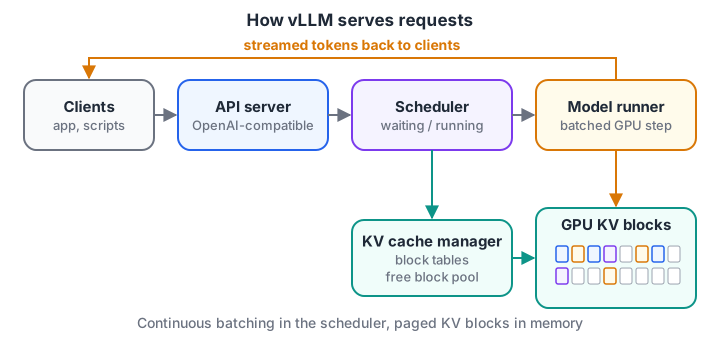
Every decode step, the scheduler decides which requests run, and the cache manager gives each one just enough blocks.
- API server. Accepts
/v1/chat/completionsand/v1/completionsrequests in the OpenAI format, applies the model's chat template and tokenises. - Scheduler. Keeps waiting and running queues. After every step it admits new requests if there is cache space, which is continuous batching.
- KV cache manager. Splits the reserved GPU memory into blocks of a fixed number of tokens and assigns blocks to requests as they grow.
- Model runner. Executes one batched forward pass for all running requests and returns one new token for each.
- Detokeniser and streamer. Turns tokens back into text and streams them to clients.
What is PagedAttention?
Before paging, servers reserved a contiguous chunk of memory per request, big enough for the maximum context length. If a chat was allowed 8,192 tokens but used 900, the rest sat idle. PagedAttention stores each request's keys and values in small blocks (16 tokens is common) that can live anywhere in memory, with a block table mapping positions to blocks.
Three benefits follow. Waste is limited to the last partly filled block. Many more requests fit at once. And identical prefixes, like Chappan Help's system prompt, can point at the same blocks, which is how prefix caching shares memory.
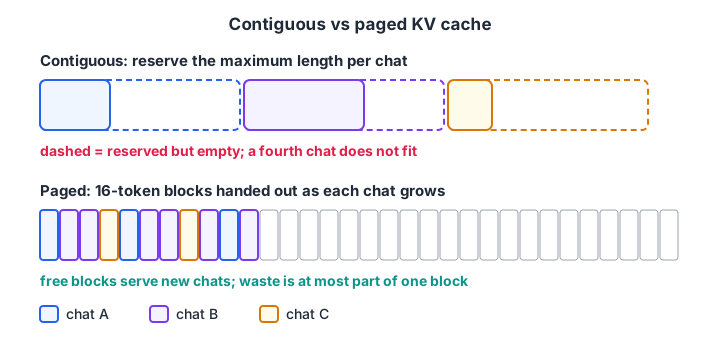
Same three chats, same GPU. Paging turns reserved-but-empty space into room for more users.
import math
import numpy as np

rng = np.random.default_rng(4)
max_len, block = 8192, 16
kv_per_token = 128 * 1024                        # bytes, 8B-class model with GQA
budget = 50 * 1024 ** 3                          # 50 GiB set aside for KV cache
used = rng.integers(300, 3000, 1000)             # real tokens per chat

contig_per_req = max_len * kv_per_token          # reserve the maximum for everyone
paged_per_req = np.array([math.ceil(u / block) * block for u in used]) * kv_per_token

fit_contig = budget // contig_per_req
fit_paged = int(budget // paged_per_req.mean())
waste_contig = 1 - used.mean() / max_len
waste_paged = 1 - used.sum() * kv_per_token / paged_per_req.sum()
print(f"contiguous: {fit_contig:4d} chats fit, {waste_contig:.0%} of reserved memory unused")
print(f"paged     : {fit_paged:4d} chats fit, {waste_paged:.1%} of allocated memory unused")
Reserving the maximum fits only 50 chats and wastes most of the memory. Paging fits several times more, wasting under one per cent. That is the main reason vLLM delivers high throughput.
Quick check
What problem does PagedAttention solve?
Paging allocates small blocks as each request grows, so very little memory sits reserved but empty.
Install and start a vLLM server
vLLM runs on Linux with a supported GPU. Install it in a fresh virtual environment, then serve a model from the Hugging Face Hub. Replace <model-id> with the open-weight model you chose, as in running LLMs locally.
uv venv --python 3.12 && source .venv/bin/activate
uv pip install vllm --torch-backend=auto

vllm serve <model-id> \
  --served-model-name support-chat-v1 \
  --max-model-len 8192 \
  --gpu-memory-utilization 0.90 \
  --max-num-seqs 64 \
  --enable-prefix-caching \
  --api-key "$VLLM_API_KEY"
The server listens on port 8000 by default. Because the API matches OpenAI's, the app can use the standard OpenAI Python client with a different base URL.
from openai import OpenAI

client = OpenAI(base_url="http://localhost:8000/v1", api_key="YOUR_VLLM_API_KEY")

stream = client.chat.completions.create(
    model="support-chat-v1",                    # the --served-model-name alias
    messages=[
        {"role": "system", "content": "You are Chappan Help. Refunds for missing items within 48 hours."},
        {"role": "user", "content": "My raita was missing yesterday. Can I get a refund?"},
    ],
    temperature=0.2,
    max_tokens=200,
    stream=True,
)
for chunk in stream:
    if chunk.choices and chunk.choices[0].delta.content:
        print(chunk.choices[0].delta.content, end="", flush=True)
Sampling settings such as temperature and max tokens work as described in generation parameters.
The vLLM flags that matter most
| Flag | What it controls | Chappan Help choice |
|---|---|---|
--gpu-memory-utilization |
Share of GPU memory vLLM may use for weights plus KV cache | 0.90 |
--max-model-len |
Longest prompt plus reply per request | 8192, enough for history and two articles |
--max-num-seqs |
Maximum requests decoded together in one step | 64 |
--max-num-batched-tokens |
Token budget per step, which shapes chunked prefill | Default, tuned after load tests |
--enable-prefix-caching |
Reuse KV blocks for identical prompt prefixes | On, since every chat shares the system prompt |
--tensor-parallel-size |
Split the model across several GPUs | 1 |
--quantization, --kv-cache-dtype |
Lower-precision weights or cache | Tested against the golden set first |
--served-model-name |
Name clients use in the model field |
support-chat-v1 |
--api-key |
Require a bearer token | Always set |
Quick check
Chappan Help's app uses model="support-chat-v1" in API calls. Which vLLM flag makes that name work?
--served-model-name sets the name clients send in the model field, so the app never hard-codes the underlying model ID.
Plan capacity before launch
How many GPUs does Chappan Help need at dinner peak? Combine the KV budget with Little's law: concurrent requests = arrival rate × average time each request is active.
import math

gpu_gib, util, weights_gib, overhead_gib = 80, 0.90, 15, 4
kv_gib_per_token = 128 / 1024 / 1024             # 128 KiB per token
avg_tokens = 2600                                 # prompt + reply, from logs

kv_budget = gpu_gib * util - weights_gib - overhead_gib
seqs_by_memory = int(kv_budget / (avg_tokens * kv_gib_per_token))
seqs_per_gpu = min(seqs_by_memory, 64)            # also capped by --max-num-seqs

peak_chats_per_s = 9                              # dinner peak arrivals
avg_active_s = 5.5                                # TTFT + streaming time per turn
concurrent = peak_chats_per_s * avg_active_s
gpus = math.ceil(concurrent / seqs_per_gpu * 1.3) # 30% headroom

print(f"KV budget per GPU     : {kv_budget:.1f} GiB -> {seqs_by_memory} sequences by memory")
print(f"Sequences per GPU used: {seqs_per_gpu}")
print(f"Concurrent at peak    : {concurrent:.0f}")
print(f"GPUs needed with headroom: {gpus}")
This is a starting estimate, not a promise. Latency targets may cap batch size below what memory allows, so confirm it with a load test.
Run vLLM in Docker and load-test it
In production you run the official container, the same pattern as in Docker for machine learning. The image tag should be pinned to a tested version rather than latest.
docker run --runtime nvidia --gpus all \
  -v ~/.cache/huggingface:/root/.cache/huggingface \
  --env "HF_TOKEN=$HF_TOKEN" \
  -p 8000:8000 --ipc=host \
  vllm/vllm-openai:<pinned-version> \
  --model <model-id> --served-model-name support-chat-v1 --api-key "$VLLM_API_KEY"

# replay realistic traffic: long prompts, short replies, 9 requests per second
vllm bench serve --base-url http://localhost:8000 --model <model-id> \
  --dataset-name random --random-input-len 2400 --random-output-len 150 \
  --num-prompts 1000 --request-rate 9 --metric-percentiles 50,95,99
The benchmark reports TTFT, time per output token and inter-token latency at the percentiles you request. Raise the request rate until p95 TTFT crosses your target; the rate just below that is your real capacity per GPU. For scaling several replicas, see Kubernetes for ML engineers.
Batch jobs without a server
For nightly work, such as summarising the day's 6,000 support chats for the quality team, skip HTTP and use the offline API, which batches everything for maximum throughput.
from vllm import LLM, SamplingParams

llm = LLM(model="<model-id>", max_model_len=8192)
params = SamplingParams(temperature=0.0, max_tokens=120)
prompts = [f"Summarise this support chat in one line:\n{chat}" for chat in todays_chats]
for out in llm.generate(prompts, params):
    print(out.outputs[0].text)
Monitor vLLM in production
vLLM exposes Prometheus metrics at /metrics. The ones to put on a dashboard first:
vllm:time_to_first_token_secondsandvllm:inter_token_latency_seconds(histograms) for user-facing speed.vllm:e2e_request_latency_secondsfor whole-request time.vllm:num_requests_runningandvllm:num_requests_waitingfor load and queueing.vllm:kv_cache_usage_percfor how full the block pool is.vllm:prefix_cache_hitsdivided byvllm:prefix_cache_queriesfor how well prefix caching works.
A rising waiting queue while cache usage sits near 1.0 means you need more GPUs or shorter contexts. Metric names occasionally change between releases, so check the metrics page for your version. Request-level tracing is covered next, in LLM observability.
Common vLLM mistakes
- Leaving
--max-model-lenat the model's huge maximum. It shrinks how many sequences the scheduler admits. Set what you need. - Running without
--api-keyon a public address. Anyone can use your GPU. Keep vLLM behind a gateway or private network too. - Using
latestimage tags. Upgrades can change defaults and metric names. Pin and test. - Changing the system prompt per user at the start. Prefix caching needs an identical prefix; put personal details after the shared part.
- Skipping evaluation after switching engines or quantisation. Rerun the golden set; chat templates and precision can change outputs.
Key takeaways
- vLLM is an open-source LLM serving engine with an OpenAI-compatible API.
- PagedAttention allocates the KV cache in blocks, fitting many more concurrent requests; continuous batching keeps the GPU busy.
- Start with
vllm serve, then tune memory share, context length, concurrent sequences and an API key. - Plan with KV maths and Little's law, then confirm with
vllm bench serveat realistic traffic. - Watch TTFT, waiting requests and KV cache usage in production.
FAQ
What is vLLM used for?
vLLM is used to serve open-weight large language models in production with high throughput and low latency. Teams run it on their own GPUs to provide an OpenAI-compatible API for chatbots, RAG systems and agents, or use its offline mode for large batch jobs such as summarising or labelling thousands of documents.
Is vLLM better than Ollama?
They suit different jobs. Ollama is designed for easy local use on a laptop or desktop with a single user. vLLM is designed for serving many concurrent users on data-centre GPUs, with continuous batching, paged KV cache and production metrics. Many developers prototype with Ollama and deploy with vLLM.
Does vLLM work without a GPU?
vLLM targets GPUs and other accelerators; that is where its speed comes from. A CPU backend exists for some setups, but it is far slower and mainly useful for testing. For learning on a laptop without a suitable GPU, a local runner such as llama.cpp or Ollama is more practical.
Is vLLM compatible with the OpenAI API?
Yes. vLLM's server implements the OpenAI chat completions and completions endpoints, so the official OpenAI client libraries work by changing the base URL and key. Most frameworks that support OpenAI-style APIs can talk to vLLM with no other code changes, which makes switching between hosted and self-hosted models easier.
Can I learn vLLM and LLM deployment in Indore?
Yes. Debugshala at Old Palasia, Indore, teaches Generative AI with offline classes in English and Hindi, including serving and deploying models. Their placement-focused course on building and serving LLM apps starts with a free demo class. You can also attempt Linux and Python practice rounds on Debugshala Test.
From the team behind this site
Go further with the Generative AI Course at Debugshala
These tutorials are written by Debugshala, a training and placement institute at Old Palasia, Indore. The classroom course adds live mentoring, real projects and interview preparation.
- Offline classes at Old Palasia, Indore
- Free demo class before you pay
- Non-IT, fresher and year-gap friendly
- Placement assistance
700+ students placed · 200+ hiring partners · 4.9★ Google rating
