

Kubernetes for ML Engineers: Deploy and Scale a Model API
Kubernetes for ML: Deployments, Services, readiness probes and HPA autoscaling for a model API, with YAML, kubectl commands and Python simulations you can run.
The city bus depot in Indore has a simple rule written on the board: "Route 5 needs 12 buses on the road." The depot manager does not care which twelve. If one breaks down near Bhawarkua, he sends a spare. If the evening rush needs 18, he sends six more and pulls them back at night.
Nobody drives the buses from the board. The board states what should be true, and the manager keeps making it true.
Kubernetes is that depot manager for containers. You write down the desired state, and it keeps your model API running in the right number of copies, on whichever machines have room.
What is Kubernetes in machine learning?
In the analogy, the depot is the cluster, each bus is a pod running your container, the board is a YAML manifest, the depot manager is the Kubernetes control plane, and sending extra buses at rush hour is autoscaling.
Kubernetes is an open-source system that runs containerised applications across a cluster of machines and continuously reconciles the actual state (what is running) with the declared desired state (what should be running).
The Docker lesson produced the image chappan/eta-api:14. One container on one server is fragile: if it crashes at 8 p.m. on a Saturday, Chappan Express, our fictional Indore delivery company, shows no delivery times at its busiest hour. Kubernetes runs several copies, replaces failed ones, spreads them across machines and adds more when orders spike.
Kubernetes objects an ML engineer must know
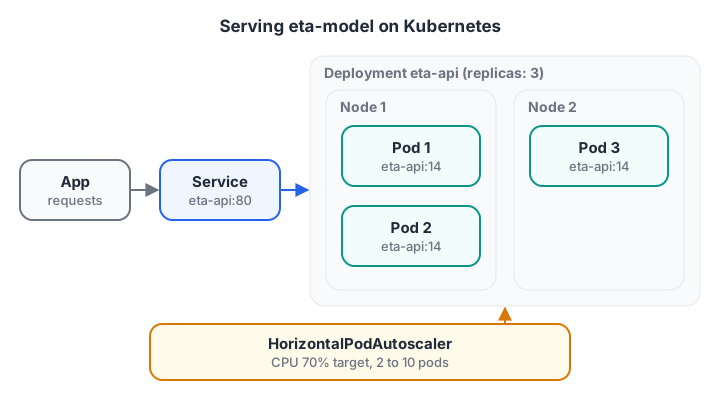
You edit the Deployment and HPA; Kubernetes creates and replaces pods. The Service hides which pods exist right now.
| Object | What it does | Chappan Express use |
|---|---|---|
| Pod | Smallest unit: one or more containers sharing network | One running copy of eta-api |
| Deployment | Keeps N identical pods running and handles rolling updates | eta-api with 3 replicas |
| Service | Stable name and IP that load-balances to healthy pods | http://eta-api inside the cluster |
| Ingress | Routes outside HTTP traffic to Services | api.chappan.example/eta |
| ConfigMap and Secret | Settings and credentials injected at runtime | Model version, database password |
| HorizontalPodAutoscaler | Changes replica count from metrics | 2 to 10 pods based on CPU |
| Job and CronJob | Run-to-completion tasks, optionally on a schedule | Nightly retraining |
Deploying the model API to Kubernetes
Kubernetes objects are described in YAML. This Deployment runs three replicas of the ETA API with resource budgets and three kinds of health check:
# eta-api-deployment.yaml
apiVersion: apps/v1
kind: Deployment
metadata:
  name: eta-api
  labels:
    app: eta-api
spec:
  replicas: 3
  selector:
    matchLabels:
      app: eta-api
  strategy:
    type: RollingUpdate
    rollingUpdate:
      maxSurge: 1
      maxUnavailable: 0
  template:
    metadata:
      labels:
        app: eta-api
        model-version: "14"
    spec:
      containers:
        - name: eta-api
          image: registry.example.com/chappan/eta-api:14
          ports:
            - containerPort: 8000
          resources:
            requests:
              cpu: "500m"
              memory: "512Mi"
            limits:
              memory: "1Gi"
          startupProbe:
            httpGet:
              path: /health
              port: 8000
            periodSeconds: 5
            failureThreshold: 24
          readinessProbe:
            httpGet:
              path: /health
              port: 8000
            periodSeconds: 5
          livenessProbe:
            httpGet:
              path: /health
              port: 8000
            periodSeconds: 20
And a Service so the app has one address to call:
# eta-api-service.yaml
apiVersion: v1
kind: Service
metadata:
  name: eta-api
spec:
  selector:
    app: eta-api
  ports:
    - port: 80
      targetPort: 8000
Apply and inspect them with kubectl:
kubectl apply -f eta-api-deployment.yaml -f eta-api-service.yaml
kubectl get pods -l app=eta-api          # three pods, STATUS Running
kubectl logs deploy/eta-api              # logs from one of the pods
kubectl port-forward svc/eta-api 8080:80 # test locally at localhost:8080
Requests and limits for ML pods
A request is what the scheduler reserves for the pod; a limit is the ceiling. Models are memory-heavy, so always set a memory limit: a pod that exceeds it is killed with an OOMKilled status.
Measure your model's real memory under load with docker run --memory before choosing numbers. Many teams set a CPU request but no CPU limit, so pods can use spare CPU without being throttled.
Why do readiness probes matter for ML?
Kubernetes has three probes, and ML services need all three:
- Startup probe: gives a slow-starting container time to boot. Loading a large model can take minutes; the probe above allows up to 120 seconds (24 checks every 5 seconds).
- Readiness probe: "can this pod take traffic right now?" If it fails, the Service stops sending requests to it, without restarting it.
- Liveness probe: "is this pod stuck?" If it fails repeatedly, Kubernetes restarts the container.
The block simulates a rolling update of three pods whose replacements need 20 seconds to load the model, with and without a readiness probe.
# Rolling update: 3 old pods replaced one by one by new pods that need
# 20 seconds to load the model before they can answer.
LOAD_SECONDS, REQS_PER_SECOND, UPDATE_SECONDS = 20, 30, 90

def simulate(use_readiness_probe):
    failed = 0
    for t in range(UPDATE_SECONDS):
        pods = []
        for i in range(3):                     # pod i is replaced at t = 30 * i
            start = 30 * i
            if t < start:
                pods.append("old")             # still serving
            else:
                pods.append("ready" if t - start >= LOAD_SECONDS else "loading")
        if use_readiness_probe:                # Service skips pods not yet ready
            routable = [p for p in pods if p != "loading"]
        else:
            routable = pods
        bad_share = routable.count("loading") / len(routable)
        failed += round(REQS_PER_SECOND * bad_share)
    return failed

total = REQS_PER_SECOND * UPDATE_SECONDS
for probe in (False, True):
    f = simulate(probe)
    print(f"readiness probe={probe!s:5}  failed {f:4d} of {total} requests ({f / total:.1%})")
Without a readiness probe, the Service sends a share of requests to pods that are still loading, and roughly one in five requests fails during the update. With the probe, those pods receive nothing until they are ready, and no request fails.
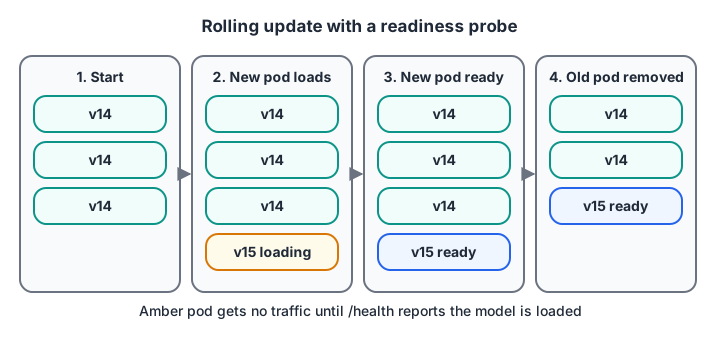
With maxUnavailable: 0, an old pod is removed only after its replacement passes the readiness check.
For this to work, /health must say "ok" only after the model has finished loading, which is why the FastAPI app in the deployment lesson reports model_loaded.
Quick check
A pod is still loading a 2 GB model. Which probe should stop the Service sending it traffic?
A failing readiness probe removes the pod from the Service's endpoints without restarting it. Liveness failures cause restarts, which would make loading worse.
Autoscaling a model API with the HPA
Orders at Chappan Express peak at lunch and dinner. Running ten pods all day wastes money; running two at 8 p.m. means slow responses. The HorizontalPodAutoscaler adjusts replicas using the formula from the Kubernetes docs:
desiredReplicas = ceil(currentReplicas × currentMetric / targetMetric)
It skips changes when the ratio is within a tolerance (10% by default). The block applies that rule across a day of traffic.
import math

# Requests per second to the ETA API, by hour of day (lunch and dinner peaks)
traffic = {9: 40, 11: 120, 13: 420, 15: 150, 17: 110, 20: 520, 22: 260, 23: 60}
POD_CAPACITY = 60          # req/s one pod handles at 100% of its CPU request
TARGET = 0.70              # HPA target: 70% average CPU utilisation
MIN_PODS, MAX_PODS, TOLERANCE = 2, 10, 0.10

replicas = MIN_PODS
print("hour  req/s  cpu_before  replicas")
for hour, rps in traffic.items():
    util = rps / (replicas * POD_CAPACITY)            # average CPU utilisation
    ratio = util / TARGET
    if abs(ratio - 1) > TOLERANCE:                    # HPA ignores small wobbles
        replicas = math.ceil(replicas * ratio)
        replicas = max(MIN_PODS, min(MAX_PODS, replicas))
    print(f"{hour:>4}  {rps:>5}  {util:>9.0%}  {replicas:>8}")
The service sits at the minimum of two pods in the morning, jumps to the maximum of ten for the lunch and dinner rushes, and steps back down at night. The real HPA also waits through a stabilisation window (five minutes by default) before scaling down, so a brief dip does not remove pods you need a minute later.
The YAML for this autoscaler uses the stable autoscaling/v2 API:
# eta-api-hpa.yaml
apiVersion: autoscaling/v2
kind: HorizontalPodAutoscaler
metadata:
  name: eta-api
spec:
  scaleTargetRef:
    apiVersion: apps/v1
    kind: Deployment
    name: eta-api
  minReplicas: 2
  maxReplicas: 10
  metrics:
    - type: Resource
      resource:
        name: cpu
        target:
          type: Utilization
          averageUtilization: 70
CPU utilisation is measured against the pod's CPU request, which is another reason to set requests honestly. For GPU-bound models, CPU is a poor signal; teams scale on request rate or queue length with custom metrics instead.
Quick check
Three pods average 98% CPU utilisation against a 70% target. How many replicas does the HPA formula give?
ceil(3 × 98 / 70) = ceil(4.2) = 5.
Training jobs, GPUs and when to use Kubernetes
Training jobs and GPUs
Not everything is a long-running API. Nightly retraining is a task that starts, finishes and exits. A CronJob runs it on a schedule:
apiVersion: batch/v1
kind: CronJob
metadata:
  name: eta-retrain
spec:
  schedule: "30 2 * * *"            # 2:30 a.m. daily
  timeZone: "Asia/Kolkata"
  jobTemplate:
    spec:
      backoffLimit: 2
      template:
        spec:
          restartPolicy: Never
          containers:
            - name: train
              image: registry.example.com/chappan/eta-train:2026.11.1
              command: ["python", "train.py", "--window-days", "90"]
              resources:
                requests:
                  cpu: "2"
                  memory: "4Gi"
For a GPU model, a container asks for nvidia.com/gpu: 1 under resources.limits, and the cluster needs the NVIDIA device plugin on its GPU nodes. Higher-level ML tools build on these primitives: Kubeflow for pipelines and KServe for model serving both run on Kubernetes.
Do you need Kubernetes for ML?
| Situation | Better choice |
|---|---|
| One model, steady low traffic | A single container on a VM, or a managed container service |
| Nightly batch scoring only | A scheduled job; no API at all |
| Several models, traffic peaks, need for zero-downtime releases | Kubernetes, ideally a managed cluster (EKS, GKE, AKS) |
| Small team, no platform engineer | Managed serving platform first; Kubernetes later |
Kubernetes is powerful but has a real learning and running cost. Learn it locally with kind or minikube, and adopt it when you have the problems it solves. The official Kubernetes documentation has interactive tutorials.
Common mistakes running ML on Kubernetes
- No readiness probe. Traffic hits pods that have not loaded the model.
- Liveness probe too strict. A slow model load triggers endless restarts; use a startup probe.
- No memory limit. One leaky pod can starve a whole node.
- Image tag
latest. Kubernetes cannot tell versions apart, and rollbacks become guesswork. - Scaling on CPU for GPU models. Pick a metric that reflects real load.
- Too many workers per pod. Use one server process per container and let Kubernetes add replicas.
When you want to work through clusters like this with an instructor, Debugshala's GenAI course, taught in English and Hindi, is available in Indore. To keep your logic sharp between labs, take a reasoning break on Debugshala Test.
Key takeaways
- Kubernetes keeps declared state true: replicas, resources and versions of your model API.
- Deployment, Service, probes and HPA are the core objects for model serving.
- Readiness and startup probes stop traffic reaching pods that are still loading models.
- The HPA scales by
ceil(current × metric / target), using CPU relative to requests by default. - Training runs as Jobs or CronJobs; GPUs are requested as
nvidia.com/gpu. Next, monitoring and drift watches what these pods predict.
FAQ
Why is Kubernetes used for machine learning?
Kubernetes runs model services and training jobs reliably at scale. It restarts failed containers, spreads replicas across machines, rolls out new model versions without downtime, autoscales with traffic and schedules GPU workloads. Tools such as Kubeflow and KServe build ML-specific features on top of it.
Do ML engineers need to learn Kubernetes?
Most ML engineers need working knowledge: reading and editing Deployments, Services, probes and autoscalers, checking logs and debugging failed pods. Deep cluster administration is usually a platform team's job. Knowing the basics makes you far more effective at getting models into production.
What is the difference between Docker and Kubernetes?
Docker builds images and runs containers on one machine. Kubernetes orchestrates many containers across many machines: scheduling, scaling, networking, health checks and rolling updates. You typically build an image with Docker, push it to a registry, and Kubernetes pulls and runs it.
What is KServe?
KServe is an open-source model serving platform that runs on Kubernetes. It provides a custom resource for deploying models with features such as autoscaling, canary rollouts and standard inference protocols, so you write less Deployment and Service YAML yourself. It suits teams serving many models on one cluster.
Where can I learn Kubernetes for ML in Indore?
Debugshala at Old Palasia, Indore, teaches Generative AI, Machine Learning and Data Engineering with offline classes in English and Hindi and placement assistance. Fresh graduates, non-IT learners and people with a year gap can join after a free demo class. Admissions: +91-8982385539.
From the team behind this site
Go further with the Generative AI Course at Debugshala
These tutorials are written by Debugshala, a training and placement institute at Old Palasia, Indore. The classroom course adds live mentoring, real projects and interview preparation.
- Offline classes at Old Palasia, Indore
- Free demo class before you pay
- Non-IT, fresher and year-gap friendly
- Placement assistance
700+ students placed · 200+ hiring partners · 4.9★ Google rating
