

Open-Source LLMs Explained: Sizes, Quantisation and Licences
Open-source LLMs explained: open-weight vs closed models, parameter sizes, what fits on a laptop, 4-bit quantisation maths, GGUF and ONNX, and licences.
Think about two ways to get dal baati for a family function in Indore. You can order from a well-known caterer: the food arrives, it is good, you pay per plate, but you never see the recipe and you cannot change how it is made.
Or a relative gives you their tested recipe and you cook at home. You control the spice, pay nothing extra each week, and nobody sees your guest list. But you need a big enough kitchen.
Large language models come in the same two flavours. That choice shapes cost, privacy, quality and what hardware you need.
What are open-source LLMs?
Mapping the analogy: the caterer is a closed model reached through an API. The recipe is the model's weights, the billions of numbers learned during training. Cooking at home is running the model on your own machine or server, and the kitchen size is your RAM and GPU memory.
An open-weight LLM is a large language model whose trained weights are published for download, so you can run, inspect and fine-tune it on your own hardware under the terms of its licence.
People often say "open-source LLM", but most of these models are more precisely open-weight. The weights are public, while the training data and full training code often are not. A model counts as open source in the strict sense only when its licence and released materials meet a definition such as the Open Source Initiative's.
| Closed models (API) | Open-weight models | |
|---|---|---|
| How you use it | Send prompts to the provider's API | Download weights, run them yourself or via a host |
| Cost | Pay per token | Pay for your hardware or hosting |
| Privacy | Prompts go to the provider | Data can stay on your machine |
| Control | Provider decides updates and limits | You pin the version, fine-tune, quantise |
| Effort | Very little setup | You handle hardware, serving and updates |
| Peak quality | Often the strongest general models | Strong and improving, best in a size class |
Many teams prototype on a closed API, then move a narrow, high-volume task to a small open model.
Quick check
A model's weights are public but its training data is not. What is the most precise term?
Public weights alone make a model open-weight; strict open source needs more to be released.
Model sizes and parameters
A parameter is one learned number. Model names often include the size: "1B", "8B", "70B" mean roughly 1, 8 and 70 billion parameters. More parameters usually mean more knowledge and better reasoning, but also more memory and slower answers.
Open model families usually come in several sizes, such as a tiny 1B-class model for phones, a 7B to 9B-class model for laptops and single GPUs, and 30B to 70B-plus models for servers.
Each size often ships as a base model (raw next-token predictor) and an instruct or chat version (tuned to follow instructions). For an assistant, you almost always want the instruct version.
Some families use a mixture-of-experts (MoE) design: many parameters in total, but only a fraction active per token. It needs memory for all of them yet generates faster than a dense model of the same size.
What fits on a laptop?
The rule of thumb is simple: memory ≈ parameters × bytes per parameter, plus some overhead for the runtime and the KV cache, the memory that grows with the length of the conversation.
import numpy as np

sizes_b = np.array([1, 3, 8, 14, 32, 70])            # billions of parameters
bytes_per_param = {"fp32": 4, "fp16": 2, "int8": 1, "4-bit": 0.5}
overhead = 1.2                                        # ~20% for runtime and a modest KV cache

print(f"{'size':>6}" + "".join(f"{k:>9}" for k in bytes_per_param))
for s in sizes_b:
    row = [s * b * overhead for b in bytes_per_param.values()]
    print(f"{s:>5}B" + "".join(f"{gb:>8.1f}G" for gb in row))

laptop_gb = 16
usable = laptop_gb * 0.6                              # leave room for the OS and browser
fits = sizes_b[sizes_b * 0.5 * overhead <= usable]
print(f"\nOn a {laptop_gb} GB laptop, 4-bit models up to about {fits.max()}B parameters fit")
So a 16 GB laptop runs an 8B-class model at 4-bit comfortably, and a 14B-class one at a squeeze. A 70B model needs server hardware even when quantised. On a CPU, expect a few tokens per second from 7B to 8B models; GPUs and Apple Silicon are faster thanks to higher memory bandwidth.
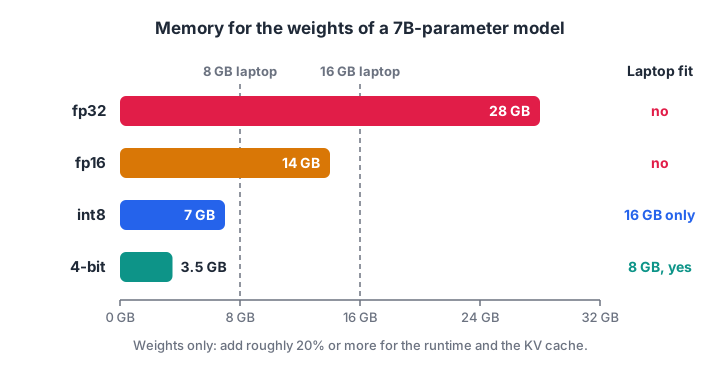
Each halving of bits halves the memory. Only the 4-bit version of a 7B model sits comfortably on an 8 GB laptop.
Quick check
Roughly how much memory do the weights of an 8B model need at 4-bit?
8 billion parameters times 0.5 bytes is about 4 GB, before runtime overhead.
Quantisation: fp16, int8 and 4-bit
Weights are normally stored as 16-bit floats (fp16 or bf16). Quantisation stores them with fewer bits, typically 8 or 4, like measuring flour in rough cups instead of grams: the recipe works, but each amount is slightly off.
Quantisation compresses a model by mapping each weight to one of a small set of levels, storing a small integer per weight plus a scale factor that converts it back to an approximate real value.
The simplest scheme is symmetric absmax quantisation. For int8, divide every weight by scale = max(|w|) / 127, round to the nearest integer between -127 and 127, and multiply by scale again when you need the value. With 4 bits you have only about 15 levels, so the rounding error grows.
One large outlier weight stretches the scale and wastes levels for everyone else. That is why practical methods quantise in small groups, such as 32 to 128 weights, each with its own scale. Let's measure all of this:
import numpy as np

rng = np.random.default_rng(7)
w = rng.normal(0, 0.02, 4096).astype(np.float32)   # one row of a weight matrix
w[100] = 0.4                                        # a single outlier weight

def quantise(x, bits):
    levels = 2 ** (bits - 1) - 1                    # 127 for int8, 7 for 4-bit
    scale = np.abs(x).max() / levels
    q = np.clip(np.round(x / scale), -levels, levels)
    return q * scale

def grouped(x, bits, group=64):
    return np.concatenate([quantise(g, bits) for g in x.reshape(-1, group)])

for name, approx in [("int8, per row", quantise(w, 8)),
                     ("4-bit, per row", quantise(w, 4)),
                     ("4-bit, groups of 64", grouped(w, 4))]:
    err = np.abs(w - approx).mean() / np.abs(w).mean()
    zeros = np.mean(approx == 0)
    print(f"{name:<20} relative error {err:6.1%}   weights rounded to zero {zeros:5.1%}")

print("memory for this row: fp16", w.size * 2, "bytes, 4-bit", w.size // 2, "bytes (+ scales)")
With one outlier, per-row 4-bit rounds most weights to zero, which would wreck the model. Grouping cuts the error sharply while keeping the 4x saving over fp16. Real methods add smarter level spacing and calibration data, but the principle is the same.
In practice, 8-bit is usually close to the original quality, and good 4-bit quantisation of a 7B-plus model keeps most of it. Very small models and 2 to 3-bit widths lose quality faster.
Quick check
Why do practical 4-bit methods quantise weights in small groups?
Each group gets its own scale, so an outlier only hurts its own small group.
Formats and runtimes for open models
The same model can be packaged in different ways. You do not need every detail, just the main shapes:
- safetensors: the standard format on the Hugging Face Hub for full or half-precision weights, loaded by the transformers library. Safer than older pickle-based files because it contains no executable code. The Hugging Face tutorial shows how to load these.
- GGUF: a single-file format that bundles quantised weights, the tokenizer and metadata. It is used by llama.cpp and the many desktop apps and local servers built on it, and runs well on CPUs and Apple Silicon. Files are often labelled with their quantisation level, such as Q4 or Q8.
- GPU-oriented quantised formats (for example GPTQ and AWQ): used by GPU serving engines that batch many users' requests.
- ONNX: a framework-neutral graph format run by ONNX Runtime, common for deploying to varied hardware and edge devices.
Many local runtimes expose an OpenAI-compatible HTTP API, so an app can often switch from a hosted model to a local one by changing the base URL, which makes comparing them on the same RAG pipeline easy.
Licences for open-weight models
"Downloadable" does not mean "free to use for anything". Licences fall into three broad groups:
- Permissive licences such as Apache 2.0 and MIT: commercial use, modification and redistribution allowed, with attribution.
- Community or custom model licences: commercial use often allowed but with conditions, such as an acceptable-use policy, naming requirements for derived models, or limits for very large companies.
- Non-commercial or research-only licences: fine for learning and papers, not for a paid product.
A fine-tuned version usually inherits the base model's licence. Read the model card and licence file, and get a qualified review if a client project depends on it.
How to choose an open-source LLM for your task
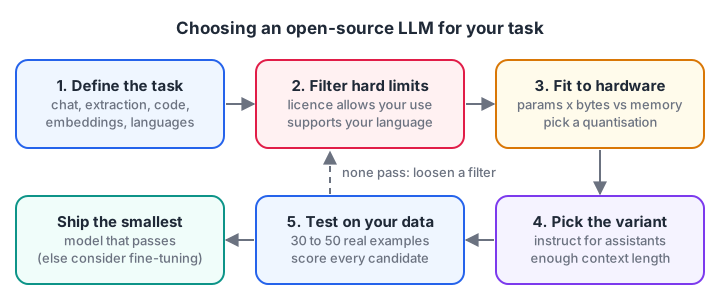
Filters first, then testing. Leaderboards narrow the list but your own examples make the decision.
Work through these questions in order:
- What is the task? Chat, extraction, code and embeddings each have specialised models, and a small specialised model often beats a large general one.
- Licence and language. Remove anything your use case cannot legally use, and anything weak in the languages you need, such as Hindi.
- Hardware, latency and context length. Use the memory maths above, and prefer the smallest model that passes.
- Test on your own data. Write 30 to 50 real examples with expected answers and score each candidate.
The filtering step is easy to automate:
candidates = [
    {"name": "family-a-3b-instruct",  "params_b": 3,  "license": "apache-2.0", "hindi": True,  "ctx_k": 32},
    {"name": "family-b-8b-instruct",  "params_b": 8,  "license": "community",  "hindi": True,  "ctx_k": 128},
    {"name": "family-c-14b-instruct", "params_b": 14, "license": "apache-2.0", "hindi": False, "ctx_k": 32},
    {"name": "family-d-7b-base",      "params_b": 7,  "license": "non-commercial", "hindi": True, "ctx_k": 8},
]
need = {"commercial": True, "hindi": True, "min_ctx_k": 16, "ram_gb": 16}
ok_licences = {"apache-2.0", "mit", "community"}       # 'community' = read its conditions

for m in candidates:
    gb = m["params_b"] * 0.5 * 1.2                     # 4-bit plus overhead
    reasons = []
    if need["commercial"] and m["license"] not in ok_licences: reasons.append("licence")
    if need["hindi"] and not m["hindi"]: reasons.append("no Hindi")
    if m["ctx_k"] < need["min_ctx_k"]: reasons.append("short context")
    if gb > need["ram_gb"] * 0.6: reasons.append(f"needs {gb:.1f} GB")
    if "base" in m["name"]: reasons.append("base, not instruct")
    print(f"{m['name']:<24}", "KEEP for testing" if not reasons else "drop: " + ", ".join(reasons))
The survivors go into your evaluation set. That final step matters most, and it is also where you learn whether you need fine-tuning with LoRA or just a better prompt.
Common mistakes with open models
- Picking by size alone. A well-tuned 8B model can beat an older 30B one.
- Forgetting the KV cache. Long chats and long documents need memory beyond the weights.
- Over-quantising small models. 4-bit on a 1B model can hurt far more than on an 8B one.
- Skipping the licence. It is much cheaper to check before you build than after a client asks.
Key takeaways
- Open-weight models can be downloaded and run on your own hardware; closed models are API-only.
- Memory is about parameters times bytes per parameter, plus overhead for the runtime and KV cache.
- Quantisation to 8-bit or 4-bit cuts memory 2x to 4x versus fp16, with small, measurable quality loss when done in groups.
- GGUF suits local CPU and laptop runtimes, safetensors suits transformers, ONNX suits cross-platform deployment.
- Choose by task, licence, language and hardware, then decide with your own test set.
FAQ
Are open-source LLMs as good as ChatGPT-style closed models?
On hard general reasoning the strongest closed models are often ahead, though the gap varies by task. For narrow tasks such as classification, extraction or answering from your own documents, a good open model is often good enough at a fraction of the cost.
Can I run an LLM on a laptop with 8 GB RAM?
Yes, with a small model. A 3B to 4B-class model at 4-bit runs comfortably, and a 7B to 8B-class model at 4-bit can just fit if you close other apps. Expect slower answers on a CPU than from a hosted API.
Is it legal to use open-weight models in a commercial product?
It depends on the licence. Apache 2.0 and similar allow it, community licences often allow it with conditions, and non-commercial licences do not. Check the exact version you use.
Where can I learn to run and deploy open-source LLMs in Indore?
Debugshala runs its Generative AI programme as offline LLM classes in Old Palasia, Indore, taught in English and Hindi, and you can join a free demo class before paying. For interview preparation alongside, you can solve timed coding quizzes on Debugshala Test.
From the team behind this site
Go further with the Generative AI Course at Debugshala
These tutorials are written by Debugshala, a training and placement institute at Old Palasia, Indore. The classroom course adds live mentoring, real projects and interview preparation.
- Offline classes at Old Palasia, Indore
- Free demo class before you pay
- Non-IT, fresher and year-gap friendly
- Placement assistance
700+ students placed · 200+ hiring partners · 4.9★ Google rating
