

Data Pipelines for ML: ETL, Validation and Train/Serve Skew
Build a data pipeline for machine learning: extract, validate, transform, load, idempotent backfills, Airflow scheduling, and a runnable train/serve skew demo.
Every morning a sabzi vendor in Indore's Chhoti Gwaltoli market buys stock from the mandi. On the way back he throws out the rotten tomatoes, washes the rest, sorts them by size and stacks them on the cart.
If he skipped the sorting one day, customers would still buy. If he skipped throwing out the rotten ones, the whole cart would suffer by afternoon.
Data for a model goes through the same daily trip. Raw records arrive from apps and databases, some broken. Something has to clean, check, reshape and stack them before training or prediction can use them.
What is a data pipeline for machine learning?
In the market analogy, the mandi is your source systems, throwing out rotten produce is validation, washing and sorting is transformation, and the stacked cart is the feature table your model reads from.
A data pipeline for ML is an automated sequence of extract, validate, transform and load steps that turns raw source data into clean, consistent features for model training and serving, and runs on a schedule or on new data.
At Chappan Express, the fictional delivery company in this course, raw data comes from three places: the order database, rider GPS pings and a weather feed.
Every night, a pipeline turns the previous day's records into rows of features for eta-model. This lesson builds that pipeline step by step. It follows the reproducibility lesson, because each pipeline output should itself be a versioned dataset.
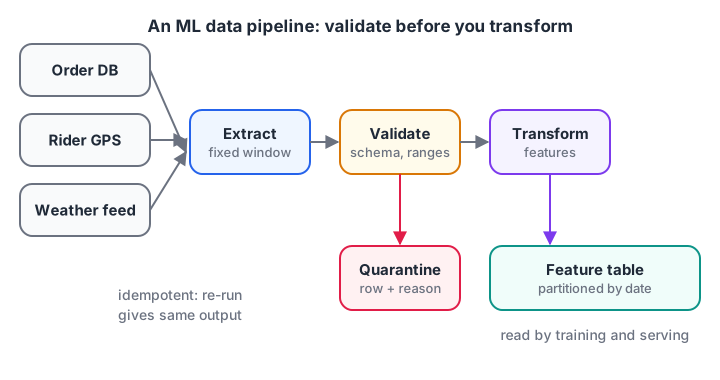
Validation sits before transformation. Bad rows are quarantined with a reason, not silently dropped.
ETL vs ELT for ML
You will hear two acronyms. The difference is where the transformation happens.
| ETL | ELT | |
|---|---|---|
| Order | Extract, Transform, then Load | Extract, Load raw, then Transform |
| Transform runs in | Pipeline code (Python, Spark) | The warehouse (SQL) |
| Good when | Logic is complex or needs Python | Data is already in a warehouse such as BigQuery |
| Raw data kept? | Not always | Yes, so you can re-transform later |
For ML, keeping the raw data is valuable because feature ideas change. Many teams land raw data first (ELT) and then run Python transforms for features that SQL handles poorly.
The four steps of an ML data pipeline
- Extract. Pull yesterday's orders, GPS pings and weather from their sources. Pull by a fixed time window, never "whatever is new since last time", so re-runs are predictable.
- Validate. Check schema, ranges, nulls and duplicates. Send failures to a quarantine table with a reason.
- Transform. Compute features: distance in km, local hour, rain flag, rider load.
- Load. Write the feature table, partitioned by date, replacing that date's partition if it already exists.
The block runs all four steps on a tiny batch of raw order events with typical real-world problems: a duplicate event, a negative distance, a missing prep time and an impossible delivery time.
import pandas as pd

raw = pd.DataFrame({
    "order_id": [1, 2, 2, 3, 4, 5, 6],
    "ts_utc": pd.to_datetime("2026-10-14 " + pd.Series(
        ["06:40", "07:05", "07:05", "13:20", "14:10", "15:45", "16:30"])),
    "distance_m": [2400, 5100, 5100, -300, 3300, 7800, 1500],
    "prep_min": [12, 18, 18, 10, None, 22, 9],
    "minutes": [24, 35, 35, 15, 29, 410, 17],
})
def validate(df):
    df = df.drop_duplicates("order_id")
    rules = {"negative distance": df.distance_m < 0, "missing prep": df.prep_min.isna(),
             "minutes out of range": ~df.minutes.between(5, 180)}
    bad = pd.Series("", index=df.index)
    for reason, mask in rules.items():
        bad[mask & (bad == "")] = reason
    return df[bad == ""], df[bad != ""].assign(reason=bad[bad != ""])
def transform(df):
    local = df.ts_utc + pd.Timedelta(hours=5, minutes=30)   # IST
    return pd.DataFrame({"order_id": df.order_id,
                         "distance_km": df.distance_m / 1000,
                         "hour_ist": local.dt.hour,
                         "prep_min": df.prep_min.astype(int),
                         "minutes": df.minutes})
good, quarantine = validate(raw)
features = transform(good)
print(features.to_string(index=False))
print("\nQuarantined:\n", quarantine[["order_id", "reason"]].to_string(index=False))
Out of seven raw events, one duplicate disappears, three are quarantined with a reason and three become clean feature rows. The 410-minute delivery was probably an order nobody marked as delivered. Training on it would have taught the model that some orders take seven hours.
Make every step idempotent
An idempotent pipeline gives the same output no matter how many times you run it for the same date. The code above is idempotent because it de-duplicates by order_id and the load step overwrites a date partition instead of appending.
This matters for backfills. When you fix a bug in the distance feature, you re-run the pipeline for the last 90 days. If loading appended rows, you would end up with every order three times.
Validation tools
The hand-written rules above are fine for a handful of checks. As they grow, teams use libraries such as Great Expectations or pandera to declare expectations ("distance between 0 and 30 km, never null") and generate reports. The idea is identical: fail early, explain why, and keep the bad rows for inspection.
Quick check
Why should a pipeline's load step overwrite a date partition instead of appending?
Idempotent loads make re-runs and backfills safe; appends would add a second copy of every order.
What is train/serve skew?
Here is the most common bug in ML pipelines. The data team writes the feature code for training in Python. The app team, months later, writes the code that builds features for live predictions in another service. The two versions disagree in some small way.
That disagreement is train/serve skew: the model sees features in production that are computed differently from the ones it learned on.
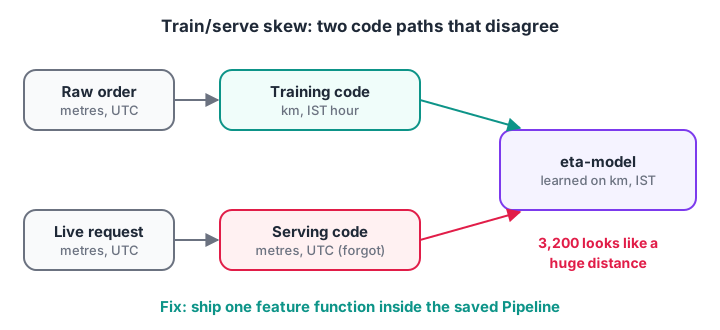
Two code paths that should match but do not. The model has no way to know the units changed.
The next block trains on distance in kilometres and IST hours, then simulates a serving service that forgets the unit conversion for distance and uses UTC hours. Watch the error.
import numpy as np
from sklearn.ensemble import GradientBoostingRegressor
from sklearn.metrics import mean_absolute_error

rng = np.random.default_rng(4)
n = 2000
dist_m = rng.uniform(500, 9000, n)
hour_ist = rng.integers(10, 23, n)
peak = np.isin(hour_ist, [13, 14, 20, 21]).astype(float)
minutes = 8 + 3.2 * dist_m / 1000 + 6 * peak + rng.normal(0, 2.5, n)

train_X = np.column_stack([dist_m / 1000, hour_ist])        # km, IST
model = GradientBoostingRegressor(random_state=0).fit(train_X, minutes)

good_X = np.column_stack([dist_m / 1000, hour_ist])          # same code path
skew_X = np.column_stack([dist_m, (hour_ist - 5) % 24])      # metres, UTC (rounded)

print(f"MAE with matching features: {mean_absolute_error(minutes, model.predict(good_X)):.1f} min")
print(f"MAE with skewed features  : {mean_absolute_error(minutes, model.predict(skew_X)):.1f} min")
print("sample prediction, 3.2 km at 8 pm IST:",
      round(model.predict([[3.2, 20]])[0], 1), "vs skewed",
      round(model.predict([[3200, 15]])[0], 1))
The model does not crash. It quietly returns numbers that are far off, because a tree model sees "3,200" as simply a very large distance and treats the hour as off-peak.
Fix skew with one shared transformation
The cure is to make it impossible for the two paths to differ. Put the feature logic inside the model artefact so the serving code passes raw fields and the model does its own conversion. scikit-learn's Pipeline and FunctionTransformer do exactly that.
import numpy as np
import pandas as pd
from sklearn.pipeline import Pipeline
from sklearn.preprocessing import FunctionTransformer
from sklearn.linear_model import LinearRegression

def build_features(raw):
    hour_ist = (raw["hour_utc"] + 5.5).astype(int) % 24
    peak = hour_ist.isin([13, 14, 20, 21]).astype(float)
    return np.column_stack([raw["distance_m"] / 1000, peak])

rng = np.random.default_rng(8)
raw = pd.DataFrame({"distance_m": rng.uniform(500, 9000, 1500),
                    "hour_utc": rng.integers(4, 18, 1500)})
y = 8 + 3.2 * raw.distance_m / 1000 + 6 * ((raw.hour_utc + 5.5).astype(int) % 24).isin([13, 14, 20, 21])

eta = Pipeline([("features", FunctionTransformer(build_features)),
                ("model", LinearRegression())]).fit(raw, y)

request = pd.DataFrame({"distance_m": [3200], "hour_utc": [14.5]})  # 8 pm IST
print("serving sends raw fields, prediction:", round(eta.predict(request)[0], 1), "min")
Now the serving service sends exactly what it has (metres and UTC time), and the conversion travels with the model. Serialise the whole Pipeline, not just the estimator, and skew of this kind cannot happen. The feature stores lesson solves the harder version, where features depend on history.
Quick check
A model trained on distance in km receives distance in metres in production. What is this called?
The world did not change; the serving code computed the feature differently from training. That is skew, fixed by sharing one transformation.
Scheduling the pipeline with Apache Airflow
A pipeline that only runs when someone remembers is not a pipeline. An orchestrator runs the steps on a schedule, in order, with retries and alerts. Apache Airflow is the most widely used open-source option. In Airflow 3, a nightly version of the steps above is written with the TaskFlow API:
import pendulum
from airflow.sdk import dag, task

@dag(schedule="0 2 * * *",                        # 2 a.m. every night
     start_date=pendulum.datetime(2026, 10, 1, tz="Asia/Kolkata"),
     catchup=False, tags=["eta-model"])
def eta_features_daily():

    @task(retries=2)
    def extract(ds=None) -> str:
        return copy_orders_for_date(ds)            # returns a file path

    @task()
    def validate(path: str) -> str:
        return run_checks_and_quarantine(path)

    @task()
    def transform_and_load(path: str) -> None:
        write_feature_partition(path)              # overwrite that date

    transform_and_load(validate(extract()))

eta_features_daily()
Airflow passes the run's logical date as ds, which keeps each run tied to a fixed window and makes backfills safe. Prefect and Dagster are popular alternatives with similar ideas. See the Airflow TaskFlow tutorial for the full API. If decorators like @task are new to you, the Python decorators tutorial explains them.
Batch vs streaming pipelines
| Batch | Streaming | |
|---|---|---|
| Runs | On a schedule, for example nightly | Continuously, per event |
| Latency | Hours | Seconds |
| Chappan Express use | Training data, restaurant averages | Live rider location, current queue length |
| Typical tools | Airflow with pandas or Spark | Kafka with Flink or Spark Structured Streaming |
| Difficulty | Lower | Higher: ordering, late events, state |
Start with batch. Add streaming only for features whose value really expires in minutes.
Common mistakes in ML data pipelines
- Dropping bad rows silently. Quarantine them with a reason, and alert if the share jumps.
- Appending instead of overwriting partitions. Back-fills then duplicate data.
- Time zones. Store UTC, convert once in a shared function, and label columns with the zone.
- Two copies of feature code. This guarantees train/serve skew eventually.
- No pipeline versioning. Record the pipeline's Git commit with each output partition.
If you prefer building pipelines with mentor feedback, mentor-guided generative AI study in Old Palasia is an option, and you can keep your pandas reflexes sharp on Debugshala Test.
Key takeaways
- An ML data pipeline extracts, validates, transforms and loads data on a schedule.
- Validate before transforming, and quarantine bad rows with a reason.
- Keep pipelines idempotent with fixed time windows and partition overwrites.
- Ship feature logic inside the model
Pipelineso training and serving cannot drift apart. - Use an orchestrator such as Airflow for schedules, retries and backfills.
FAQ
What is a data pipeline in machine learning?
A data pipeline in ML is automated code that collects raw data, checks it, converts it into model features and stores those features for training and prediction. It runs on a schedule or on new events, so models always learn from and predict on consistent, validated data.
What is the difference between a data pipeline and an ML pipeline?
A data pipeline produces clean data and features. An ML pipeline usually includes that and continues into training, evaluation and model registration. In practice the terms overlap; the important part is that every step from raw data to registered model is automated and repeatable.
What causes train/serve skew?
Train/serve skew happens when features in production are computed differently from training: different units, time zones, default values, or code written separately by two teams. It can also come from stale features. Sharing one transformation function or a feature store between training and serving prevents it.
Is Airflow required for ML pipelines?
No. A cron job running a Python script is a valid start. Airflow, Prefect or Dagster become worth it when you have several dependent steps, need retries and alerts, or must backfill many dates. The design rules, fixed windows and idempotent steps, matter more than the tool.
Where can I practise data pipelines for ML in Indore?
Debugshala at Old Palasia, Indore, runs Data Engineering, Machine Learning and Generative AI courses with offline classes in English and Hindi. Non-IT graduates and people with a career gap are welcome, and you can sit a free demo class first. Admissions are on +91-8982385539.
From the team behind this site
Go further with the Generative AI Course at Debugshala
These tutorials are written by Debugshala, a training and placement institute at Old Palasia, Indore. The classroom course adds live mentoring, real projects and interview preparation.
- Offline classes at Old Palasia, Indore
- Free demo class before you pay
- Non-IT, fresher and year-gap friendly
- Placement assistance
700+ students placed · 200+ hiring partners · 4.9★ Google rating
