

Deploy a Small LLM: Transformers, GGUF, Ollama and OpenAI API
Export your own small LLM to Transformers format, convert it to GGUF, quantise it, run it in Ollama or vLLM and serve an OpenAI-compatible API.
Picture a home baker in Vijay Nagar who has perfected a cake recipe. Friends love it, but the cake only exists in her own kitchen. To sell it, she needs a standard box any shop can stock, a smaller travel size for delivery, a listing on a delivery app, and a counter where customers can order from a familiar menu.
Your trained model is in the same position. It works inside your training script and nowhere else.
What does deploying a small LLM mean?
Deploying an LLM means packaging its weights and tokenizer in a standard format and running them behind an inference server, usually one with an OpenAI-compatible HTTP API, so other programs can send prompts and receive replies.
Mapping the bakery: the standard box is the Hugging Face Transformers format (config.json, model.safetensors, tokenizer files). The travel size is a quantised GGUF file for llama.cpp. The delivery app is Ollama. The shop counter with a familiar menu is the OpenAI-compatible API.
This is the last article in the series. You have already evaluated your model, and you should pick the checkpoint that won that comparison. For running other people's models locally, see how to run LLMs locally.
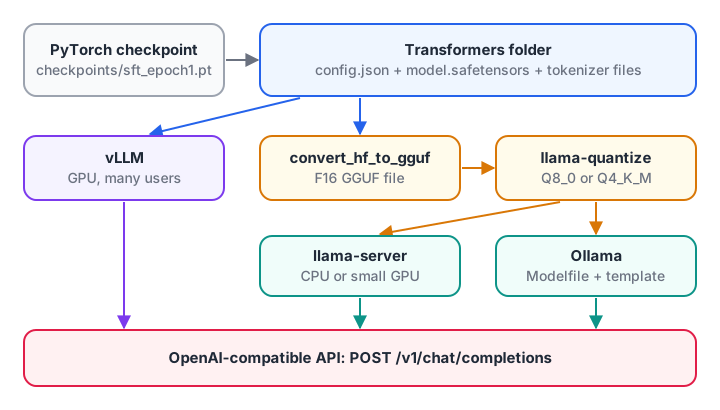
Every path goes through the Transformers folder. Get that step right and everything after it is commands.
Step 1: export to Transformers format
Serving tools don't know your custom nn.Module. They do know standard architectures. The model you built in the architecture tutorial uses RMSNorm, RoPE, grouped-query attention and SwiGLU, which is exactly the Llama layout. So the easiest export is to copy your weights into a LlamaForCausalLM with a matching config.
import torch
from transformers import LlamaConfig, LlamaForCausalLM, AutoTokenizer

ckpt = torch.load("checkpoints/sft_epoch1.pt", map_location="cpu")   # or dpo_last.pt, whichever won
sd, c = ckpt["model"], ckpt["config"]                               # saved by the SFT script

cfg = LlamaConfig(
    vocab_size=c["vocab_size"], hidden_size=c["dim"],                # 6,400 and 768
    intermediate_size=c["ffn_dim"],                                  # 2,432
    num_hidden_layers=c["n_layers"], num_attention_heads=c["n_heads"],
    num_key_value_heads=c["n_kv_heads"], head_dim=c["dim"] // c["n_heads"],
    max_position_embeddings=c["max_seq_len"],                        # 1,024 after SFT
    rms_norm_eps=c["norm_eps"], rope_theta=c["rope_base"],           # 1e-5 and 10,000
    hidden_act="silu", attention_bias=False, mlp_bias=False,
    tie_word_embeddings=True,                                        # TinyLM ties lm_head to embed
    pad_token_id=0, bos_token_id=1, eos_token_id=2,                  # <|endoftext|>, <|im_start|>, <|im_end|>
)
hf = LlamaForCausalLM(cfg)

# Hugging Face name -> TinyLM name from the architecture tutorial
names = {"model.embed_tokens.weight": "embed.weight", "model.norm.weight": "norm.weight"}
for i in range(cfg.num_hidden_layers):
    for hf_n, mine in [("self_attn.q_proj", "attn.q"), ("self_attn.k_proj", "attn.k"),
                       ("self_attn.v_proj", "attn.v"), ("self_attn.o_proj", "attn.o"),
                       ("mlp.gate_proj", "mlp.gate"), ("mlp.up_proj", "mlp.up"),
                       ("mlp.down_proj", "mlp.down"),
                       ("input_layernorm", "norm1"), ("post_attention_layernorm", "norm2")]:
        names[f"model.layers.{i}.{hf_n}.weight"] = f"layers.{i}.{mine}.weight"

new_sd = {hf_key: sd[my_key] for hf_key, my_key in names.items()}
missing, unexpected = hf.load_state_dict(new_sd, strict=False)
print("missing:", missing, "unexpected:", unexpected)   # only lm_head.weight, which is tied
hf.tie_weights()
assert torch.equal(hf.lm_head.weight, hf.model.embed_tokens.weight)
hf.eval()
Check the export before anything else
A silent mistake here ruins every later step. Feed the same input to your original TinyLM and to the converted model, compare the logits in fp32, and only then save:
from model import Config, TinyLM

mine = TinyLM(Config(**c))
mine.load_state_dict(sd)
mine.eval()
ids = torch.tensor([[1, 345, 78, 910, 22]])
with torch.no_grad():
    a, _ = mine(ids)                             # TinyLM returns (logits, loss)
    b = hf(ids).logits
print("max abs diff:", (a - b).abs().max().item())   # expect about 1e-5 or smaller in fp32

hf.to(torch.float16).save_pretrained("export/my-llm")      # writes config.json and model.safetensors
tok = AutoTokenizer.from_pretrained("tokenizer")             # your trained BPE tokenizer
tok.save_pretrained("export/my-llm")                         # copies the chat template too
No q/k permutation is needed. Your TinyLM already uses the "rotate half" RoPE layout from the architecture tutorial, the same one Transformers' Llama uses, so the q and k weights copy across unchanged. (Only a model that rotates adjacent pairs, the complex-number style, would need its q and k rows reordered during export.)
If the difference is large, check the name map for typos, then rms_norm_eps, rope_theta and tie_word_embeddings against your model's config. The saved fp16 copy will differ from the fp32 original by a few thousandths, which is normal.
Make sure the tokenizer folder includes your chat template. The Transformers chat templating docs explain how apply_chat_template uses it. Every server below reads it.
Quick check
Why export a custom model into a standard architecture such as LlamaForCausalLM?
Matching a known architecture lets every downstream tool load your weights directly.
Step 2: serve on a GPU with vLLM
Once the folder loads with AutoModelForCausalLM, vLLM can serve it directly:
pip install vllm
vllm serve ./export/my-llm --served-model-name tiny-chat \
  --max-model-len 1024 --port 8000
Keep --max-model-len at the length you trained on (1,024 tokens after SFT in this series) unless you add RoPE scaling.
vLLM batches many requests together, so it suits a GPU serving many users. For a model this small, it is often more than you need. The vLLM serving tutorial covers its flags and capacity planning.
Step 3: convert to GGUF and quantise with llama.cpp
GGUF is the single-file format used by llama.cpp, and it runs well on plain CPUs.
- Clone llama.cpp and install its Python requirements.
- Convert the Transformers folder to a 16-bit GGUF file.
- Quantise it to a smaller type.
- Chat with it locally, or start the server.
python convert_hf_to_gguf.py ../export/my-llm --outfile my-llm-f16.gguf --outtype f16
./build/bin/llama-quantize my-llm-f16.gguf my-llm-q8_0.gguf Q8_0
./build/bin/llama-cli -m my-llm-q8_0.gguf
./build/bin/llama-server -m my-llm-q8_0.gguf --port 8080 --jinja
If the converter stops with an error saying the BPE pre-tokenizer was not recognised, it does not know your custom tokenizer's pre-splitting rules. The warning prints a chkhsh value.
Your tokenizer uses the standard GPT-2 byte-level split from the tokenizer tutorial, so the usual fix is to map that hash to the existing gpt-2 pre-tokenizer: add if chkhsh == "<the printed hash>": res = "gpt-2" inside the converter's get_vocab_base_pre() function. Test the result by comparing token IDs with your original tokenizer.
How big will the file be? Weights dominate, plus a small KV cache per conversation:
# Approximate GGUF file size and memory for a small model at different precisions.
params = 64e6          # change to your model's parameter count
bits = {"F32": 32, "F16": 16, "Q8_0": 8.5, "Q4_K_M": 4.9}   # approx. bits per weight

for name, b in bits.items():
    mb = params * b / 8 / 1e6
    print(f"{name:<7} ~{mb:7.1f} MB")

# KV cache for one chat: 2 (K and V) x layers x kv_heads x head_dim x tokens x 2 bytes (F16)
layers, kv_heads, head_dim, ctx = 8, 4, 96, 1024
kv_mb = 2 * layers * kv_heads * head_dim * ctx * 2 / 1e6
print(f"KV cache at {ctx} tokens: ~{kv_mb:.1f} MB per concurrent chat")
A 64M model is tiny even at full precision. For models this small, prefer Q8_0. Aggressive 4-bit types save little absolute memory and tend to hurt small models more than large ones. See model quantization for edge devices for how the types differ.
Step 4: package it for Ollama
Ollama wraps a GGUF file with a Modelfile that sets the chat template and stop tokens. This example assumes the ChatML-style markers from your SFT template; swap in your own.
FROM ./my-llm-q8_0.gguf
TEMPLATE """{{ if .System }}<|im_start|>system
{{ .System }}<|im_end|>
{{ end }}<|im_start|>user
{{ .Prompt }}<|im_end|>
<|im_start|>assistant
"""
PARAMETER stop "<|im_end|>"
PARAMETER temperature 0.7
PARAMETER num_ctx 1024ollama create tiny-chat -f Modelfile
ollama run tiny-chat "What is the capital of Madhya Pradesh?"The stop parameter matters most. Without it, the model may print its end-of-turn marker and keep writing a fake user turn.
Quick check
Your Ollama model keeps printing <|im_end|> and inventing a user turn. What is the likely fix?
The stop parameter tells the server to end generation at the template's end-of-turn token.
Step 5: call it through the OpenAI-compatible API
llama-server, Ollama (at http://localhost:11434/v1) and vLLM all speak the OpenAI chat-completions format. Your app code stays the same; only the base URL and model name change.
from openai import OpenAI

client = OpenAI(base_url="http://localhost:8080/v1", api_key="local")   # or :11434/v1, :8000/v1
resp = client.chat.completions.create(
    model="tiny-chat",
    messages=[{"role": "user", "content": "Write one line about Indore."}],
    max_tokens=80, temperature=0.7,
)
print(resp.choices[0].message.content)
Before you hand the endpoint to anyone, run a smoke test. Look for template tokens leaking into replies and for answers that stop only because they hit max_tokens:
import json

# A reply in the OpenAI chat-completions shape, as llama-server, Ollama and vLLM return it
raw = '''{"id": "chatcmpl-1", "object": "chat.completion", "model": "tiny-chat",
 "choices": [{"index": 0, "finish_reason": "stop",
   "message": {"role": "assistant", "content": "Indore is a city in Madhya Pradesh."}}],
 "usage": {"prompt_tokens": 14, "completion_tokens": 9, "total_tokens": 23}}'''

def smoke_test(body, bad_markers=("<|im_start|>", "<|im_end|>", "<think>")):
    data = json.loads(body)
    choice = data["choices"][0]
    text = choice["message"]["content"]
    problems = [m for m in bad_markers if m in text]
    if choice["finish_reason"] == "length":
        problems.append("hit max_tokens: stop token may be missing")
    return text, data["usage"]["completion_tokens"], problems

text, n, problems = smoke_test(raw)
print("reply:", text)
print("tokens:", n)
print("problems:", problems or "none")
leaky = raw.replace("Pradesh.", "Pradesh.<|im_end|>").replace('"stop"', '"length"')
print("leaky reply problems:", smoke_test(leaky)[2])
Then estimate speed and cost, so you know what hardware to rent:
# Decode speed is mostly limited by how fast weights stream from memory.
model_mb = {"F16": 128, "Q8_0": 68, "Q4_K_M": 39}
devices = {"laptop CPU (~50 GB/s)": 50, "consumer GPU (~900 GB/s)": 900}
efficiency = 0.5     # real kernels reach a fraction of peak bandwidth

for dev, gbps in devices.items():
    row = []
    for q, mb in model_mb.items():
        tps = gbps * 1000 / mb * efficiency
        row.append(f"{q}={tps:,.0f} tok/s")
    print(f"{dev:<26} " + ", ".join(row))

# Cost of a cloud GPU serving this model
price_per_hour, tok_s = 40.0, 2000    # Rs per hour (example), tokens/s across all users
per_million = price_per_hour / (tok_s * 3600) * 1e6
print(f"about Rs {per_million:.2f} per million generated tokens at full load")
The speed figures are rough upper bounds from memory bandwidth. For a model this small, fixed overheads per token dominate, so measure your real tokens per second with the server's own logs. The rupee price is only an example; plug in your provider's rate.
What a model this size can do in production
Be honest with yourself and your users. A 25M to 100M parameter model trained from scratch is a learning project. It can hold a short chat, follow simple formats and run on almost any machine. It cannot replace a large hosted assistant; it invents facts often and loses track of long conversations.
Good uses: a teaching demo, an offline toy assistant, a fast first-pass classifier or formatter for a narrow task you fine-tuned it on, or a baseline to compare bigger models against. If you would like to learn generative AI with guidance, Debugshala's Generative AI course for Indore students starts with a free demo class.
Common deployment mistakes
- Skipping the logit check. A wrong RoPE layout still produces fluent-looking nonsense.
- Missing chat template. Servers then fall back to a default template, and replies degrade badly.
- No stop token. The model rambles into fake turns or hits
max_tokensevery time. - Context set beyond the trained length without RoPE scaling, which breaks long chats.
- Exposing the port publicly without an API key or a reverse proxy in front.
Key takeaways
- Export to a standard Transformers architecture, save safetensors plus tokenizer and chat template, and verify logits.
- vLLM serves the Transformers folder on a GPU; llama.cpp converts it to GGUF for CPUs.
- For tiny models, Q8_0 is a safe quantisation choice.
- Ollama needs a Modelfile with the right template and stop token.
- All three servers expose an OpenAI-compatible API, so smoke-test that endpoint before sharing it.
FAQ
Can I run my own trained LLM in Ollama?
Yes. Export the model to Transformers format, convert it to GGUF with llama.cpp's converter, and create a Modelfile that points to the file and sets the chat template and stop token. Then run ollama create and ollama run. Ollama serves it on port 11434 with an OpenAI-compatible endpoint.
Which quantisation should I use for a small LLM?
For models under about 100M parameters, Q8_0 is the safest choice: the file is roughly half the size of F16 and quality loss is usually small. Four-bit types save only a few tens of megabytes at this scale and often degrade small models noticeably, so test them on your fixed prompt set first.
Do I need a GPU to serve a small LLM?
No. A model of 25M to 100M parameters in GGUF format runs comfortably on an ordinary laptop or a small cloud CPU instance using llama-server or Ollama. A GPU becomes useful only when many users send requests at once, which is where vLLM fits.
What is the difference between safetensors and GGUF?
Safetensors is the Hugging Face weight format used by Transformers and vLLM. It stores tensors safely, without running code on load. GGUF is llama.cpp's single-file format, which bundles weights, tokenizer and metadata, and supports many quantisation types for efficient CPU inference.
Does Debugshala teach generative AI in Indore?
Yes. Generative AI is one of Debugshala's courses, taught at the Old Palasia campus in Indore in English and Hindi. There is a free demo class before you pay, and placement assistance is offered. You can also test your Python on Debugshala Test.
From the team behind this site
Go further with the Generative AI Course at Debugshala
These tutorials are written by Debugshala, a training and placement institute at Old Palasia, Indore. The classroom course adds live mentoring, real projects and interview preparation.
- Offline classes at Old Palasia, Indore
- Free demo class before you pay
- Non-IT, fresher and year-gap friendly
- Placement assistance
700+ students placed · 200+ hiring partners · 4.9★ Google rating
