

LLM Training Data Preparation: Pretraining and Chat Datasets
Prepare LLM training data step by step: token budgets, cleaning and dedup, packing into blocks, uint16 token files, and chat, DPO and RL formats.
A tiffin service in Vijay Nagar delivers 300 lunches a day. The kitchen doesn't cook straight from the market bags. Vegetables are sorted, rotten ones thrown out, duplicates of the same order merged, and every meal is packed into identical steel tins so the delivery boys can stack them on the bike.
Training data works the same way. The market bags are raw web pages and documents. Sorting and throwing out are filtering and deduplication. Packing into identical tins is tokenizing and packing into fixed-length blocks, so the GPU can stack them into batches without wasting space.
What is LLM training data preparation?
LLM training data preparation is the pipeline that collects raw text, filters and deduplicates it, converts it to token IDs with your tokenizer, and stores it in the exact format each training stage expects.
This is stage 3 of the build-an-LLM roadmap, and it uses the tokenizer from training a BPE tokenizer. Bad data is the most common reason a small model is bad, so this stage deserves as much care as the model code.
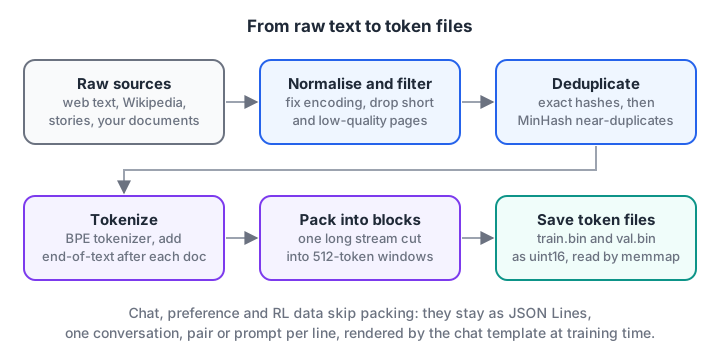
Each step removes waste. The output is two binary files of token IDs for pretraining, plus JSON Lines files for later stages.
What data does each training stage need?
Each stage of the pipeline reads a different shape of data. Decide all four formats now, even if you only use the first two on your first build.
| Stage | Format | One example | Typical size for a small model |
|---|---|---|---|
| Pretraining | {"text": ...} per line |
A Wikipedia article, a story, a web page | 0.5B to 2B tokens |
| SFT | {"messages": [...]} per line |
A user question and an assistant answer | 50k to 500k conversations |
| DPO | {"prompt", "chosen", "rejected"} |
Two answers to one prompt, one better | 10k to 100k pairs |
| RL (GRPO) | {"prompt", "answer"} |
A maths question with a checkable answer | 5k to 50k prompts |
The sizes are rough planning ranges, not rules. Preference and RL data are covered in depth in DPO training and PPO and GRPO hands-on.
How many tokens do you need to pretrain an LLM?
Start from the parameter count and work backwards. Use about 20 tokens per parameter as a floor, then convert tokens to disk size. With a small byte-level vocabulary, one token of English is very roughly 4 bytes of text.
bytes_per_token = 4.0      # rough figure for English with a 6,400-token byte-level vocab
for name, params in [("small 27M", 27e6), ("running 64M", 64e6)]:
    for tpp in (20, 50):
        tokens = params * tpp
        raw_gb = tokens * bytes_per_token / 1e9
        bin_gb = tokens * 2 / 1e9          # uint16 = 2 bytes per token
        print(f"{name}: {tpp:2d} tok/param -> {tokens/1e9:4.2f}B tokens, "
              f"~{raw_gb:4.1f} GB raw text, {bin_gb:4.2f} GB token file")
Hindi text in UTF-8 takes about three bytes per character, so the bytes-per-token figure is higher for Hindi. Measure it on your own tokenizer and a sample of your data instead of trusting the 4.0.
Where to get pretraining text
Good public sources on the Hugging Face Hub include Wikipedia dumps, filtered educational web text such as FineWeb-Edu, and simple synthetic stories such as TinyStories, which is a good fit for models under 30M parameters. Always check each dataset's licence before you use it.
How to clean and deduplicate pretraining data
Cleaning follows a fixed order. Cheap filters run first so expensive steps see less data.
- Normalise. Fix encoding errors, unify whitespace and strip HTML or markdown leftovers.
- Filter by length. Drop documents too short to teach anything, such as a 12-character page title.
- Filter by quality. Drop pages that are mostly symbols, numbers or repeated lines, such as menus and price lists.
- Language filter. Keep the languages your tokenizer was built for.
- Deduplicate. Remove exact copies, then near-duplicates. Repeated text makes a small model memorise and repeat itself.
- Hold out validation data before training, never from the same documents.
Here is a runnable version of steps 1, 2, 3 and the exact-duplicate half of step 5:
import hashlib, re

docs = [
    "Indore is the largest city in Madhya Pradesh.",
    "indore is the largest  city in Madhya Pradesh. ",
    "Home | About | Contact | Login | Cart | 9876543210",
    "Hi",
    "Poha and jalebi are a popular breakfast in Indore, often eaten near Sarafa.",
]

def normalise(t):
    return re.sub(r"\s+", " ", t).strip().lower()

seen, kept = set(), []
for d in docs:
    n = normalise(d)
    letters = sum(c.isalpha() for c in n) / max(len(n), 1)
    h = hashlib.md5(n.encode()).hexdigest()
    if len(n) < 20:
        reason = "too short"
    elif letters < 0.6:
        reason = f"low letter ratio {letters:.2f}"
    elif h in seen:
        reason = "duplicate"
    else:
        seen.add(h); kept.append(d); reason = "kept"
    print(f"{reason:22s} | {d[:50]}")
print(f"\nkept {len(kept)} of {len(docs)} documents")
For near-duplicates, such as the same news story on two sites, use MinHash with locality-sensitive hashing. The idea is to compare sets of word n-grams cheaply instead of comparing every pair of documents.
How to pack documents into training blocks
Your model trains on fixed-length blocks, for example 512 tokens. Documents are never exactly that long. You can pad each document to the block length, or pack them: join all documents into one long stream with an end-of-text token between them, then cut the stream into equal blocks.
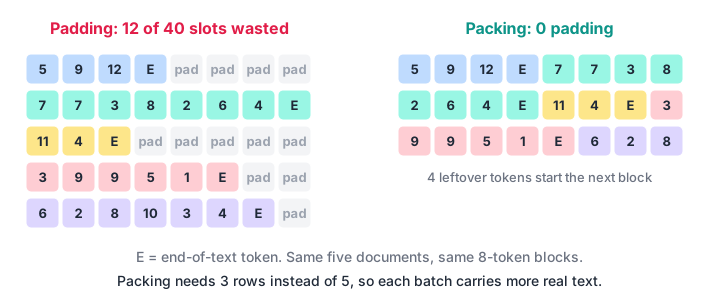
Packing keeps every position in every batch doing useful work.
import numpy as np

EOS = 0
docs = [[5, 9, 12], [7, 7, 3, 8, 2, 6, 4], [11, 4], [3, 9, 9, 5, 1], [6, 2, 8, 10, 3, 4]]
block = 8

padded_slots = len(docs) * block
real = sum(len(d) + 1 for d in docs)          # +1 for EOS
print(f"padding: {len(docs)} rows, {padded_slots - real} of {padded_slots} slots wasted")

stream = np.array([t for d in docs for t in d + [EOS]], dtype=np.uint16)
n_blocks = (len(stream) - 1) // block
for i in range(n_blocks):
    x = stream[i * block: i * block + block]
    y = stream[i * block + 1: i * block + block + 1]   # targets = inputs shifted by one
    print(f"block {i}: x={x.tolist()}  y={y.tolist()}")
print(f"packing: {n_blocks} rows, {len(stream) - n_blocks * block} leftover tokens, 0 padding")
Notice that the targets y are the inputs shifted one position left. That shift is the entire pretraining objective, and the pretraining tutorial builds the loss on it.
A block can contain the end of one document and the start of the next. That is normal and harmless, because the model learns that the end-of-text token means "a new, unrelated text starts here".
Tokenize once and store uint16 files
Tokenizing on the fly in every epoch wastes CPU. Tokenize once and save the IDs to a flat binary file. With a vocabulary under 65,536, every ID fits in a uint16, which halves the file size compared with int32.
import json
import numpy as np
from transformers import AutoTokenizer

tok = AutoTokenizer.from_pretrained("tokenizer")
eos = tok.convert_tokens_to_ids("<|endoftext|>")

def write_bin(jsonl_path, out_path, batch=1000):
    ids, buf = [], []

    def flush():
        for doc in tok(buf, add_special_tokens=False)["input_ids"]:
            ids.extend(doc + [eos])
        buf.clear()

    with open(jsonl_path, encoding="utf-8") as f:
        for line in f:
            buf.append(json.loads(line)["text"])
            if len(buf) == batch:
                flush()
    if buf:
        flush()
    arr = np.array(ids, dtype=np.uint16)
    arr.tofile(out_path)
    print(out_path, f"{len(arr)/1e6:.1f}M tokens")

write_bin("data/clean/train.jsonl", "data/pretrain_train.bin")
write_bin("data/clean/val.jsonl", "data/pretrain_val.bin")
For corpora larger than your RAM, write in chunks with np.memmap or append to the file per batch. The training script then reads random windows with np.memmap("data/pretrain_train.bin", dtype=np.uint16, mode="r"), so the whole file never has to be in memory.
Quick check
Why store pretraining token IDs as uint16?
With a vocabulary of 6,400, every ID fits in 16 bits. You convert to int64 only when building each batch.
Quick check
What does packing do?
Packing fills every position with real tokens, so no compute is spent on padding.
How to format chat data for SFT
Fine-tuning data is a list of conversations. Each line of the file holds one conversation as a list of messages with a role and content, the same shape the OpenAI-style chat APIs use:
{"messages": [
  {"role": "system", "content": "You are a helpful assistant."},
  {"role": "user", "content": "Name one famous food street in Indore."},
  {"role": "assistant", "content": "Chappan Dukan is one of Indore's best known food streets."}
]}
The tokenizer's chat template turns that structure into one string with special tokens. You can render ChatML yourself to see exactly what the model will read:
import json

line = '{"messages": [{"role": "user", "content": "Name a food street in Indore."}, {"role": "assistant", "content": "Chappan Dukan."}]}'

def render_chatml(messages, add_generation_prompt=False):
    out = ""
    for m in messages:
        out += f"<|im_start|>{m['role']}\n{m['content']}<|im_end|>\n"
    if add_generation_prompt:
        out += "<|im_start|>assistant\n"
    return out

convo = json.loads(line)["messages"]
print(render_chatml(convo))
print("--- at inference time ---")
print(render_chatml(convo[:1], add_generation_prompt=True))
Training uses the full conversation. At inference you send everything up to <|im_start|>assistant and the model writes the rest. The SFT tutorial shows how to train only on the assistant's part. For writing good conversations in the first place, see creating an instruction dataset.
Common data preparation mistakes
- Validation text leaking into training. Split by whole document, and deduplicate across both splits so no validation passage also appears in training.
- Too many duplicates. A model that repeats the same sentence forever often saw that sentence thousands of times.
- Mismatched templates. SFT data rendered with one template and inference with another gives broken answers.
- Truncating long chats silently. If the assistant turn is cut off, the model never learns to emit
<|im_end|>. - Ignoring licences and personal data. Remove phone numbers, emails and anything you have no right to train on.
Working through pipelines like this with feedback is easier in a group; an offline GenAI course for non-IT graduates in Indore is one option if you prefer classroom learning.
Key takeaways
- Plan data from the model size: about 20 or more tokens per parameter, roughly 4 bytes of English text per token.
- Clean in order: normalise, length filter, quality filter, language filter, deduplicate, then split.
- Pack documents with an end-of-text separator into fixed blocks; targets are inputs shifted by one.
- Store token IDs as
uint16binary files and read them withnp.memmap. - Chat data is role-based messages rendered by the chat template; next, design the model architecture.
FAQ
How much data is needed to train a small LLM from scratch?
About 20 tokens per parameter is a sensible minimum, so roughly 0.5B tokens for a 27M model and 1.3B for the 64M model used in this series. That is about 2 GB and 5 GB of English text with a small vocabulary. More clean data keeps helping small models.
Should I pad or pack sequences for pretraining?
Pack them. Joining documents with an end-of-text token and cutting the stream into equal blocks uses every position. Padding is fine for SFT, where each conversation is one sample and you want clear boundaries, though packing with careful masking works there too.
What file format is best for LLM training data?
Use JSON Lines (.jsonl) for human-readable sources and conversations, and a flat binary file of uint16 token IDs for pretraining. The binary file loads instantly with np.memmap, while JSON Lines is easy to inspect, filter and version.
Can I train an LLM on Hindi text?
Yes, if the tokenizer was trained on enough Hindi and your pretraining mix contains a fair share of it. Hindi Wikipedia and public Indian-language corpora on the Hugging Face Hub are starting points. Measure tokens per sentence in Hindi to check the tokenizer isn't splitting it into bytes.
Can I learn Generative AI with mentors in Indore?
Debugshala offers a Generative AI course at its Old Palasia campus in Indore, taught in English and Hindi, and it accepts fresh graduates and learners from non-IT backgrounds. You can attend a free demo class first, and the practice quizzes on Debugshala Test help you check your understanding.
From the team behind this site
Go further with the Generative AI Course at Debugshala
These tutorials are written by Debugshala, a training and placement institute at Old Palasia, Indore. The classroom course adds live mentoring, real projects and interview preparation.
- Offline classes at Old Palasia, Indore
- Free demo class before you pay
- Non-IT, fresher and year-gap friendly
- Placement assistance
700+ students placed · 200+ hiring partners · 4.9★ Google rating
