

Train a BPE Tokenizer for Your LLM: Vocab Size and Chat Tokens
Train a byte-level BPE tokenizer for a small LLM: the merge loop in plain Python, choosing vocab size, chat special tokens and Hugging Face tokenizers code.
A tea seller near Sarafa writes orders in a notebook all evening. At first he writes every letter: "c-h-a-i". By the end of the week he has shorthand for the things people order most. "Chai" becomes one squiggle, "poha" another, and only rare orders like "chana jor garam" are still spelled out.
That is byte pair encoding. The notebook's letters are bytes, each squiggle is a merged token, and the list of squiggles he has invented is the vocabulary. Frequent strings get a short code; rare ones are spelled from smaller pieces, so nothing is ever impossible to write.
What is a BPE tokenizer?
A byte pair encoding (BPE) tokenizer is a subword tokenizer that learns its vocabulary from data by repeatedly merging the most frequent pair of adjacent symbols, so common words become single tokens and rare words split into known pieces.
This is stage 2 of the build-an-LLM roadmap. The tokenizer you train here fixes the vocabulary size of the model and the special tokens of its chat template, so you train it once and never change it. For the general idea of tokens and why models need them, see tokenization explained. This tutorial is about building one.
How does BPE training work?
The algorithm, from the 2016 paper by Sennrich and colleagues on subword units for translation, is short:
- Split every word in the training text into single symbols, and count how often each word appears.
- Count every pair of adjacent symbols, weighted by word frequency.
- Merge the most frequent pair into one new symbol and record the merge.
- Repeat steps 2 and 3 until the vocabulary reaches the size you chose.
To encode new text later, you apply the recorded merges in the same order.
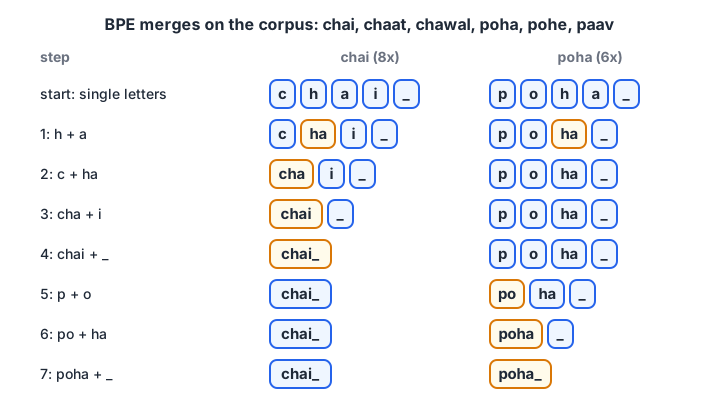
Each merge creates one new vocabulary entry. "ha" is merged first because it appears in chai, chaat, chawal and poha.
A BPE merge loop in plain Python
Here is the whole training loop on a tiny food-order corpus. The _ marks the end of a word, so the tokenizer can tell "cha" inside a word from "cha" at the end.
from collections import Counter

corpus = {"chai": 8, "chaat": 5, "chawal": 4, "poha": 6, "pohe": 2, "paav": 3}
words = {tuple(w) + ("_",): n for w, n in corpus.items()}

def merge_pair(symbols, pair):
    out, i = [], 0
    while i < len(symbols):
        if i + 1 < len(symbols) and (symbols[i], symbols[i + 1]) == pair:
            out.append(symbols[i] + symbols[i + 1]); i += 2
        else:
            out.append(symbols[i]); i += 1
    return tuple(out)

merges = []
for step in range(7):
    pairs = Counter()
    for sym, n in words.items():
        for a, b in zip(sym, sym[1:]):
            pairs[(a, b)] += n
    (a, b), count = pairs.most_common(1)[0]
    merges.append((a, b))
    words = {merge_pair(sym, (a, b)): n for sym, n in words.items()}
    print(f"merge {step+1}: {a!r} + {b!r} -> {a+b!r}  (count {count})")

def encode(word):
    sym = tuple(word) + ("_",)
    for pair in merges:            # apply merges in training order
        sym = merge_pair(sym, pair)
    return list(sym)

for w in ["chai", "poha", "chana"]:
    print(w, "->", encode(w))
"chai" and "poha" become one token each. "chana" was never seen, yet it still encodes as cha, n, a, _. That fallback is why subword tokenizers never fail on new words.
Quick check
In BPE training, which pair is merged at each step?
BPE greedily merges the most frequent adjacent pair, weighted by how often each word appears.
Why use byte-level BPE?
The toy above starts from letters. Real tokenizers start from the 256 possible bytes of UTF-8 text instead, which is called byte-level BPE. Every string in every language is a sequence of bytes, so the base vocabulary of 256 covers everything and the tokenizer never needs an "unknown" token.
The cost shows up with non-Latin scripts. Each Devanagari character takes 3 bytes in UTF-8, so Hindi text starts out three times longer than English until merges compress it.
for text in ["chai", "चाय", "Indore", "इंदौर"]:
    b = text.encode("utf-8")
    print(f"{text!r:10} chars={len(text):2d} bytes={len(b):2d} first bytes={list(b[:6])}")
If you want your model to handle Hindi well, put a fair share of Hindi text in the tokenizer's training data. Otherwise few Hindi merges are learned, and a Hindi sentence costs three or four times as many tokens as the same sentence in English. That wastes context length and training compute.
How big should the tokenizer vocabulary be?
Vocabulary size is a trade-off between sequence length and parameters. A bigger vocabulary packs more text into each token, so sequences get shorter. But every token needs a row in the embedding table, and in a small model that table can eat a large share of the parameter budget.
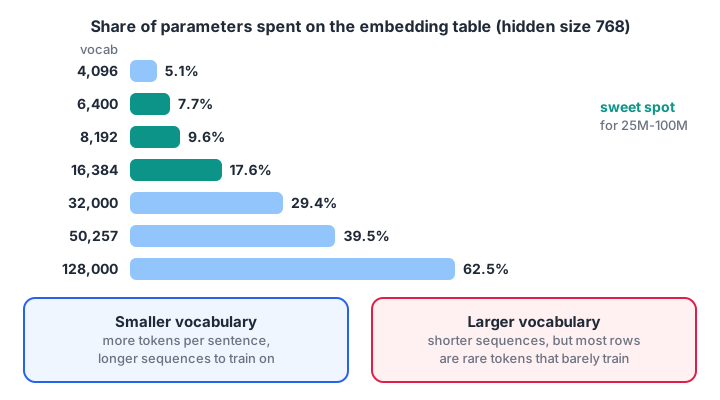
Large models can afford 100k+ vocabularies. A 64M model cannot.
Compute the embedding share for this series' running example (hidden size 768, about 59M non-embedding parameters, input and output embeddings tied):
hidden = 768
non_embedding = 59.0e6          # 8 transformer blocks of the running example
for vocab in [4096, 6400, 8192, 16384, 32000, 50257, 128000]:
    emb = vocab * hidden        # tied: one matrix serves input and output
    total = non_embedding + emb
    print(f"vocab {vocab:>7,}: embedding {emb/1e6:5.1f}M = {emb/total:5.1%} of {total/1e6:5.1f}M")
With a 128k vocabulary, over 60 percent of the model would be a lookup table, the total would jump from 64M to about 157M, and most rows would get too few training updates to learn anything.
For reference, GPT-2 used 50,257 tokens and recent large open models use 100k to 150k or more, but they have billions of parameters to spread over.
Now look at the other side of the trade-off. More merges mean fewer tokens per sentence:
from collections import Counter

text = ("the shop in indore sells chai and poha every morning . "
        "the shop near the station sells samosa and chai in the evening . ") * 20
test = "the station shop sells poha and chai"

def train(text, n_merges):
    words = Counter(tuple(w) + ("_",) for w in text.split())
    merges = []
    for _ in range(n_merges):
        pairs = Counter()
        for s, n in words.items():
            for p in zip(s, s[1:]):
                pairs[p] += n
        if not pairs: break
        best = pairs.most_common(1)[0][0]
        merges.append(best)
        new = Counter()
        for s, n in words.items():
            out, i = [], 0
            while i < len(s):
                if i + 1 < len(s) and (s[i], s[i + 1]) == best:
                    out.append(s[i] + s[i + 1]); i += 2
                else:
                    out.append(s[i]); i += 1
            new[tuple(out)] += n
        words = new
    return merges

def count_tokens(sentence, merges):
    total = 0
    for w in sentence.split():
        s = list(w) + ["_"]
        for a, b in merges:
            i = 0
            while i < len(s) - 1:
                if s[i] == a and s[i + 1] == b:
                    s[i:i + 2] = [a + b]
                else:
                    i += 1
        total += len(s)
    return total

for k in [0, 10, 25, 50]:
    n = count_tokens(test, train(text, k))
    print(f"{k:3d} merges -> {n:2d} tokens, {len(test)/n:.2f} chars per token")
The token counts include the _ end-of-word markers. Because the toy corpus repeats two sentences, 50 merges already turn whole words into single tokens; real text needs thousands of merges to reach that point for common words only.
A practical rule: 6,400 (this series' choice) or 8,192 for an English-first model, and 12,000 to 16,000 if you mix in a lot of Hindi. With a small byte-level vocabulary on English, expect very roughly 3.5 to 4.5 characters per token, depending on your data.
Quick check
Why is a 128,000-token vocabulary a poor choice for this series' 64M parameter model?
At hidden size 768, 128k rows need about 98M parameters, far more than the 59M in the transformer blocks.
Which special tokens does a chat LLM need?
Special tokens are vocabulary entries that are never produced by merges. The tokenizer treats them as atomic and never splits them. Your chat template, thinking blocks and tool calls all depend on them, so add them before training so they get the lowest, stable IDs.
<|endoftext|>separates documents in pretraining and doubles as padding.<|im_start|>starts a chat turn and is followed by the role:system,userorassistant.<|im_end|>ends a chat turn. The model learns to emit it, which is how it knows when to stop.<think>and</think>wrap optional reasoning text.<tool_call>and</tool_call>wrap a JSON tool call the model wants to make.<|reserved_0|>and onwards are spare slots, so you can add tokens later without resizing the model.
The <|im_start|>role ... <|im_end|> layout is called ChatML, a widely used chat format. The data preparation tutorial shows full conversations in it.
Train the tokenizer with Hugging Face tokenizers
The Rust-backed Hugging Face tokenizers library trains a 6,400-token vocabulary on a few hundred megabytes of text in minutes. The code below streams text from a JSON Lines file, trains byte-level BPE, and saves a transformers-compatible tokenizer with a ChatML chat template.
import json
from tokenizers import Tokenizer, models, trainers, pre_tokenizers, decoders
from transformers import PreTrainedTokenizerFast

SPECIALS = ["<|endoftext|>", "<|im_start|>", "<|im_end|>",
            "<think>", "</think>", "<tool_call>", "</tool_call>"]
SPECIALS += [f"<|reserved_{i}|>" for i in range(32 - len(SPECIALS))]

def texts(path, limit=2_000_000):
    with open(path, encoding="utf-8") as f:
        for i, line in enumerate(f):
            if i == limit:
                break
            yield json.loads(line)["text"]

tok = Tokenizer(models.BPE())
tok.pre_tokenizer = pre_tokenizers.ByteLevel(add_prefix_space=False)
tok.decoder = decoders.ByteLevel()
trainer = trainers.BpeTrainer(
    vocab_size=6400,
    min_frequency=2,
    special_tokens=SPECIALS,                       # IDs 0..31
    initial_alphabet=pre_tokenizers.ByteLevel.alphabet(),
)
tok.train_from_iterator(texts("data/clean/pretrain.jsonl"), trainer=trainer)

hf_tok = PreTrainedTokenizerFast(
    tokenizer_object=tok,
    bos_token="<|im_start|>", eos_token="<|im_end|>",
    pad_token="<|endoftext|>",
)
hf_tok.chat_template = (
    "{% for m in messages %}"
    "{{ '<|im_start|>' + m['role'] + '\n' + m['content'] + '<|im_end|>\n' }}"
    "{% endfor %}"
    "{% if add_generation_prompt %}{{ '<|im_start|>assistant\n' }}{% endif %}"
)
hf_tok.save_pretrained("tokenizer")
print(len(hf_tok), hf_tok.tokenize("Indore is famous for poha."))
save_pretrained writes tokenizer.json and tokenizer_config.json, plus the chat template (recent Transformers versions store it in a separate chat_template.jinja file). Every later script loads it with AutoTokenizer.from_pretrained("tokenizer").
How to check your tokenizer
- Round trip.
decode(encode(text)) == textmust hold for English, Hindi, numbers, code and emoji. - Special tokens.
<|im_end|>must encode to exactly one ID, not several pieces. - Compression. Measure characters per token on held-out text for each language you care about.
- Spot-check splits. Common words should be single tokens; leading spaces should attach to words, such as
Ġpohain byte-level notation.
Common tokenizer mistakes
- Training on too little text. A few megabytes gives merges that fit that text and nothing else. Use a few hundred megabytes that look like your pretraining data.
- Adding chat tokens after training the model. New rows start random and the model has never seen them. Reserve them up front.
- Retraining the tokenizer midway. Token IDs change, and every checkpoint becomes useless.
- Comparing loss across tokenizers. Per-token loss depends on what a token is. Compare bits per byte instead; the evaluation tutorial explains how.
- Huge vocabulary on a tiny model. See the table above.
Key takeaways
- BPE learns merges greedily from data; encoding replays those merges in order.
- Byte-level BPE starts from 256 bytes, so it never meets an unknown character.
- Vocabulary size trades shorter sequences against embedding parameters; about 6k to 8k suits a small English model.
- Reserve chat, thinking and tool-call special tokens before training, and freeze the tokenizer afterwards.
- Next, use this tokenizer to prepare pretraining and chat data.
FAQ
What vocabulary size should I use for a small LLM?
For a model under 100M parameters, use about 6,000 to 16,000 tokens. A 6,400-token vocabulary keeps the embedding table under 8 percent of a 64M model. Go higher only if you need several languages, such as English and Hindi, and check characters per token on held-out text before deciding.
Should I train my own tokenizer or reuse an existing one?
Reuse an existing tokenizer when you fine-tune an existing model, because the weights are tied to it. Train your own when you build from scratch and want a small vocabulary that fits your data and parameter budget. Training one takes minutes, so the cost is low.
How much text do I need to train a BPE tokenizer?
A few hundred megabytes of text that matches your pretraining mix is plenty for a 6k to 16k vocabulary. You don't need the full corpus; a representative sample of 1 to 2 million documents gives stable merges.
What is the difference between BPE, WordPiece and SentencePiece?
BPE merges the most frequent pair. WordPiece, used by BERT, merges the pair that most increases training-data likelihood. SentencePiece is a library that can train BPE or unigram models directly on raw text, including spaces. For a GPT-style decoder, byte-level BPE is the common choice.
Where can I practise tokenizer and LLM concepts in Indore?
Debugshala runs Generative AI classes at its Old Palasia campus in Indore, in English and Hindi, and you can attend a free demo class before deciding. To test yourself after this tutorial, practise MCQs on Debugshala Test, or join a free demo class of Debugshala's GenAI programme.
From the team behind this site
Go further with the Generative AI Course at Debugshala
These tutorials are written by Debugshala, a training and placement institute at Old Palasia, Indore. The classroom course adds live mentoring, real projects and interview preparation.
- Offline classes at Old Palasia, Indore
- Free demo class before you pay
- Non-IT, fresher and year-gap friendly
- Placement assistance
700+ students placed · 200+ hiring partners · 4.9★ Google rating
