

Gradio and Hugging Face Spaces: Build a Streaming LLM Demo
Build an LLM chat demo with Gradio 6 and deploy it on Hugging Face Spaces: streaming replies, chat history, secrets, ZeroGPU and calling it from Python.
On a winter evening at Chappan Dukan, one sweet shop puts a small tray of fresh gajar halwa on the counter with tiny spoons. People who would never read a menu stop, taste and buy. The tray needs very little: a spot on the counter, someone refilling it, and a small card saying what it is.
A model on your laptop is a recipe nobody can taste. A recruiter or a client will not clone your repository and install PyTorch. They will click a link and type a question.
That tasting tray is a Gradio app on Hugging Face Spaces.
What are Gradio and Hugging Face Spaces?
Gradio is an open-source Python library for building web interfaces around machine learning functions, and Hugging Face Spaces is a hosting service that runs Gradio (or Docker or static) apps from a Git repository and gives each one a public URL.
Mapping the counter: the halwa is your model, the tray and spoons are the Gradio interface, the spot on the counter is the Space's hardware, the small card is the README with its YAML header, and refilling the tray is the queue that serves visitors one batch at a time.
The Hugging Face tutorial built a one-function gr.Interface Space. This guide builds what a real LLM demo needs, for example to show off a model you trained with SFT, DPO or GRPO: a streaming chat, a system prompt control, GPU options, secrets, and calling your Space from code.
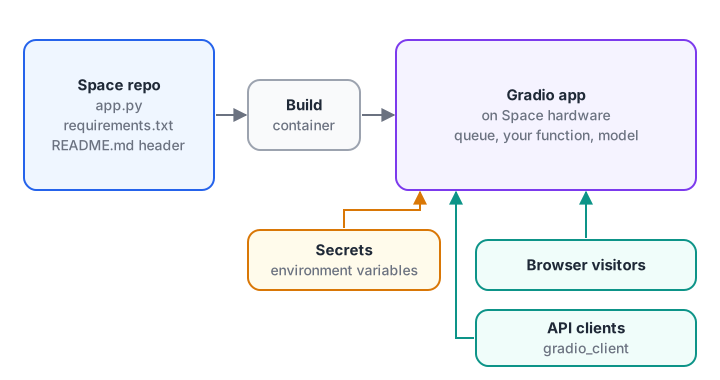
Push files, the Space builds a container, and Gradio serves both the web page and an API from the same function.
How streaming chat works in Gradio
An LLM writes one token at a time. If your function waits for the full reply, visitors stare at a spinner for ten seconds and assume the demo is broken. Gradio solves this with generators: if your function uses yield instead of return, Gradio sends each yielded value to the browser, replacing the previous one.
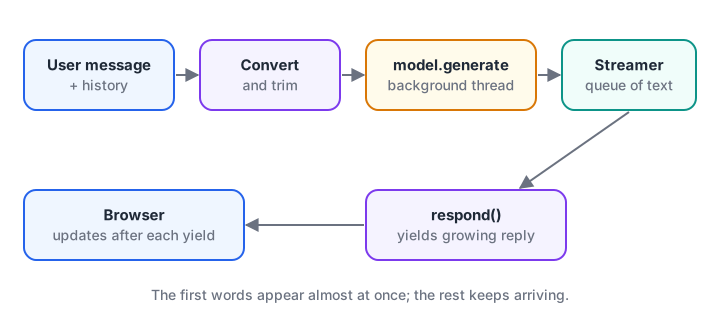
Generation runs in a background thread; the main function reads from the streamer and yields the growing reply.
You can see the idea without any model. This fake respond function yields the reply so far after every word:
import time

def fake_model_tokens(prompt):
    reply = "Weekend batches run on Saturday and Sunday. Call the office to confirm seats."
    for word in reply.split():
        time.sleep(0.05)              # pretend each token takes time to generate
        yield word + " "

def respond(message, history):
    partial = ""
    for piece in fake_model_tokens(message):
        partial += piece
        yield partial                 # Gradio replaces the shown reply with this value

start = time.time()
for i, shown in enumerate(respond("Weekend batch?", [])):
    if i in (0, 4, 12):
        print(f"{time.time() - start:4.2f}s  {shown!r}")
The visitor sees the first word after 0.05 seconds instead of waiting for all 13 words. Real models feel the same way: perceived speed comes from the first token, not the last.
Quick check
How does a Gradio function stream an LLM reply to the browser?
When a function yields, Gradio sends each yielded value to the interface, replacing the previous one.
Converting Gradio chat history into model messages
gr.ChatInterface calls your function with two arguments: the new message and the history so far. In Gradio 6, history is a list of dictionaries with role and content, and content is a list of parts such as {"type": "text", "text": "..."}. Chat models want plain strings, and long histories must be trimmed to fit the context window:
def to_model_messages(message, history, system_prompt, max_turns=4):
    def text_of(content):
        if isinstance(content, str):
            return content
        return " ".join(p.get("text", "") for p in content if p.get("type") == "text")

    turns = [{"role": h["role"], "content": text_of(h["content"])}
             for h in history if h["role"] in ("user", "assistant")]
    turns = turns[-2 * max_turns:]                     # keep the last few exchanges only
    return ([{"role": "system", "content": system_prompt}] + turns +
            [{"role": "user", "content": message}])

history = [
    {"role": "user", "content": [{"type": "text", "text": "Hi, which courses do you run?"}]},
    {"role": "assistant", "content": [{"type": "text", "text": "Data Science, Analytics and GenAI."}]},
    {"role": "user", "content": [{"type": "file", "file": {"path": "brochure.pdf"}},
                                 {"type": "text", "text": "Is this brochure current?"}]},
    {"role": "assistant", "content": "Please check with the office for the latest one."},
]
for m in to_model_messages("Weekend batch hai?", history, "Reply in under 50 words.", max_turns=1):
    print(f"{m['role']:>9}: {m['content']}")
The file part is skipped because this text model cannot read it, and max_turns=1 keeps only the last exchange. Trimming history is a small piece of context engineering; without it, a long chat eventually overflows the model's window.
Build the app.py for an LLM chat demo
Here is a complete app.py that streams replies from a small open chat model with transformers. It runs on a CPU Space, slowly, and comfortably on a GPU. To demo your own model, swap MODEL_ID for your fine-tuned repository from the LoRA fine-tuning guide:
from threading import Thread

import gradio as gr
from transformers import AutoModelForCausalLM, AutoTokenizer, TextIteratorStreamer

MODEL_ID = "HuggingFaceTB/SmolLM2-360M-Instruct"
SYSTEM = "You are a helpful admissions assistant. Be brief."
tokenizer = AutoTokenizer.from_pretrained(MODEL_ID)
model = AutoModelForCausalLM.from_pretrained(MODEL_ID, dtype="auto", device_map="auto")

def text_of(content):
    if isinstance(content, str):
        return content
    return " ".join(p.get("text", "") for p in content if p.get("type") == "text")

def respond(message, history, system_prompt, max_new_tokens):
    messages = [{"role": "system", "content": system_prompt}]
    messages += [{"role": h["role"], "content": text_of(h["content"])} for h in history[-8:]]
    messages.append({"role": "user", "content": message})

    inputs = tokenizer.apply_chat_template(messages, add_generation_prompt=True,
                                           return_dict=True, return_tensors="pt").to(model.device)
    streamer = TextIteratorStreamer(tokenizer, skip_prompt=True, skip_special_tokens=True)
    Thread(target=model.generate,
           kwargs=dict(**inputs, streamer=streamer, max_new_tokens=int(max_new_tokens))).start()

    partial = ""
    for piece in streamer:
        partial += piece
        yield partial

demo = gr.ChatInterface(
    fn=respond,
    additional_inputs=[
        gr.Textbox(SYSTEM, label="System prompt"),
        gr.Slider(32, 512, value=200, step=16, label="Max new tokens"),
    ],
    examples=[["Is there a weekend batch?", SYSTEM, 200],     # message + one value per extra input
              ["Explain RAG in two lines.", SYSTEM, 120]],
    title="Admissions assistant demo",
)
demo.queue(default_concurrency_limit=2).launch()
Run it locally first with python app.py, then open http://localhost:7860. The additional_inputs appear in a collapsible panel below the chat, which lets visitors change the system prompt and see how the model reacts.
queue(default_concurrency_limit=2) lets two generations run at once (the default is one), so a small machine is not swamped. The generation settings themselves are explained in LLM generation parameters.
When to use Blocks instead of ChatInterface
ChatInterface is the fastest way to a chat demo. For anything else, such as a side-by-side comparison of a base model and your fine-tuned version, use gr.Blocks, which lets you place components in rows and columns and wire events yourself:
import gradio as gr

def compare(question):
    return f"base model says: ...", f"fine-tuned model says: ..."   # call both models here

with gr.Blocks() as demo:
    question = gr.Textbox(label="Question")
    with gr.Row():
        base_out = gr.Textbox(label="Base model")
        tuned_out = gr.Textbox(label="Fine-tuned model")
    gr.Button("Compare").click(compare, inputs=question, outputs=[base_out, tuned_out])

demo.launch()
In Gradio 6, app-wide options such as theme and css are passed to launch() rather than to gr.Blocks().
Deploy the demo to Hugging Face Spaces
Follow these steps:
- On the Hub, create a new Space, choose the Gradio SDK and the free CPU hardware to start.
- Add
app.py, arequirements.txtand theREADME.mdheader shown below. - Add any tokens under Settings, Variables and secrets. They appear in your code as environment variables, read with
os.environ["HF_TOKEN"]. - Push with Git or upload in the browser. The Space builds and shows logs; fix any import errors they reveal.
- Open the Space, test the examples, then share the link.
The README.md header configures the Space:
---
title: Admissions Assistant Demo
sdk: gradio
sdk_version: 6.31.0
app_file: app.py
python_version: "3.12"
short_description: Streaming chat demo of a fine-tuned small LLM
---transformers
torch
acceleraterequirements.txt does not need gradio; the sdk_version line installs it. Free CPU Spaces sleep after a period without visitors and take a little while to wake, so warn people in the description.
Free GPUs with ZeroGPU
For larger models, ZeroGPU Spaces borrow a GPU only while a decorated function runs. Select ZeroGPU in the Space settings, load the model onto cuda at the top of app.py, and decorate the function that generates:
import spaces

@spaces.GPU(duration=60)          # seconds of GPU time this call may use
def generate_reply(prompt):
    ...                           # model.generate(...) as before
ZeroGPU works only with the Gradio SDK, and visitors share daily GPU quotas, so keep calls short. Check the ZeroGPU documentation for the current hosting limits on free and PRO accounts.
Quick check
Where should a Hugging Face access token used by your Space be stored?
Space files are visible in public Spaces; secrets are injected at runtime without being exposed.
Call your Space from Python
Every Gradio app also exposes an API. The gradio_client package lets scripts, tests or other apps call it:
from gradio_client import Client

client = Client("your-username/admissions-assistant-demo")
client.view_api()                                   # prints endpoint names and parameters
reply = client.predict("Is there a weekend batch?", "Be brief.", 150, api_name="/respond")
print(reply)
In Gradio 6, endpoints are named after your function, so respond becomes /respond. Always check view_api() output rather than guessing.
Before you push, a short pre-flight check catches the mistakes that most often break a first Space:
import re

repo = {
    "README.md": "---\ntitle: Admissions Demo\nsdk: gradio\nsdk_version: 6.31.0\napp_file: app.py\n---\n",
    "requirements.txt": "transformers\ntorch\ngradio==4.44.0\n",
    "app.py": 'import gradio as gr\nTOKEN = "hf_AbCdEfGhIjKlMnOpQrStUvWxYz123456"\n',
}

def preflight(files):
    problems = []
    header = re.search(r"^---\n(.*?)\n---", files.get("README.md", ""), re.S)
    meta = dict(line.split(": ", 1) for line in header.group(1).splitlines()) if header else {}
    for key in ("sdk", "sdk_version", "app_file"):
        if key not in meta:
            problems.append(f"README header is missing '{key}'")
    if meta.get("app_file") and meta["app_file"] not in files:
        problems.append(f"app_file {meta['app_file']} not found")
    if re.search(r"^gradio", files.get("requirements.txt", ""), re.M):
        problems.append("requirements.txt pins gradio; sdk_version already installs it")
    for name, text in files.items():
        if re.search(r"hf_[A-Za-z0-9]{30,}", text):
            problems.append(f"{name} contains what looks like an access token; use a Space secret")
    return problems or ["ready to push"]

for p in preflight(repo):
    print("-", p)
Common mistakes with Gradio Spaces
- Tokens in code. A public Space shows its files to everyone. Use secrets.
- No streaming. Long silent waits make demos look broken.
- Unbounded history. Trim it, or long chats will overflow the context window.
- Model loaded inside the function. Load once at the top of
app.py, not on every request. - Ignoring the licence. Check the model card before putting a model behind a public link.
- Using Gradio 5 examples on Gradio 6. Tuple-style history and
type="tuples"no longer work.
Key takeaways
- Gradio turns Python functions into web apps; Spaces hosts them from a Git repository.
- Use
gr.ChatInterfacewith a generator for streaming chat, andgr.Blocksfor custom layouts. - Convert Gradio 6 history parts into plain messages and trim old turns.
- Configure the Space in the README header, keep secrets out of code and test locally first.
- ZeroGPU lends a GPU per call, and
gradio_clientlets code call your demo.
FAQ
Is Hugging Face Spaces free?
Yes, for the basic CPU hardware, which is enough for small models and demos. Upgraded CPUs and dedicated GPUs are paid by the hour, and ZeroGPU offers shared GPU time with daily quotas. Free Spaces sleep when idle, so the first visitor after a quiet period waits for a restart.
What is the difference between Gradio Interface, Blocks and ChatInterface?
gr.Interface wraps one function with inputs and outputs, ideal for simple demos. gr.ChatInterface is a ready-made chat UI around a function that takes a message and history. gr.Blocks is the low-level layout tool for custom arrangements, multiple steps or side-by-side comparisons.
Can I deploy Gradio somewhere other than Hugging Face?
Yes. A Gradio app is a Python web server, so it runs on any machine or cloud that can run Python, inside Docker or behind a reverse proxy. Spaces is simply the quickest free option. Deploying ML models as APIs covers production-style hosting.
How do I make my Gradio demo faster?
Load the model once at startup, stream the output, keep max_new_tokens modest and limit concurrent generations with the queue. A quantised or smaller model, or GPU hardware such as ZeroGPU, helps most. Running LLMs locally explains the size and speed trade-offs.
Will a Gradio demo help me get a GenAI job, and can I learn this in Indore?
A working demo link is one of the strongest items in a portfolio, because reviewers can try your model in seconds; see Generative AI projects for your portfolio for ideas. Debugshala runs a project-focused GenAI course in Indore at Old Palasia with placement assistance and a free demo class, and you can solve Python coding rounds on Debugshala Test.
From the team behind this site
Go further with the Generative AI Course at Debugshala
These tutorials are written by Debugshala, a training and placement institute at Old Palasia, Indore. The classroom course adds live mentoring, real projects and interview preparation.
- Offline classes at Old Palasia, Indore
- Free demo class before you pay
- Non-IT, fresher and year-gap friendly
- Placement assistance
700+ students placed · 200+ hiring partners · 4.9★ Google rating
