

Fine-Tuning LLMs with LoRA: When, Why and How It Works
When to fine-tune an LLM instead of prompting or RAG, how LoRA and QLoRA work, how to prepare instruction data, and a transformers plus peft example.
Imagine a chartered accountant's office in Indore hires a sharp commerce graduate. On day one, you can hand them a sticky note before each task: "Reply to clients formally, quote the GST section." That works, but you must write the note every single time.
Next, you give them the office file cabinet so they can look up each client's history before answering. Now their answers contain the right facts, even though they did not memorise anything.
Finally, after a month of supervised practice on real cases, the habits stick. They draft replies in the firm's format without being told. Nobody re-taught them commerce from scratch; they kept everything they knew and added a thin layer of firm-specific habit on top.
What is fine-tuning an LLM?
Mapping the analogy: the sticky note is prompting, the file cabinet is retrieval (RAG), and the month of supervised practice is fine-tuning. The graduate's existing knowledge is the pretrained model, and the thin layer of new habit is a LoRA adapter.
Fine-tuning is the process of continuing to train a pretrained language model on a smaller, task-specific set of examples, so that it changes its default behaviour, such as output format, tone or a specialised skill, without needing those instructions in every prompt.
The key word is behaviour. Fine-tuning is excellent at "always answer in this JSON shape" or "classify tickets into our 12 categories". It is weak at "know our latest fee list", because facts baked into weights go stale and the model may still blend them with hallucinations.
Quick check
Your bot gives wrong answers about this month's batch timings. What should you try first?
Changing facts belong in retrieval; fine-tuning bakes in information that goes stale.
Fine-tuning vs prompting vs RAG
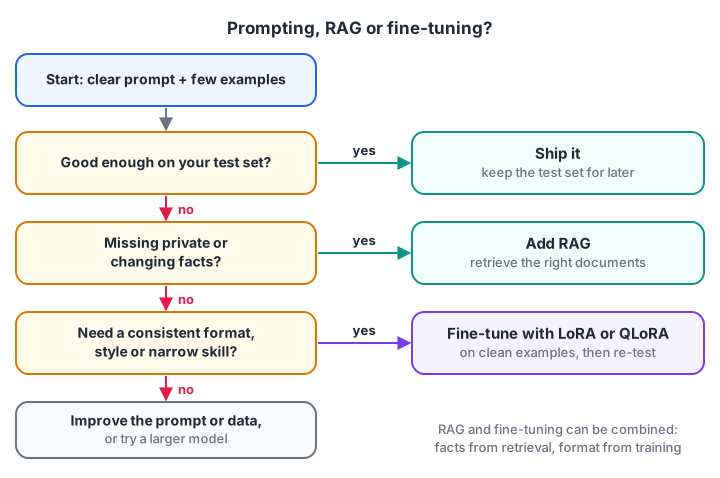
Move right only when the cheaper option has clearly failed on your test set.
| Approach | Changes | Best for | Cost to update |
|---|---|---|---|
| Prompt engineering | The input | Most tasks, quick iteration | Edit text, instant |
| RAG | The context | Private or changing facts, citations | Re-index documents |
| Fine-tuning | The weights | Consistent format, style, narrow skills, smaller and cheaper models | Retrain and re-evaluate |
A common winning pattern is a small fine-tuned model that has learned the format, combined with RAG that supplies fresh facts. Fine-tuning also pays off when you want a small open model to match a much larger one on one narrow job, which cuts cost and latency.
Full fine-tuning vs parameter-efficient fine-tuning
Full fine-tuning updates every weight. That is expensive because training stores much more than the weights: gradients and optimiser state as well. With the popular Adam optimiser and mixed precision, a common estimate is about 16 bytes per parameter, so a 7B model needs over 100 GB of GPU memory before counting activations.
Parameter-efficient fine-tuning (PEFT) freezes the original weights and trains a small number of new ones. Memory drops sharply, training fits on one GPU, and the result is a small file, often a few megabytes to a few hundred, that you load on top of the unchanged base model. You can keep several adapters, one per task, and swap them.
LoRA is the most widely used PEFT method.
How LoRA works: low-rank adapters
Inside a transformer, most weights live in large matrices, for example a 4096 x 4096 projection in each attention layer. Full fine-tuning learns an update matrix ΔW of the same size, almost 16.8 million numbers for that one layer.
LoRA's insight is that the useful update usually has low rank: it can be approximated by multiplying two thin matrices. Instead of learning ΔW directly, LoRA learns B (4096 x r) and A (r x 4096), where the rank r is small, such as 8 or 16. The layer then computes:
output = W·x + (alpha / r) · B·A·x
W stays frozen. B starts at zero, so at step one the model behaves exactly like the original. alpha is a scaling knob. After training you can merge the adapter, replacing W with W + (alpha / r)·B·A, so inference is no slower than the original model.
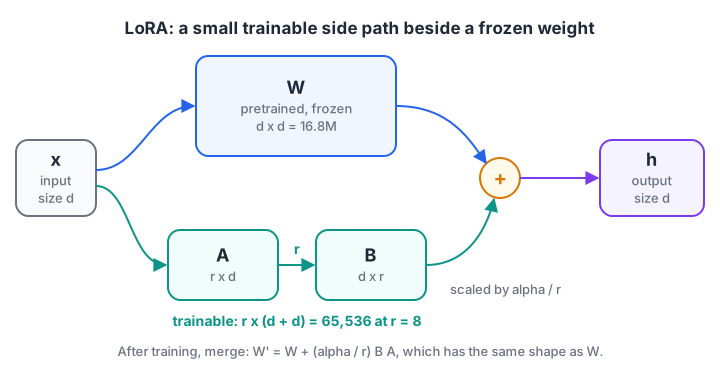
Only the two thin matrices A and B are trained. For d = 4096 and r = 8 they hold 65,536 numbers instead of 16.8 million.
Let's check the numbers and the shapes:
import numpy as np

d_out, d_in = 4096, 4096
full = d_out * d_in
for r in [4, 8, 16, 64]:
    lora = r * (d_in + d_out)
    print(f"r={r:<3} LoRA params {lora:>9,}  vs full {full:,}  -> {lora / full:.2%} of the layer")

rng = np.random.default_rng(0)
d, r, alpha = 512, 8, 16
W = rng.normal(0, 0.02, (d, d))              # frozen pretrained weight
A = rng.normal(0, 0.01, (r, d))              # trainable, small random start
B = np.zeros((d, r))                         # trainable, starts at zero
x = rng.normal(size=d)

print("\nB @ A shape:", (B @ A).shape, "| W shape:", W.shape)
print("Same output as base model at start:", np.allclose(W @ x + (alpha / r) * B @ (A @ x), W @ x))

B = rng.normal(0, 0.01, (d, r))              # pretend training changed B
merged = W + (alpha / r) * B @ A
print("Merged weight gives the same result:", np.allclose(merged @ x, W @ x + (alpha / r) * B @ (A @ x)))
print("Rank of the update:", np.linalg.matrix_rank(B @ A))
At r = 8, each adapted layer trains about 0.4 percent of its weights. Across a whole model, LoRA typically trains well under 1 percent of parameters. The adapter can only express a rank-8 change, which is a real limit, but for format and style adjustments it is usually enough.
QLoRA: LoRA on a 4-bit base model
QLoRA goes one step further. The frozen base model is loaded in 4-bit precision, using a 4-bit data type designed for normally distributed weights (NF4), while the small LoRA matrices train in 16-bit. Gradients flow through the quantised weights into the adapters.
Because the frozen weights take a quarter of their 16-bit memory, a 7B to 8B-class model can be fine-tuned on a single GPU with roughly 16 to 24 GB of memory, and sometimes less with short sequences. Training is somewhat slower because weights are de-quantised on the fly. The open-source LLMs guide explains the quantisation maths behind this.
Quick check
For a 4096 x 4096 layer with LoRA rank 8, how many parameters does the adapter train?
A and B together hold 8 x (4096 + 4096) = 65,536 parameters.
Quick check
Why does LoRA initialise B to zero?
With B = 0, BA = 0, so training begins from the base model's behaviour.
Preparing an instruction dataset
Your data matters more than any setting. Most instruction datasets store one example per line in a JSONL file. Each record has an instruction, optional input and the exact output you want:
{
  "instruction": "Classify this support ticket into one category: billing, login, course_content, other. Reply with JSON only.",
  "input": "I paid the fee yesterday but my dashboard still shows pending.",
  "output": "{\"category\": \"billing\", \"urgent\": true}"
}
Guidelines that save you weeks:
- Quality over quantity. A few hundred to a few thousand clean, consistent examples often beat 50,000 noisy ones.
- Make outputs exactly what you want to see, including format, length and tone. The model copies everything, including mistakes.
- Cover the edge cases: empty inputs, Hinglish messages, tickets that fit no category.
- Hold out a test set of 10 to 20 percent that the model never trains on, and check for duplicates between the splits.
- Remove personal data such as phone numbers, unless you have clear permission to use it.
A quick validator catches most problems before you spend GPU time:
import json

raw = """{"instruction": "Classify the ticket", "input": "Fee paid, dashboard shows pending", "output": "{\\"category\\": \\"billing\\"}"}
{"instruction": "Classify the ticket", "input": "Cannot log in after OTP", "output": "{\\"category\\": \\"login\\"}"}
{"instruction": "Classify the ticket", "input": "Cannot log in after OTP", "output": "{\\"category\\": \\"login\\"}"}
{"instruction": "Classify the ticket", "input": "Where is module 4 video?", "output": "category: course_content"}
{"instruction": "Classify the ticket", "input": "", "output": "{\\"category\\": \\"other\\"}"}"""

seen, problems = set(), []
for n, line in enumerate(raw.splitlines(), start=1):
    rec = json.loads(line)
    key = (rec["instruction"], rec["input"])
    if key in seen:
        problems.append((n, "duplicate example"))
    seen.add(key)
    if not rec["input"].strip():
        problems.append((n, "empty input"))
    try:
        json.loads(rec["output"])
    except json.JSONDecodeError:
        problems.append((n, "output is not valid JSON"))

print(f"{len(seen)} unique examples, {len(problems)} problems")
for line_no, issue in problems:
    print(f"  line {line_no}: {issue}")
Line 3 repeats line 2, line 4 would teach the model to break your own JSON format, and line 5 is empty, so decide whether it is a real edge case worth keeping. If you are new to loops and dictionaries, the Python for loop tutorial covers what this script uses.
Fine-tuning with LoRA in Python: transformers and peft
Here is a complete, minimal LoRA run with the Hugging Face transformers, datasets and peft libraries. It needs a GPU and network access, so run it in a cloud notebook or on a GPU machine:
from datasets import load_dataset
from peft import LoraConfig, get_peft_model
from transformers import (AutoModelForCausalLM, AutoTokenizer, DataCollatorForLanguageModeling,
                          Trainer, TrainingArguments)

model_id = "HuggingFaceTB/SmolLM2-360M-Instruct"   # a small chat model with a permissive licence
tokenizer = AutoTokenizer.from_pretrained(model_id)
if tokenizer.pad_token is None:
    tokenizer.pad_token = tokenizer.eos_token
model = AutoModelForCausalLM.from_pretrained(model_id, dtype="auto", device_map="auto")

lora_config = LoraConfig(r=16, lora_alpha=32, lora_dropout=0.05,
                         target_modules="all-linear", task_type="CAUSAL_LM")
model = get_peft_model(model, lora_config)
model.print_trainable_parameters()    # about 2 to 3% trainable at r=16 for a model this small

data = load_dataset("json", data_files="tickets.jsonl", split="train")
data = data.train_test_split(test_size=0.1, seed=42)

def to_features(example):
    messages = [
        {"role": "user", "content": example["instruction"] + "\n\n" + example["input"]},
        {"role": "assistant", "content": example["output"]},
    ]
    text = tokenizer.apply_chat_template(messages, tokenize=False)
    return tokenizer(text, truncation=True, max_length=512)

tokenized = data.map(to_features, remove_columns=data["train"].column_names)
collator = DataCollatorForLanguageModeling(tokenizer=tokenizer, mlm=False)  # labels = input ids

args = TrainingArguments(output_dir="ticket-lora", num_train_epochs=3, learning_rate=2e-4,
                         per_device_train_batch_size=4, gradient_accumulation_steps=4,
                         logging_steps=10, eval_strategy="epoch", save_strategy="epoch")
trainer = Trainer(model=model, args=args, train_dataset=tokenized["train"],
                  eval_dataset=tokenized["test"], data_collator=collator, processing_class=tokenizer)
trainer.train()
model.save_pretrained("ticket-lora-adapter")    # saves only the small adapter files
This version computes loss on the whole conversation. Libraries built on top, such as TRL's SFTTrainer, can restrict the loss to the assistant's answer, which often helps with short outputs. For QLoRA, load the base model with a BitsAndBytesConfig(load_in_4bit=True, bnb_4bit_quant_type="nf4") as its quantization_config, then call peft.prepare_model_for_kbit_training(model) before get_peft_model.
To use the adapter later, load the base model and attach it, then optionally merge it for faster inference:
from peft import PeftModel
from transformers import AutoModelForCausalLM

base = AutoModelForCausalLM.from_pretrained("HuggingFaceTB/SmolLM2-360M-Instruct", dtype="auto")
model = PeftModel.from_pretrained(base, "ticket-lora-adapter")
merged = model.merge_and_unload()               # plain model with W + BA folded in
merged.save_pretrained("ticket-model-merged")
Use the same chat template at inference as in training, or the model will not recognise the pattern it learned.
Evaluating a fine-tuned model
Training loss going down only proves the model memorised its training data. Real evaluation compares three systems on the held-out test set: the base model with a good prompt, the base model with RAG if facts matter, and your fine-tuned model.
- Task metrics: accuracy or F1 for classification, exact match or valid-JSON rate for structured output.
- Human review: read 30 to 50 outputs side by side; numbers miss tone and subtle errors.
- Regression checks: ask a few general questions to make sure the model did not forget basic skills, a problem known as catastrophic forgetting.
- Cost and latency: a fine-tuned small model is often worth it mainly because it is cheaper and faster.
If the fine-tuned model does not clearly beat the prompted baseline, do not ship it.
Common fine-tuning mistakes
- Fine-tuning to add facts. Use RAG for knowledge that changes.
- No baseline. Without a prompted baseline, you cannot tell whether training helped.
- Too many epochs. Validation loss rising while training loss falls means overfitting; stop earlier or add data.
- Learning rate too high. Outputs become repetitive or garbled. LoRA commonly uses around 1e-4 to 2e-4, but test.
- Train and test leakage. Duplicates across the split make results look far better than reality.
- Ignoring the base licence. Your adapter is a derivative of the base model and follows its terms.
Key takeaways
- Prompt first, add RAG for facts, and fine-tune only for behaviour that still fails.
- Full fine-tuning updates every weight and needs huge memory; PEFT freezes them and trains a few new ones.
- LoRA learns a low-rank update BA beside each frozen matrix, training well under 1 percent of parameters, and can be merged after training.
- QLoRA trains LoRA adapters on a 4-bit base model, putting 7B-class fine-tuning on a single GPU.
- Clean, consistent data and an honest comparison with a prompted baseline matter more than any hyperparameter.
FAQ
How much data do I need to fine-tune an LLM with LoRA?
For a narrow format or classification task, a few hundred high-quality examples can show a clear improvement, and one to a few thousand is a common range. Broad behaviour changes need more. Start small, measure on a held-out set, and add data where the model fails.
Can I fine-tune an LLM without a GPU?
Training even a small model on a CPU is very slow, so in practice you need a GPU. Free and low-cost cloud notebooks are enough for QLoRA on small models while you learn. You can still run the dataset preparation and evaluation scripts on a laptop.
Is LoRA as good as full fine-tuning?
For most format, style and narrow-task adaptations, LoRA gets close to full fine-tuning at a tiny fraction of the cost. For large shifts, such as teaching a new language or a whole new domain, full fine-tuning or higher ranks can perform better. Test both on your own data if the difference matters.
Where can I learn LLM fine-tuning in Indore?
Debugshala offers a Generative AI course with offline classes at its Old Palasia campus, taught in English and Hindi. It accepts fresh graduates and non-IT students, offers placement assistance, and has a free demo class before you pay. You can explore Debugshala's GenAI classroom batches for current details, and practise Python MCQs on Debugshala Test before you start.
From the team behind this site
Go further with the Generative AI Course at Debugshala
These tutorials are written by Debugshala, a training and placement institute at Old Palasia, Indore. The classroom course adds live mentoring, real projects and interview preparation.
- Offline classes at Old Palasia, Indore
- Free demo class before you pay
- Non-IT, fresher and year-gap friendly
- Placement assistance
700+ students placed · 200+ hiring partners · 4.9★ Google rating
