

Hugging Face Tutorial: Hub, Transformers, Pipelines and Spaces
Learn Hugging Face step by step: the Hub, model cards and licences, tokenizers, pipeline(), AutoModel, datasets, hosted inference and Gradio Spaces.
Picture the reference section of a college library in Indore that seniors keep adding to. Every year, final-year students leave behind their project reports, their cleaned survey data and sometimes a working demo on a lab PC.
A good library does not just pile these up. Each report has a cover sheet: what it is about, who made it, what it was tested on, where it fails, and whether you are allowed to photocopy it. The demos sit on a lab bench where anyone can walk up and try them.
Now imagine that library holding millions of trained AI models instead of reports, open to anyone with an internet connection. That is Hugging Face.
What is Hugging Face?
Mapping the analogy: the project reports are pretrained models, the survey data are datasets, the lab bench demos are Spaces, and the cover sheet is the model card, including its licence. The library's catalogue and shelves are the Hugging Face Hub.
Hugging Face is a platform (the Hub) for hosting and sharing machine learning models, datasets and demo apps, together with open-source Python libraries, such as transformers and datasets, that let you download and run those models in a few lines of code.
Hugging Face does not train one single model that you call. It is closer to an app store plus a toolkit. Research labs, companies and individuals publish their models there, and you choose which one fits your task.
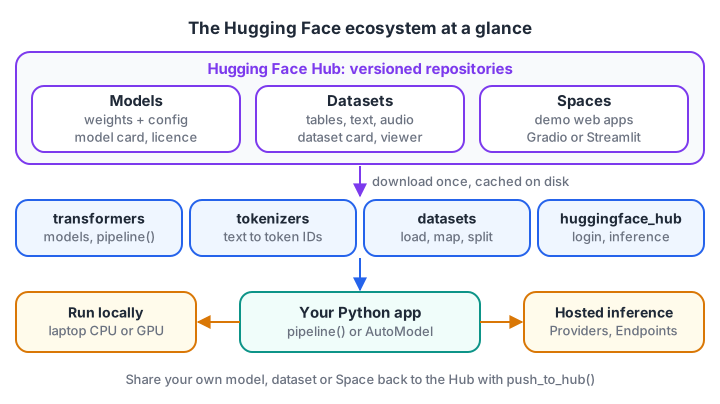
The Hub stores things, the libraries fetch and run them, and you decide where the model actually runs.
The Hugging Face Hub: models, datasets and Spaces
Every item on the Hub lives in a repository with an ID like owner/name, for example distilbert/distilbert-base-uncased. Under the hood these are Git repositories, so models have versions and a commit history.
- Models: trained weights plus their configuration and tokenizer files. You can filter by task (text generation, translation, image classification, speech recognition), language, library and licence.
- Datasets: text, tables, images or audio, with a dataset card describing how the data was collected. Many have a viewer, so you can read rows in the browser before downloading anything.
- Spaces: small web apps, usually built with Gradio or Streamlit, that let anyone try a model from a browser.
Model cards and licences
A model card is the README of a model repository. Read it before you use a model. A useful card tells you the intended use, the training data, the evaluation results, known limitations and biases, and the licence.
The licence is not a formality. Some models use permissive licences such as Apache 2.0 or MIT, which allow commercial use with attribution. Others use custom licences that restrict commercial use, require you to accept terms, or limit how many users your product may have. Some repositories are gated: you must log in and agree to the terms before downloading.
Card metadata is machine-readable, so you can check it in code. Here is the idea with a plain dictionary shaped like a model card's metadata:
model_cards = [
    {"id": "acme/support-classifier", "license": "apache-2.0", "pipeline_tag": "text-classification",
     "language": ["en", "hi"], "gated": False},
    {"id": "labx/chat-small", "license": "other", "pipeline_tag": "text-generation",
     "language": ["en"], "gated": True},
    {"id": "uni/hindi-ner", "license": "cc-by-nc-4.0", "pipeline_tag": "token-classification",
     "language": ["hi"], "gated": False},
]

COMMERCIAL_OK = {"apache-2.0", "mit", "bsd-3-clause"}

def review(card, need_commercial=True, need_lang="hi"):
    issues = []
    if need_commercial and card["license"] not in COMMERCIAL_OK:
        issues.append(f"licence '{card['license']}' needs a manual read")
    if need_lang not in card["language"]:
        issues.append(f"no '{need_lang}' support listed")
    if card["gated"]:
        issues.append("gated: accept terms on the Hub first")
    return issues or ["looks usable, still read the full card"]

for card in model_cards:
    print(card["id"], "->", "; ".join(review(card)))
A real project would also read the card text, because "other" can mean anything from very open to very strict.
Quick check
Where do you find a Hugging Face model's intended use, limitations and licence?
The model card is the repository README, and it documents use, data, evaluation, limits and licence.
Tokenizers: how text becomes numbers
Models cannot read text. A tokenizer splits text into tokens and maps each one to an integer ID from a fixed vocabulary. Most modern tokenizers use subwords: common words stay whole, while rare words break into familiar pieces.
That is how a model with a vocabulary of around 30,000 to 200,000 tokens can handle words it never saw, such as "Palasia" or a new product name.
The toy below uses greedy longest-match over a tiny vocabulary, which is similar in spirit to WordPiece, the method BERT-style tokenizers use (the ## marks a piece that continues a word):
vocab = ["[UNK]", "learn", "##ing", "token", "##izer", "##s", "in", "indore",
         "pal", "##asia", "un", "##believ", "##able", "the", "is"]
ids = {tok: i for i, tok in enumerate(vocab)}

def tokenize_word(word):
    pieces, start = [], 0
    while start < len(word):
        end, match = len(word), None
        while end > start:
            piece = word[start:end] if start == 0 else "##" + word[start:end]
            if piece in ids:
                match = piece
                break
            end -= 1
        if match is None:
            return ["[UNK]"]
        pieces.append(match)
        start = end
    return pieces

sentence = "learning tokenizers in palasia indore unbelievable"
tokens = [p for w in sentence.split() for p in tokenize_word(w)]
print(tokens)
print([ids[t] for t in tokens])
print(len(sentence.split()), "words ->", len(tokens), "tokens")
Six words became twelve tokens. Real tokenizers learn their vocabulary from a huge corpus, but the effect is the same, and it explains why LLM pricing and context limits are counted in tokens, not words. The LLM tutorial covers why that matters for generation.
Quick check
Why does a rare word like "unbelievable" often become several tokens?
Subword vocabularies keep common words whole and build rare ones from smaller pieces.
The transformers library and pipeline()
The transformers library is the main way to run Hub models in Python. Install it with PyTorch:
pip install -U transformers datasets accelerate torchThe quickest entry point is pipeline(). You name a task and, ideally, a model ID. The pipeline downloads the files once, caches them on disk, and handles tokenising, running the model and turning raw scores into readable output:
from transformers import pipeline

classifier = pipeline(
    task="text-classification",
    model="distilbert/distilbert-base-uncased-finetuned-sst-2-english",
)
print(classifier(["The mentor explained RAG really clearly.", "The lab Wi-Fi kept dropping."]))
# [{'label': 'POSITIVE', 'score': 0.99...}, {'label': 'NEGATIVE', 'score': 0.99...}]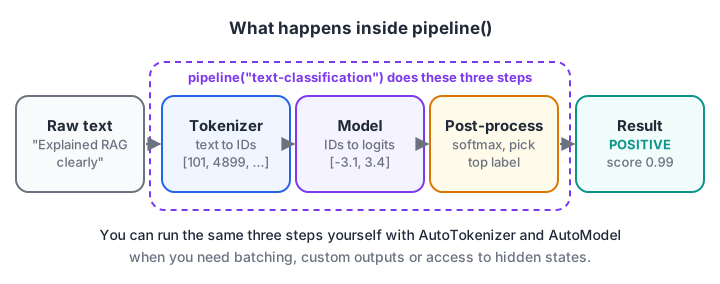
pipeline() bundles three steps you can also run yourself: tokenize, run the model, post-process.
Chat models work through the same function. You pass a list of messages with role and content, and the reply is the last message in the returned conversation:
from transformers import pipeline

chat = pipeline(task="text-generation", model="HuggingFaceTB/SmolLM2-360M-Instruct",
                dtype="auto", device_map="auto")
messages = [
    {"role": "system", "content": "You are a concise tutor."},
    {"role": "user", "content": "Explain overfitting in two sentences."},
]
result = chat(messages, max_new_tokens=80)
print(result[0]["generated_text"][-1]["content"])
dtype="auto" loads weights in the precision they were saved in instead of 32-bit floats, and device_map="auto" puts the model on a GPU if one is available. Always pin a model ID instead of relying on a task's default model, which can change between library versions.
AutoTokenizer and AutoModel for full control
When you need more control, load the pieces yourself. The Auto classes read the repository's config file and pick the right architecture for you:
from transformers import AutoModelForCausalLM, AutoTokenizer

model_id = "HuggingFaceTB/SmolLM2-360M-Instruct"
tokenizer = AutoTokenizer.from_pretrained(model_id)
model = AutoModelForCausalLM.from_pretrained(model_id, dtype="auto", device_map="auto")

print(tokenizer.tokenize("Tokenizers split unbelievable words"))

messages = [{"role": "user", "content": "Give one tip for learning Python."}]
prompt = tokenizer.apply_chat_template(messages, tokenize=False, add_generation_prompt=True)
inputs = tokenizer(prompt, return_tensors="pt").to(model.device)

output_ids = model.generate(**inputs, max_new_tokens=60)
new_tokens = output_ids[0][inputs["input_ids"].shape[1]:]
print(tokenizer.decode(new_tokens, skip_special_tokens=True))
apply_chat_template matters: each chat model was trained with its own special format for roles, and the template stored in the repository applies it correctly. Use AutoModelForCausalLM for text generation, AutoModelForSequenceClassification for labels, and plain AutoModel when you only want hidden states, for example to build embeddings.
Quick check
What does pipeline() do that a bare model does not?
pipeline() wraps the tokenizer, model and post-processing into one callable.
The datasets library
The datasets library loads Hub datasets, or your own CSV and JSON files, into a fast table format backed by Apache Arrow. Large datasets are memory-mapped from disk, so a 10 GB dataset does not need 10 GB of RAM:
from datasets import load_dataset

reviews = load_dataset("cornell-movie-review-data/rotten_tomatoes", split="train")
print(reviews)            # number of rows and column names
print(reviews[0])         # {'text': '...', 'label': 1}

short = reviews.filter(lambda row: len(row["text"]) < 200)
splits = short.train_test_split(test_size=0.2, seed=42)

local = load_dataset("csv", data_files="student_feedback.csv", split="train")
You will typically call .map() with batched=True to tokenize a whole dataset efficiently before training. The LoRA fine-tuning guide uses exactly this to prepare instruction data.
Inference options: local, hosted and Spaces
You have three broad ways to run a Hub model:
| Option | Where the model runs | Good for | Watch out for |
|---|---|---|---|
| Local with transformers | Your laptop, server or cloud notebook | Privacy, offline use, learning | RAM and GPU limits, slow on CPU for big models |
| Hosted inference (Inference Providers, Inference Endpoints) | Hugging Face or partner servers | Quick prototypes, no hardware | Usage costs, data leaves your machine |
| Spaces | A small hosted app container | Public demos and portfolios | Free hardware is limited and sleeps when idle |
Hosted inference uses the huggingface_hub client with your access token. Its chat interface follows the same shape as the OpenAI client, so code you write for one API is easy to move:
import os
from huggingface_hub import InferenceClient

MODEL_ID = "owner/chat-model-name"  # copy the ID of a chat model whose page lists an Inference Provider

client = InferenceClient(api_key=os.environ["HF_TOKEN"])
response = client.chat.completions.create(
    model=MODEL_ID,
    messages=[{"role": "user", "content": "Summarise what a model card is."}],
    max_tokens=100,
)
print(response.choices[0].message.content)
Keep tokens in environment variables, never in code you push to GitHub or to a public Space.
Build a Space with Gradio
A Space is the fastest way to turn a model into a link a recruiter can click. Create a Gradio Space on the Hub, then add two files. requirements.txt lists transformers and torch, and app.py holds the app:
import gradio as gr
from transformers import pipeline

classifier = pipeline("text-classification",
                      model="distilbert/distilbert-base-uncased-finetuned-sst-2-english")

def predict(text):
    result = classifier(text)[0]
    return f"{result['label']} ({result['score']:.2f})"

demo = gr.Interface(fn=predict, inputs="text", outputs="text",
                    title="Feedback sentiment checker")
demo.launch()
Push the files and the Space builds and starts automatically. Run python app.py first to test it locally at http://localhost:7860.
Common mistakes with Hugging Face
- Ignoring the licence. Check the card before you build a product on a model.
- Mismatched tokenizer and model. Always load both from the same model ID.
- Skipping the chat template. Hand-written prompts for chat models often produce strange output.
- Loading in full precision by accident. A 7-billion-parameter model needs about 28 GB in 32-bit floats;
dtype="auto"usually halves that. - Trusting unknown repositories blindly. Prefer the safetensors weight format, and be careful with any repository that asks you to set
trust_remote_code=True, because that runs the author's Python code on your machine.
Key takeaways
- The Hugging Face Hub hosts models, datasets and Spaces, each in a versioned repository.
- Model cards describe intended use, limits and licence; read them before building on a model.
- Tokenizers turn text into subword token IDs, which is why limits and costs are counted in tokens.
- Use pipeline() for quick results and AutoTokenizer plus AutoModel for control.
- The datasets library loads and processes data efficiently; Spaces with Gradio turn a model into a shareable demo.
FAQ
Is Hugging Face free to use?
Creating an account, browsing the Hub, downloading public models and datasets, and running them on your own machine are free. Hosted inference beyond the free monthly allowance, dedicated endpoints and upgraded Space hardware are paid. Licences of individual models still apply, even when the download is free.
Do I need a GPU to use Hugging Face transformers?
No. Small models for classification, embeddings and short text generation run on an ordinary laptop CPU, just more slowly. A GPU helps for larger models and for training. Free cloud notebooks and hosted inference are good options before you buy hardware.
What is the difference between Hugging Face and an LLM API?
An LLM API usually gives you one provider's models behind a paid endpoint. Hugging Face is a hub of many models from many authors, which you can download and run yourself or call through hosted services. The trade-off is more choice and control in exchange for more decisions about size, licence and hardware.
Can I learn Hugging Face and open-source LLMs in Indore?
Yes. Debugshala, a training and placement institute focused on Data, AI and Full Stack Development, offers Generative AI training at its Indore campus in Old Palasia, with teaching in English and Hindi and a free demo class before you pay. If your Python needs work before you start, sharpen your Python with quizzes on Debugshala Test.
From the team behind this site
Go further with the Generative AI Course at Debugshala
These tutorials are written by Debugshala, a training and placement institute at Old Palasia, Indore. The classroom course adds live mentoring, real projects and interview preparation.
- Offline classes at Old Palasia, Indore
- Free demo class before you pay
- Non-IT, fresher and year-gap friendly
- Placement assistance
700+ students placed · 200+ hiring partners · 4.9★ Google rating
