

What is RAG? Retrieval-Augmented Generation Explained Simply
What is RAG? Learn retrieval-augmented generation step by step: chunking, indexing, retrieval and prompt augmentation, with a runnable TF-IDF demo in Python.
Imagine you are writing the CA Foundation exam, but it is open book. You are a strong student with good general knowledge, yet nobody remembers every clause of every rule.
When a question comes, you do not flip through all 900 pages. You check the index, open the two or three pages that match, read them, and write your answer in your own words, quoting the section number.
That is exactly how retrieval-augmented generation works. The LLM is the capable student, your documents are the textbook, and RAG is the habit of looking things up before answering.
What is RAG?
Mapping the exam: the textbook is your knowledge base (policies, manuals, PDFs, tickets). The index at the back is the search index you build. Finding the right pages is retrieval. Keeping those pages open beside your answer sheet is augmenting the prompt. Writing the answer is generation by the LLM.
Retrieval-augmented generation (RAG) is a technique where a system retrieves passages relevant to a question from an external knowledge source and inserts them into the LLM's prompt, so the model answers from that supplied context instead of memory alone.
The idea was popularised by a 2020 research paper from Facebook AI Research, and it has become the default way to build chatbots over company documents.
Why LLMs need retrieval
An LLM only knows what was in its training data, frozen at a cutoff date. Ask it about your college's revised attendance rule or last week's price list and it can only guess. Worse, it may guess confidently.
RAG addresses four problems at once:
- Freshness: update a document and the next answer uses it; no retraining.
- Private data: your internal files were never in the training set.
- Grounding: the model is told to answer only from given passages, which reduces hallucination.
- Citations: you know which passages were used, so you can show sources.
Compared with fine-tuning (further training the model on your data), RAG is cheaper, faster to update and easier to audit. Fine-tuning is better for teaching style, format or a specialised skill; RAG is better for teaching facts. Many real systems use both.
The RAG architecture, step by step
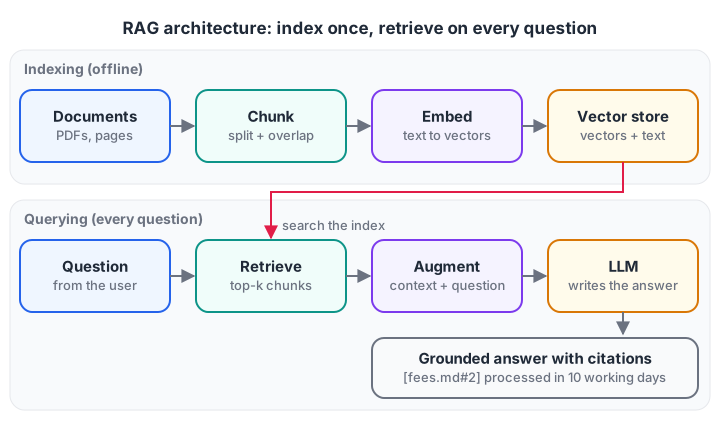
Indexing runs once (and whenever documents change). Retrieval, augmentation and generation run for every question.
Phase 1: indexing (offline)
- Load documents: PDFs, web pages, database rows, chat transcripts.
- Chunk them into passages of a manageable size.
- Embed each chunk into a vector with an embedding model (see Embeddings Explained), or build a keyword index, or both.
- Store vectors, text and metadata (file name, page, date) in a vector database or index.
Phase 2: querying (online)
- Retrieve: embed the question with the same model and fetch the top-k most similar chunks, often 3 to 8.
- Augment: build a prompt containing instructions, the retrieved chunks and the question.
- Generate: the LLM writes an answer grounded in those chunks, ideally citing them.
Quick check
In a RAG system, which step runs once when documents are added, not for every question?
Indexing is the offline phase; retrieval, augmentation and generation happen per query.
Chunking: the step that quietly decides quality
You cannot embed a 200-page manual as one vector; it would blur every topic together, and it would not fit in the prompt anyway. So you split documents into chunks, typically a few hundred tokens each.
Chunk size is a trade-off. Too small and a chunk loses context ("It must be submitted within 7 days" — what must?). Too large and retrieval returns passages full of irrelevant text. A common fix is overlap: each chunk repeats the last few words of the previous one so sentences are not cut in half.
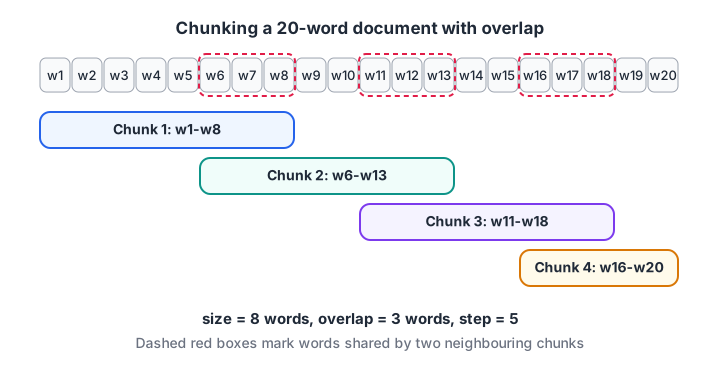
Overlapping chunks keep sentences that cross a boundary readable in at least one chunk.
Here is a word-based chunker with overlap:
def chunk_words(text, size=12, overlap=4):
    words = text.split()
    step = size - overlap
    chunks = []
    for start in range(0, len(words), step):
        chunks.append(" ".join(words[start:start + size]))
        if start + size >= len(words):
            break
    return chunks

policy = ("Students must keep 75 percent attendance in every subject. "
          "Medical leave needs a doctor's certificate submitted within 7 days. "
          "Students below the limit may appeal to the head of department once per semester.")

for i, c in enumerate(chunk_words(policy)):
    print(f"Chunk {i}: {c}")
Real systems often split on headings, paragraphs or sentences first and only fall back to fixed sizes, so each chunk is a coherent idea. Store the source and page number with every chunk; you will need them for citations.
Retrieval: finding the right chunks
Retrieval can be dense (embedding similarity, which matches meaning), sparse (keyword scoring such as TF-IDF or BM25, which matches exact terms), or hybrid (both, with scores combined).
TF-IDF gives each word a weight: high if it appears often in this chunk (term frequency) but rarely across all chunks (inverse document frequency). Words like "the" get almost no weight; words like "refund" or "hostel" get a lot. It needs no model download, which makes it perfect for a runnable toy. The scikit-learn TfidfVectorizer docs explain the details.
from sklearn.feature_extraction.text import TfidfVectorizer
from sklearn.metrics.pairwise import cosine_similarity

chunks = [
    "Hostel fees are paid every semester at the accounts office.",
    "Library books can be borrowed for 14 days and renewed once online.",
    "Fee refunds are processed within 10 working days after withdrawal.",
    "The canteen is open from 8 am to 6 pm on weekdays.",
    "Students who withdraw before classes start get a full fee refund.",
]
question = "How long does a fee refund take after I withdraw?"

vectorizer = TfidfVectorizer(stop_words="english")
chunk_vectors = vectorizer.fit_transform(chunks)        # index the chunks
query_vector = vectorizer.transform([question])          # same vocabulary

scores = cosine_similarity(query_vector, chunk_vectors)[0]
for i in scores.argsort()[::-1][:3]:
    print(f"{scores[i]:.3f}  {chunks[i]}")
The two refund chunks come out on top and the canteen chunk scores zero. But look closely: the chunk that actually says how long ranks second, because TF-IDF treats "refund" and "refunds", or "withdraw" and "withdrawal", as different words.
Embedding models handle this naturally; for keyword search, stemming helps. Swap TF-IDF for an embedding model and the code shape stays the same: vectorise chunks, vectorise the query, rank by cosine similarity.
Augmenting the prompt: from chunks to a grounded request
Retrieval alone does not answer anything. You now assemble a prompt that tells the model to use only the supplied context, to cite it, and what to do when the answer is missing. This full pipeline runs on its own and ends with the exact string you would send to an LLM:
from sklearn.feature_extraction.text import TfidfVectorizer
from sklearn.metrics.pairwise import cosine_similarity

docs = {
    "fees.md#2":    "Fee refunds are processed within 10 working days after withdrawal.",
    "fees.md#3":    "Students who withdraw before classes start get a full fee refund.",
    "library.md#1": "Library books can be borrowed for 14 days and renewed once online.",
    "canteen.md#1": "The canteen is open from 8 am to 6 pm on weekdays.",
}
question = "If I withdraw, how soon is my fee refunded?"

ids, texts = list(docs), list(docs.values())
vec = TfidfVectorizer(stop_words="english").fit(texts)
scores = cosine_similarity(vec.transform([question]), vec.transform(texts))[0]
top = [i for i in scores.argsort()[::-1][:2] if scores[i] > 0]

context = "\n".join(f"[{ids[i]}] {texts[i]}" for i in top)
prompt = f"""Answer the question using ONLY the context below.
Cite sources in square brackets. If the context does not contain the answer, say "I don't know."

Context:
{context}

Question: {question}
Answer:"""
print(prompt)
Three details in that prompt do a lot of work: the "ONLY the context" rule, the citation instruction, and the explicit "I don't know" escape hatch. The prompt engineering guide explains why each one matters.
Common RAG mistakes and how to fix them
- Blaming the LLM for retrieval failures. If the right chunk was never retrieved, no model can answer correctly. Always log and inspect what was retrieved.
- Bad chunking. Tables split mid-row and headings separated from their content ruin retrieval. Chunk along document structure.
- Too many chunks. Twenty loosely related passages dilute the answer and cost tokens. Retrieve fewer, better chunks, or add a reranker that rescores the top 20 and keeps the best 3 to 5.
- Pure vector search for exact terms. Roll numbers, product codes and section names often need keyword matching. Use hybrid search.
- No evaluation. Build a list of 30 to 50 real questions with known answers and measure whether the right chunk appears in the top-k, and whether answers are correct and cited.
- Stale indexes. When documents change, re-chunk and re-embed them, and delete the old vectors.
- Ignoring access control. If a user cannot open a file, its chunks should not appear in their answers. Filter by permissions at retrieval time.
Quick check
Your RAG bot gives a wrong answer. What should you check first?
Most RAG failures are retrieval failures; inspect the retrieved chunks before changing the model.
Key takeaways
- RAG = retrieve relevant chunks, add them to the prompt, then generate.
- It adds fresh and private knowledge without retraining the model.
- Chunking and retrieval quality decide most of the final answer quality.
- Hybrid search and reranking fix many real-world retrieval problems.
- Always include citations, an "I don't know" path, and a small evaluation set.
Want to go from toy to production? If you learn better with a mentor beside you, look at Debugshala's Generative AI training in Indore, and warm up with coding quizzes on Debugshala Test.
FAQ
Is RAG better than fine-tuning?
They solve different problems. RAG is better when the model needs facts that change or are private, because you just update documents. Fine-tuning is better for changing behaviour, tone or output format consistently. Many teams start with RAG and add fine-tuning only if needed.
Do I need a vector database for RAG?
Not for small projects. A few thousand chunks fit comfortably in memory, and a numpy array or a TF-IDF matrix is enough, as shown above. A vector database helps when you have millions of chunks, frequent updates, metadata filters or several applications sharing one index.
Does RAG stop hallucinations completely?
No. It reduces them by giving the model relevant facts and an instruction to stay within them, but the model can still misread a passage or blend in outside knowledge. Citations, an "I don't know" rule and regular evaluation on real questions keep errors visible and low.
Can I build a RAG project as a beginner in Indore?
Yes, if you know basic Python. Start with the TF-IDF example above, then swap in an embedding model and an LLM API. Debugshala's Old Palasia campus runs classroom Generative AI classes in English and Hindi, with a free demo class before you pay, if you prefer guided practice.
From the team behind this site
Go further with the Generative AI Course at Debugshala
These tutorials are written by Debugshala, a training and placement institute at Old Palasia, Indore. The classroom course adds live mentoring, real projects and interview preparation.
- Offline classes at Old Palasia, Indore
- Free demo class before you pay
- Non-IT, fresher and year-gap friendly
- Placement assistance
700+ students placed · 200+ hiring partners · 4.9★ Google rating
