

Vector Databases Explained: How RAG Stores and Finds Embeddings
What a vector database stores, how IVF and HNSW indexes speed up search, why metadata filters matter, and when numpy, Chroma or pgvector is enough for RAG.
The library at a college in Indore has 60,000 books. Ask for "something like this thermodynamics book" and the librarian does not walk past all 60,000 spines. She goes to the 536 shelf, scans two neighbouring racks and hands over the best five.
She might miss a great book shelved in the wrong rack. Nobody minds, because the answer takes two minutes instead of two days.
A vector database makes the same trade. It groups similar embeddings so a search only visits a few "racks", and it accepts a tiny chance of missing the perfect match in return for huge speed.
What is a vector database?
Mapping the library: each book is a chunk of text, its shelf position is its embedding, the numbering system is the index, and the catalogue card is the metadata.
A vector database is a database designed to store high-dimensional vectors together with their source text and metadata, and to answer "which stored vectors are closest to this one?" quickly using an approximate nearest neighbour index.
You met embeddings in Embeddings Explained and the pipeline in What is RAG?. This tutorial opens the box labelled "vector store": what is inside, how it searches, and when you need a real one.
Throughout this RAG series we use one toy knowledge base: the student handbook of the fictional Kshipra Institute of Technology (KIT), Indore, with pages on fees, refunds, attendance, hostel, library, exams, scholarships and placements.
What does a vector database store?
Each entry in a vector database is a record with four parts. Getting this structure right matters more than which product you pick.
| Part | Example from the KIT handbook | Why it is there |
|---|---|---|
| ID | fees.md#chunk-3 |
Lets you update or delete exactly one chunk |
| Vector | 384 or 1,024 numbers | What the similarity search runs on |
| Payload (text) | "Refunds are credited within 10 working days..." | What you paste into the LLM prompt |
| Metadata | {"doc": "fees", "updated": 2026, "audience": "all"} |
Filtering, citations and access control |
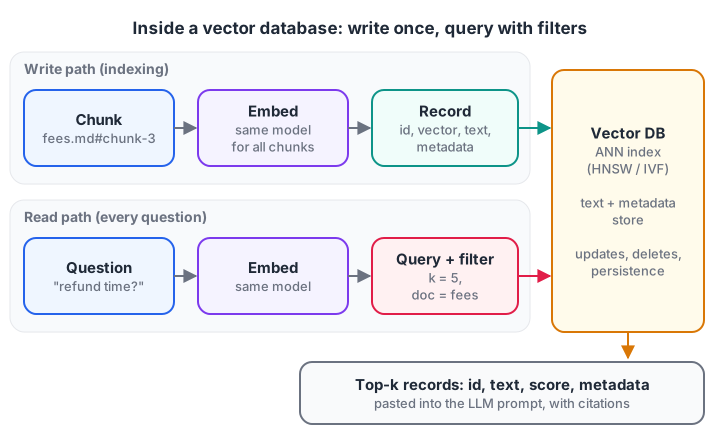
A vector database stores more than vectors. The text and metadata travel with each one, so results can be filtered, cited and pasted into a prompt.
On top of storage you get ordinary database features: updates and deletes without a rebuild, persistence, backups and concurrent users. A plain array gives you none of those.
Why not just compare every vector?
The simplest search is exact (also called brute-force or flat) search: compute the similarity between the query and every stored vector, then sort. It always finds the true best matches.
Here it is on 20,000 random normalised vectors of 384 dimensions, roughly the size of a small embedding model's output.
import time
import numpy as np

rng = np.random.default_rng(42)
n, d = 20_000, 384
db = rng.normal(size=(n, d)).astype("float32")
db /= np.linalg.norm(db, axis=1, keepdims=True)      # unit length, so dot = cosine

query = rng.normal(size=d).astype("float32")
query /= np.linalg.norm(query)

start = time.perf_counter()
scores = db @ query                                   # one dot product per stored vector
top5 = np.argpartition(-scores, 5)[:5]
top5 = top5[np.argsort(-scores[top5])]
elapsed_ms = (time.perf_counter() - start) * 1000

print("Multiplications done:", f"{n * d:,}")
print("Top-5 ids:", top5.tolist())
print(f"Search time: {elapsed_ms:.1f} ms")
On a laptop this takes about 2 milliseconds. But the work grows in a straight line with the data: at 50 million chunks, with 200 users asking at once, the server melts. That is the moment for an index. Until then, numpy is a valid vector store.
How do ANN indexes make vector search fast?
Approximate nearest neighbour (ANN) search returns vectors that are very likely, not guaranteed, to be the true nearest ones. Quality is measured by recall@k: the share of the true top-k the index returned. Two index families cover most of what you will meet.
IVF: cluster first, then search a few clusters
An inverted file (IVF) index runs k-means to group vectors into clusters, like library racks. A query finds the closest cluster centres and scans only the vectors inside those nprobe clusters.
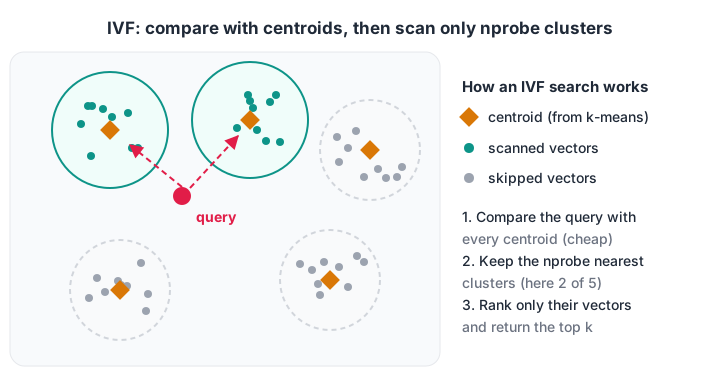
IVF compares the query with a few centroids, then only with the vectors in the closest clusters. Raising nprobe improves recall and costs time.
Here is a working IVF index built with scikit-learn's KMeans.
import numpy as np
from sklearn.cluster import KMeans

rng = np.random.default_rng(0)
centres = rng.normal(size=(40, 32))
db = np.vstack([c + 0.9 * rng.normal(size=(100, 32)) for c in centres])  # 4,000 vectors
db /= np.linalg.norm(db, axis=1, keepdims=True)

km = KMeans(n_clusters=40, n_init=1, max_iter=20, random_state=0).fit(db)
labels, cents = km.labels_, km.cluster_centers_

queries = db[rng.choice(len(db), 50, replace=False)] + 0.3 * rng.normal(size=(50, 32))
k = 10
for nprobe in [1, 2, 4, 8]:
    recalls, scanned = [], []
    for q in queries:
        true_top = set(np.argsort(-(db @ q))[:k])
        probe = np.argsort(-(cents @ q))[:nprobe]          # nearest clusters
        cand = np.where(np.isin(labels, probe))[0]         # vectors inside them
        found = set(cand[np.argsort(-(db[cand] @ q))[:k]])
        recalls.append(len(true_top & found) / k)
        scanned.append(len(cand) / len(db))
    print(f"nprobe={nprobe}: recall@10={np.mean(recalls):.2f}, "
          f"scanned {np.mean(scanned):.0%} of vectors")
With one cluster probed you scan just 2 percent of the vectors and recover 58 percent of the true top-10. Probing 8 clusters scans 20 percent and lifts recall to 0.96. Every IVF-based database exposes this knob, usually called nprobe.
HNSW: a road network of shortcuts
HNSW (Hierarchical Navigable Small World) links each vector to its close neighbours, plus sparse upper layers with long-distance links, like highways above city streets. A search starts on the highway, jumps near the target, then walks local streets to the nearest points.
HNSW gives high recall and speed with no training step, so Chroma, Qdrant, Weaviate and pgvector all offer it. It costs extra memory for the graph links and slower inserts. Its knobs are M (links per node) and ef_search (candidates explored per query).
| Index | How it searches | Strengths | Watch out for |
|---|---|---|---|
| Flat (exact) | Compares every vector | Perfect recall, no tuning | Slow beyond about a million vectors |
| IVF | Scans the nearest clusters | Low memory, fast, works with compression | Needs training; recall depends on nprobe |
| HNSW | Walks a layered neighbour graph | High recall at low latency | Uses more RAM; inserts are slower |
Quick check
An IVF index with nprobe=1 returns results quickly but misses some true neighbours. What is the usual fix?
nprobe controls how many clusters are searched; raising it improves recall at the cost of more work per query.
Metadata filtering: the feature beginners forget
Real questions come with conditions: a hostel student needs hostel rules, and fee answers should come from the 2026 handbook, not the 2023 one. Vector databases let you attach a filter to the similarity query, and how it is applied matters:
- Post-filtering finds the top-k by similarity, then drops records that fail the filter. You can end up with fewer than k results, or none.
- Pre-filtering (or filtered search) restricts the candidates first, then ranks. You always get up to k matching results.
This in-memory store shows the difference on KIT handbook chunks, with TF-IDF vectors standing in for embeddings.
import numpy as np
from sklearn.feature_extraction.text import TfidfVectorizer

records = [
    ("fees#1", "Semester fees are due by 15 July, with a late fee of 100 rupees per day.", "fees"),
    ("fees#2", "Refunds are credited within 10 working days of approval.", "fees"),
    ("hostel#1", "Hostel residents must be inside by 10 pm; late entry needs warden approval.", "hostel"),
    ("hostel#2", "Hostel mess fees are paid per semester along with the room rent.", "hostel"),
    ("library#1", "Late return of library books costs 2 rupees per day per book.", "library"),
    ("exams#1", "Revaluation costs 300 rupees per paper and must be requested within 7 days.", "exams"),
]
ids, texts, docs = zip(*records)
vec = TfidfVectorizer(stop_words="english").fit(texts)
matrix = vec.transform(texts).toarray()

def search(question, k=2, doc=None, mode="pre"):
    q = vec.transform([question]).toarray()[0]
    scores = matrix @ q
    order = np.argsort(-scores)
    if mode == "pre":
        order = [i for i in order if doc is None or docs[i] == doc][:k]
    else:  # post-filter: take top-k first, then drop non-matching rows
        order = [i for i in order[:k] if doc is None or docs[i] == doc]
    return [(ids[i], round(float(scores[i]), 2)) for i in order]

question = "What is the late fee per day?"
print("No filter        :", search(question))
print("Post-filter hostel:", search(question, doc="hostel", mode="post"))
print("Pre-filter hostel :", search(question, doc="hostel", mode="pre"))
The unfiltered search returns the fees and library chunks. Post-filtering those two for "hostel" leaves nothing at all, while pre-filtering returns the hostel chunks, ranked.
The curfew chunk wins because it mentions late entry; the second scores 0.0, a hint that a minimum score threshold is worth adding. Check which behaviour your database uses; with HNSW, very selective filters can also hurt recall.
Quick check
You post-filter the top-5 results for doc = "hostel" and get zero rows, though hostel chunks exist. Why?
Post-filtering applies the condition after ranking, so it can shrink results to nothing. Pre-filtering restricts candidates first.
Which vector database should you use?
The right tool depends on scale and on what you already run.
| Option | What it is | Good fit |
|---|---|---|
| numpy / scikit-learn | In-memory arrays | Prototypes, under about 100,000 chunks |
| FAISS | A similarity-search library, not a server | Fast batch search inside one Python process |
| Chroma | Lightweight open-source vector database | Local apps, notebooks, small services |
| pgvector | PostgreSQL extension | Teams already on Postgres who want SQL, joins and transactions |
| Qdrant, Milvus, Weaviate | Dedicated vector database servers | Millions to billions of vectors, heavy filtering |
| Managed cloud services | Hosted vector search | Teams that do not want to run servers |
A sensible path is: start in numpy, move to Chroma or pgvector when you need persistence and filters, and only adopt a dedicated cluster when measurements say you must.
Chroma in a few lines
This targets the Chroma 1.x Python client and runs locally after pip install chromadb, not in the browser. See the Chroma documentation for options.
import chromadb

client = chromadb.PersistentClient(path="./kit_index")   # saved to disk
handbook = client.get_or_create_collection(
    name="kit_handbook",
    configuration={"hnsw": {"space": "cosine"}},          # cosine distance
)

handbook.add(
    ids=["fees#2", "hostel#1"],
    documents=[
        "Refunds are credited within 10 working days of approval.",
        "Hostel residents must be inside by 10 pm.",
    ],
    metadatas=[{"doc": "fees", "year": 2026}, {"doc": "hostel", "year": 2026}],
)   # Chroma embeds the documents with its default embedding function

result = handbook.query(
    query_texts=["When will I get my refund?"],
    n_results=2,
    where={"doc": "fees"},                                # metadata filter
)
print(result["ids"], result["distances"])
pgvector if you already use PostgreSQL
The pgvector extension (0.8 at the time of writing) adds a vector column type, distance operators and HNSW or IVFFlat indexes to PostgreSQL. <=> is cosine distance, so smaller means more similar.
CREATE EXTENSION IF NOT EXISTS vector;

CREATE TABLE handbook_chunks (
    id        text PRIMARY KEY,
    doc       text NOT NULL,
    content   text NOT NULL,
    embedding vector(384)
);

CREATE INDEX ON handbook_chunks USING hnsw (embedding vector_cosine_ops);

SET hnsw.ef_search = 100;   -- explore more candidates for better recall

SELECT id, content, embedding <=> $1 AS distance
FROM handbook_chunks
WHERE doc = 'fees'
ORDER BY embedding <=> $1
LIMIT 5;
FAISS follows the same pattern as a library: build an index such as faiss.IndexHNSWFlat(384, 32, faiss.METRIC_INNER_PRODUCT), call index.add(vectors), then distances, ids = index.search(queries, 5). You store the text and metadata yourself, keyed by the returned ids.
Common mistakes with vector databases
- Switching embedding models without re-indexing. Old and new vectors live in different spaces. Rebuild the whole collection.
- Wrong distance metric. If your model expects cosine and the collection uses L2 on unnormalised vectors, rankings drift. Set the metric explicitly when you create the collection.
- No IDs you control. Use stable IDs like
fees.md#chunk-3, so editing a page replaces its chunks instead of duplicating them. - Never measuring recall. Compare ANN results with exact search on a sample of queries before trusting default settings.
Once storage is sorted, the next lever on quality is what you store: see RAG chunking strategies. Later, hybrid search and re-ranking shows how to combine vector search with keyword search.
Key takeaways
- A vector database stores ID, vector, text and metadata for each chunk, and answers nearest neighbour queries fast.
- Exact search is perfect but linear in data size; ANN indexes like IVF and HNSW trade a little recall for big speed gains.
- Recall@k is how you check an ANN index; tune
nprobeoref_searchagainst it. - Filters, ideally applied before ranking, handle document type, dates and access control.
- Start simple: numpy, then Chroma or pgvector, and a dedicated cluster only when measurements demand it.
Building a RAG app end to end, from embeddings to a deployed index, is easier with guidance. Debugshala's generative AI course with hands-on vector search projects covers it in class, and you can test your retrieval and Python basics on Debugshala Test.
FAQ
What is the difference between a vector database and a normal database?
A normal database finds rows by exact matches and ranges, such as doc = 'fees' or year > 2024. A vector database finds rows by similarity to a query vector, using an approximate nearest neighbour index. Many modern systems do both, such as PostgreSQL with the pgvector extension.
Is FAISS a vector database?
Not exactly. FAISS is an open-source library from Meta for fast similarity search and clustering of dense vectors. It runs inside your process, with no server, metadata storage or persistence of its own, so you build those around it.
How many vectors can I search without a vector database?
With numpy on a normal laptop, exact search over about 100,000 vectors of 384 dimensions takes only a few milliseconds per query. Beyond a million vectors, many simultaneous users or frequent updates, an ANN index and a proper database become worth the extra setup.
Can I learn vector databases and RAG in Indore?
Yes. Debugshala's Generative AI course is taught offline at its Old Palasia campus in Indore, in English and Hindi, and accepts fresh graduates and non-IT learners. You can attend a free demo class before paying, and placement assistance is offered after the course.
From the team behind this site
Go further with the Generative AI Course at Debugshala
These tutorials are written by Debugshala, a training and placement institute at Old Palasia, Indore. The classroom course adds live mentoring, real projects and interview preparation.
- Offline classes at Old Palasia, Indore
- Free demo class before you pay
- Non-IT, fresher and year-gap friendly
- Placement assistance
700+ students placed · 200+ hiring partners · 4.9★ Google rating
